• Hello MLAers! We've re-enabled auto-approval for accounts. If you are still waiting on account approval, please check this thread for more information.

Netatalk/Virtual Box setup and config

I'm getting all sorts of weird stuff trying to connect to this thing that I wasn't before. I must have royally screwed something up.

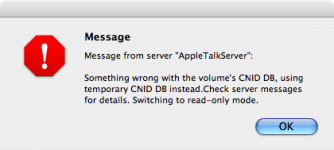
When I connected to the server with my iMac G4 running 10.4, I was greeted by the below:

Picture 2.png

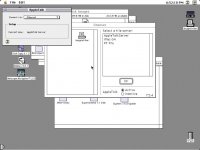
Then on my IIfx, it says that there is an AppleTalk zone called "AppleTalk Server"...I didn't think that there should be a zone with the name of the server. I might have to start again from scratch...I messed this up somehow.

Picture 1.jpg

 
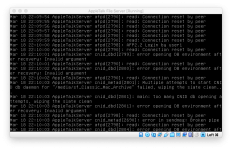
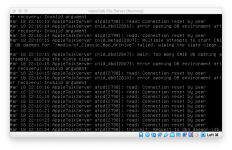
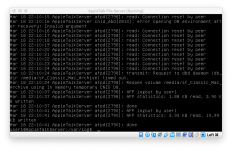
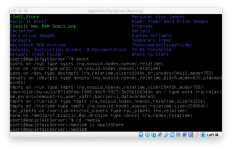
So I checked the server logs and discovered the area that recorded just what happened with this. I so not really know what to make of it, except somewhere there is an invalid argument and something corrupting a CNID DB (I have no idea what that is). At this point I'm almost ready to just use MacIPgw :P.

Screen Shot 2020-03-18 at 10.18.05 PM 2.png

Screen Shot 2020-03-18 at 10.18.38 PM.png

Screen Shot 2020-03-18 at 10.18.51 PM 2.png

 
I'm wondering whether netatalk is trying to use a filesystem operation that the VirtualBox shared folders driver doesn't support?  Some of the 'shared folder' drivers are rather questionable.

 
I would venture that that may have something to do with it. I discovered after the post that the A2SHARED drive still mounts fine without issue (on my PT Pro and G4). Perhaps I am trying to do something that is not realistically feasible. However, I cannot even connect to the server with my IIfx on 7.5.5. Perhaps if I delete the shared folder access and see if it works with just A2SHARED. That will have to wait until I return from work tonight, unfortunately.

 
Last edited by a moderator:
So you are suggesting effectively connecting the virtual machine to a "network" drive on the host computer and using that as the shared drive?

Would that cause any issues with resource forks and the like?

 
Last edited by a moderator:
I was going to suggest nfs, which I've had some success with in the past, but SMB ought to work too.  The resource fork and metadata management is done in netatalk, no UNIX filesystem really has them.  So so long as the UNIX filesystem it's talking to is actually behaving itself (which the VirtualBox one apparently isn't) it shouldn't mind what it backs onto.

 
Would that cause any issues with resource forks and the like?


The resource fork and metadata management is done in netatalk, no UNIX filesystem really has them


This does raise a point though.  If the resource fork is being managed in Netatalk, you may have issues if you add files via your Mac and expect to use them with the a2server.  If you add files via a2server they will probably be treated differently WRT the resource fork than if you add them via your Mac.  I would expect that this might cause issues.

Is the point of your wanting to use a folder on your Mac that you want to have just one library that you can share on your modern Mac and via a2server for vintage Macs?  Why not just mount the a2server share on your Mac and access the share that way?  I do this and it works great. 

I have the same issue in that I have an FTP share that is different than my a2server and I want the same library on both.  But, you could just enable FTP on the a2server Virtualbox machine to get FTP if that is what you want.

Right now I just periodically sync the two, which works but is tedious; I'm going to look into enabling FTP on the VM. 

 
If the resource fork is being managed in Netatalk, you may have issues if you add files via your Mac and expect to use them with the a2server
True: I think that OS X uses AppleDouble when talking to SMB, though, so you might have luck, and it would probably be tweakable to work.

 
Is the point of your wanting to use a folder on your Mac that you want to have just one library that you can share on your modern Mac and via a2server for vintage Macs?  Why not just mount the a2server share on your Mac and access the share that way?  I do this and it works great. 


Yes, the issue I have is that I have my current Classic Mac Archive at 66 GB on my external RAID server. The pie-in-the-sky goal is that every machine I have, from System 6 up through 10.14, could access it via Network in OS X and the Chooser in classic Mac OS. All this running FTP servers and dealing with shuttling back and forth and using three bridge machines is a pain. a2server is a very ideal solution, and it appears it works well out of the box. The problem is I don't want 66 GB of my precious files locked up in some virtual HD, and syncing between the "real" copy and the one on the server would be very tedious. For what it is worth, when I copied System 7.5.5 update files from OS X into the a2shared drive, and then mounted that on my IIfx, and the disk images arrived with resource files and all intact...so it does work.

 
 By the way, I did try your suggestion and set up the other sharing....but I get nothing in the directory that supposedly links to the SMB shared drive. I made sure that it was shared via SMB on the server machine.

 
It says line 14 (the line I wrote) is bad. Ill copy what I wrote here:

//10.0.1.50/volumes/Mustang/"Classic Mac Archive" /media/AppleShare cifs vers=3.0,credentials=~smbcredentials

I chose to not hide the credentials file because I don't care.

The other message I get is that //10.0.1.50 can't be found in /etc/fstab when I try directly using "mount 10.0.1.50"

 
Back
Top