• Hello MLAers! We've re-enabled auto-approval for accounts. If you are still waiting on account approval, please check this thread for more information.

Need help determining the speed of PowerPC G3 CPU

jasa1063

6502
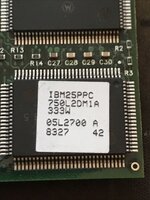
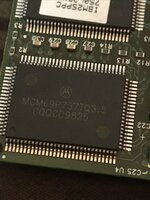
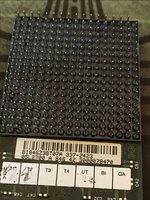
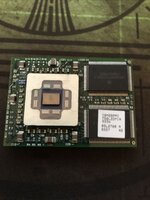
I just picked a G3 CPU for my Beige Power Macintosh G3. I believe this is a 333MHz CPU as indicated by the 333W portion of the number on sticker in the 2nd picture, but I would like to very that. The CPU was advertised as 300MHz. I currently have it the Beige G3 Power Macintosh jumpered for 333MHz and the CPU is working properly. Any help would be appreciated.
 

Attachments
  • s-l1600-1.jpg
    s-l1600-1.jpg
    219.9 KB · Views: 16
  • s-l1600-2.jpg
    s-l1600-2.jpg
    231.3 KB · Views: 16
  • s-l1600-3.jpg
    s-l1600-3.jpg
    211.5 KB · Views: 12
  • s-l1600-4.jpg
    s-l1600-4.jpg
    258.8 KB · Views: 15
Last edited:
The chip speed is probably marked on the package under the white "gasket". However, it would be best not remove it as you don't want to damage the die with the heatsink. I believe that 333W is the module speed and if it's running ok at 333 well then there you go! :)
 
The chip speed is probably marked on the package under the white "gasket". However, it would be best not remove it as you don't want to damage the die with the heatsink. I believe that 333W is the module speed and if it's running ok at 333 well then there you go! :)
Thanks for the info and it continues to run well at 333MHz. This was a nice speed bump from the 233MHz CPU it had originally and I got the added bonus of a 1MB vs 512KB L2 Cache! :)
 
The clock speed of the CPU is usually listed on the core itself, but this can wear off over time. You know where to go now - 366 or 400 Mhz :)
 
The clock speed of the CPU is usually listed on the core itself, but this can wear off over time. You know where to go now - 366 or 400 Mhz :)
Motorola laser marked the die on most parts. Apparently IBM marked the substrate rather than the die on their parts.
 
The clock speed of the CPU is usually listed on the core itself, but this can wear off over time. You know where to go now - 366 or 400 Mhz :)
My target was one speed bump above 300Mhz, so I am perfectly happy with 333Mhz for now. especially with everything running stable. :)
 
Well I just bit the bullet and tried the CPU at 366MHz and so far so good. That is a solid 133Mhz jump from where I started. Not too shabby:)
 
Back
Top