• Hello MLAers! We've re-enabled auto-approval for accounts. If you are still waiting on account approval, please check this thread for more information.

Need Disk Image/Documentation for ImageWriter II AppleTalk

LaPorta

68LC040
Through the gracious beneficence of a forum member, I will soon be in possession of an ImageWriter II AappleTalk Card. What I need now is the installation disk images, and I was hoping for a PDF or other form of documentation to tell me how to set it up properly. Does anyone have either of these things?
 
Will it need configuration? Once the card is installed I would think the ImageWriter printer would just show up in the Chooser when you click the AppleTalk ImageWriter icon (Assuming you have the physical cabling right and the extension).

I don‘t have a lot of experience with pre System 7 but I think the “AppleTalk ImageWriter” chooser extension is installed along with default OS install.

I believe you can use the “Namer” printer utility application to set the AppleTalk name of AppleTalk LaserWriters and ImageWriters. I think I recall that app being on the legacy OS CD images that are out there.
 
The card is straight forward to install in the printer, but you do need to flip a DIP switch to indicate to the printer that its installed. System 7 and later come with the drivers you need.
 
Yes, that was what I read that the DIP switches had to be set to something different. That was why I was hoping to score some documentation, even electronically. Of course, expert help would be just as good.
 
The card is straight forward to install in the printer, but you do need to flip a DIP switch to indicate to the printer that its installed. System 7 and later come with the drivers you need.
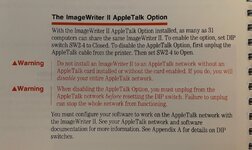
Huh, makes sense. Looking at the ImageWriter II Owner's Manual I have (copy-write 1985), page 52 says the following:

IMG_1872.jpg

“To enable the option (the AppleTalk card), set DIP switch SW2-4 to Closed.”

I half expected my old manual to say nothing about an AppleTalk option but apparently it was available early in the history of AppleTalk. Having a much lower cost network printer option vs. a LaserWriter was seen as a good idea early on I suppose.

Found a copy of the manual online here:
 
Last edited:
That's what the Technical Reference says. I like the bit about DDoSing an entire network by plugging in a regular old ImageWriter II!
 
I have a sealed in box ImageWriter II/LQ LocalTalk Option.

If you can’t get yours up and going, I can unseal it and archive the contents.
 
Wouldn’t that just be the best prank? Have someone try to diagnose a non-working AppleTalk network that you hooked the non-AppleTalk ImageWriter to!
 
Back
Top