• Hello MLAers! We've re-enabled auto-approval for accounts. If you are still waiting on account approval, please check this thread for more information.

Make Color Scans With a Grayscale Scanner?

olePigeon

68040
I was just thinking. If you had an original Apple OneScanner and some 8x11 color filters, could you still make color scans by doing one pass for each color? Then recombine them in Photoshop?

Would that work?

Friday morning thoughts. Everyone is at home, so I'm alone at work. :P
 
I was just thinking. If you had an original Apple OneScanner and some 8x11 color filters, could you still make color scans by doing one pass for each color? Then recombine them in Photoshop?

Would that work?

Friday morning thoughts. Everyone is at home, so I'm alone at work. :p
Absolutely, the same principle is used by space telescopes for instance rather than using a bayer filter array. Of course, you would need to align the page exactly each time or fix that in post processing which will give up some resolution.

However, since a scanner is self-lit, you have another option: replace the scanner light source with a diffused RGB strip of sufficient luminance and do 3 scans each lit by one color. Then you should in theory get pixel-perfect results without alignment issues. Of course, you do need to calibrate so that the exposures are equal and possibly do a little levels adjustment on the final product.

This makes me wonder about (color) scanner sensors... I suppose they could be using an image sensor with 3 pixels width - each pixel row with a different filter? As I doubt they're using bayer arrays. I've never had occasion to think about it.

Sometimes those friday morning thoughts can lead to learning something fun :)
 
I took apart a broken projector cuz I was curious about the LCD. Turns out it's a teeny tiny grayscale LCD. It uses a prism to split the light to 3 mirrors that then run it through 3 color filters, then a final prism that recombines it all.

Also, I think there's a way to use a spinning color wheel at a specific refresh rate in front of a grayscale monitor. Something like that. I seem to recall someone on here did that. Turned their SE/30 into a color machine with an elaborate rig. :D
 
Its not a new idea, look up the CBS sequential color television system. Early on, many flatbed scanners were not "single pass". They were actually modified grayscale units doing what you want to do, except that they automatically switched out the red, green, and blue color filters with each scanning pass.
 
Given a relatively wide-response greyscale sensor, you can also have a certain amount of fun making false-colour images using filters that aren't RGB; with camera sensors a fun one is narrowband hydrogen-alpha, but I doubt that would work well with a scanner. But definitely one to consider.
 
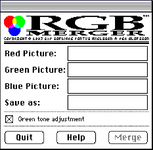
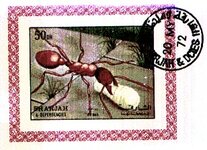
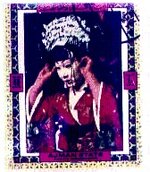
I made an app for this back in 1993. I called it RGBMerger, but it has sadly been lost to time. I do have a screenshot and two scans still. I remember that the biggest challenge was to properly align the thing you scanned every time so that you captured red, green and blue pixel values (respectively) for the exact same location. Otherwise it would come out fuzzy.

Anyway, as long as you were careful it actually worked pretty well and I could scan in color using our AGFA 64-level grayscale scanner. :)
 

Attachments

  • rgbmerger.png
    rgbmerger.png
    20 KB · Views: 25
  • Ant_merged.jpeg
    Ant_merged.jpeg
    41.7 KB · Views: 25
  • Geisha_merged.jpeg
    Geisha_merged.jpeg
    22.6 KB · Views: 25
Back
Top