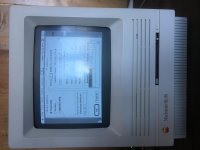
MacTCP Settings..?

Hi all,

Yes, I know there are a few other threads like this, however none had my answer.

I'm trying to connect my SE/30 to the internet through Ethernet. I have my card with the switch in the up position? In mactcp, I see the mask which is set correctly, but the rest... what should I put? Oh, gateway I have too that should be correct, but for domain is that supposed to be the DNS?? What's Net do? Or class?

Sorry for all the questions, just trying to get this thing set up!!

 
And also yes, I know the thread right above this explains some of this stuff...

Looking for EVERYTHING though on how to do this.

 
Step one is to update to MacTCP 2.1.  It'll automatically calculate those things for you.  Then all you have to do is type in your IP address, subnet, gateway, & domain (DNS.)

But if you're curious, class is the address range.  99% of computers you work with will be on Class C (i.e. 192.168.1.xxx IP address, with a 255.255.255.0 subnet.)  You set net and bits to calculate the IP and subnet.

Here is a very nice and comprehensive explanation on how to set it up:

http://odl.sysworks.biz/disk$vaxdocmay941/decw$book/dyahaaa4.p78.decw$book#194

Yes, Domain is your DNS.  Type in the domain name server on the left, the IP address on the right.  Secondary and tertiary domains go below it.

 
My settings in mactcp are correct but in Netscape (when it decides not to crash because I only have 8mb ram) says something like it cannot find -site I'm trying to connect to- DNA address...

Any ideas? By the way I'm using a power line Ethernet bridge.

 
If you go yto your router's config page, can you find a network map or something like that? If so, do you see your SE/30?

The only way I could get my SE/30 with 7.1 and MacTCP to work was by assigning it a fixed IP address in the router based off the MAC address of the Ethernet card, then dialing that same IP address into MacTCP. DHCP just did not want to work for me.. I also use Ethernet over power bridges btw.

 
OK, so got my se back together. I have no experience with networking. Can I just get someone to please explain this like I'm 5???

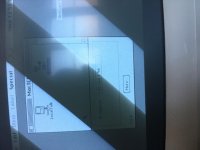
Like what should I put here?

IMG_0872.JPG

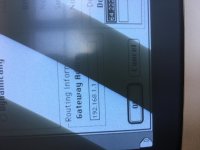
Or here?

IMG_0873.JPG

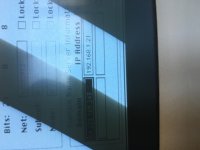
...IMG_0874.JPG

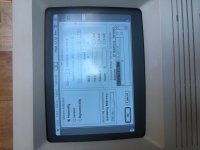
.......IMG_0875.JPG

IMG_0876.JPG

I know its probably easy, but I have absolutely no idea what I should put here. Im trying to use Netscape on an SE/30 with 32 MB ram and 7.5.5...

 
First I will assume the gateway address you have listed (192.168.1.1) is correct and is the IP of your router. If so...

The IP address you have (192.168.1.94) should work fine as long as there isn't another device on the network with that IP.

Gateway Address should be the address to your router.

In the Domain Name Server section, Domain should be a single period.  Domain IP address should also be the address to your router.

You can ignore the Net|Subnet|Node section as those will be auto-calculated from the IP address you entered on the MacTCP initial screen (I assume you are using the patched MacTCP)

Use MacTCP Ping to try and ping the router's IP address before mucking about with Netcape.

 
IT WORKS!!! :DDD
 

Finally!

Google kept redirecting, and the netscape webpage freezes everything, but its working!

Thank you so much!!!!

 
Ok, tried these settings with my Quadra 700. I know this is the compact mac section, but I don't want to make a new thread for the same problem...

I have WannaBe installed and MacWeb 2.0. Each do not work.

In MacWeb, when I hit enter (After having http://www.info.cern.chor Http://www.google.comin) it brings up a 500 error immediately and cannot find the web pages. 

In WannaBe (Text only browser) it says initiating connection, and the lights start blinking on my hub, but after a few more seconds it says failed.

So it sounds like... I have no idea. I have the same exact settings as above, and in my SE/30. I have also tried changing the IP (Just incase).

Ive tried OT too, still nothing.

Ill also add that I am using an Asante ethernet adapter for that weird ethernet port n the back. I would think I would not need software for it? Ill also throw in one of my apple ethernet nubus cards later and see what happens.

 
Last edited by a moderator:
Tried the nubus. Same result. It comes up as Ethernet (6) in Mac tcp

Thoughts? I'm using a power line adapter which has always worked in the past if that matters.

 
You should probably use Open Transport v 1.2 on both those macs instead of classic TCP networking. IMO

Most modern routers don't like those old 10 cards so an older hub or switch between the router and old Mac is preferred.

For more info Research Open Transport. There's a wealth of info on it here.

 
Thanks! I wasn't using OT on my 30 because I was so new to this when I did it. I've already got a hub. I have a thread now in the Quadra section.

 
Back
Top