• Hello MLAers! We've re-enabled auto-approval for accounts. If you are still waiting on account approval, please check this thread for more information.

MacSE (Maxine) Internal Zip100 (I had to.)

markyb86

68000
DSC00582.jpg


Since I was the recipient of an internal zip100 SCSI, from a trade with J.R.,

I thought this needed to be done, sooner than later.

First I had to make a new pigtail as this drive uses floppy power.

DSC00578.jpg


DSC00579.jpg


Then I just re-used the HDD bracket. All I had to do was bend the LED holder out of the way (didn't get a pic), and notch two holes right in the front to line up with the zip's screw holes.

DSC00580.jpg


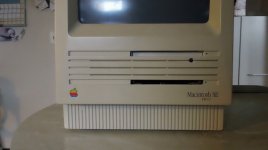
And (besides the scsi cable being oriented just-so-annoyingly-wrong) I had to (Steal jt's filing idea AND IT WORKED, obviously.) I'm not going to widen the floppy, however. So, it looks a little funny. But I'm excited how it turned out, and it worked.

DSC00581.jpg


:o) :o) :o)

 
Go ahead and widen the floppy a bit to match, it'll look just right again and nobody will know the difference! Nice hack! :approve:

It was MinerAl's hack, he did the ZippieCC over ten years ago. We're all following his lead. ;)

 
Hi,

I think it looks good as is, if not a bit unusual. It allows one to differentiate which is which at a glance (perhaps even a stick-on ZIP identifier next to the slot to further identify it).

Keep up the good work, MarkyB!

c

 
Thanks guys!

I looked up MinerAl's tutorial so let me say thanks for pioneering such a thing!

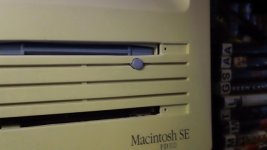
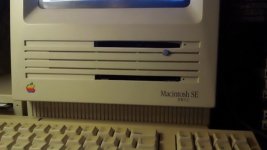
I opened the slot a little more this morning, made the hole bigger for the ejector, (unfortunately, fugly), and widened the floppy to match. It really didn't look right not lined up.

DSC00585.JPG

:b&w:

 
Very nice. Try removing the door from the Zip, the contrast of the (FDD matching) black rectangle will take the eye off the hole for the eject button. :beige:

Meanwhile, I'll nose around the excess plastics for a matching button. If the hole is still the right height, a rectangular eject button from a DOA CD or a PC Floppy drive might look right at home on the Maxine's (Hallmark's Maxine?) bezel.

 
Personally I would have not made the hole for the eject button.
Probably shouldn't have, but it looked Real weird with the green LED flashing behind the grille..

a rectangular eject button from a DOA CD or a PC Floppy drive might look right at home on the Maxine's (Hallmark's Maxine?) bezel.
Now there's a thought...

The name Maxine came from -> MacSE -> Maxy? Nope.. Maxine.. LOL :o) Untitled-5.gif

 
DSC00601.JPG

DSC00602.JPG

DSC00607.JPG

Zip drive is mounted to the cage a little crooked right now so I'll open her up tomorrow and fix. I'm all out of will for the day.

 
I forgot to mention how I got the eject button in and permanent.

First I had to use a 5/16" drill bit to make the hole smooth. I did not use a drill, I just slowly rotated the bit by hand so that I could control it the best. I started with a very small one and worked my way up.

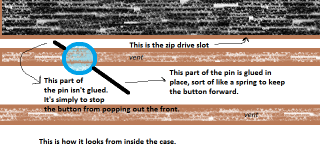
Next, The button I had is from my IBM Aptiva case. It was a little long so I measured how long it needed to be and filed it down accordingly.

Then I got a safety pin and heated it up with a candle hot enough to poke through the end of the button (The end that will be inside the Mac.) I then cut off the part of the pin I did not need. Here's a drawing of how it turned out (and how it is mounted)

Untitled.png

 
Back
Top