• Hello MLAers! We've re-enabled auto-approval for accounts. If you are still waiting on account approval, please check this thread for more information.

Macintosh SE screen flickering/changing shape

I just got in another Mac SE and it’s got a bit of a weird problem. The screen will periodically flicker and get larger horizontally by about a cm. Supposedly it was working perfectly before I got it, but it wasn’t packaged very well by the seller and I’m thinking that something may have gotten knocked out of place. I did try adjusting the picture with the potentiometers on the side but it doesn’t seem to affect the fundamental issue. Any ideas?

View attachment 9588B1CA-780D-4D62-813E-B7B3447CB535.MOV
 
Last edited by a moderator:
No ideas on this one? I noticed that it had the old squirrel cage style fan (which is really is quite loud). Somewhere I heard that these fans could potentially cause screen interference, but I don't know if it's related. I'm kind of stumped about where to start diagnosing this since I don't know a lot about CRTs.

 
I'm still new to working on the innards of compact macs, but I could handle reflowing some solder joints if you think that might help.

 
Sorry if I left you hanging.....

J1 is the connector from the deflection coil on the CRT to the analog board. 

There are 4 wires, I think I remember that they’ll be red, blue, green, yellow. I don’t remember the order. 

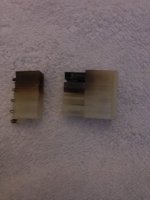
Check the solder joints on the analog board at that connector, and check the connector for brown / black, that will come from inside the connector. 

If there is brown / black, conditions will only get worse. 

Change the connector. 

 
https://www.digikey.com/product-detail/en/0015311046/WM1042-ND/313615/?itemSeq=287242932

https://www.digikey.com/product-detail/en/0019091049/WM1606-ND/26362/?itemSeq=287243257

https://www.digikey.com/product-detail/en/02-09-5106/WM6388-ND/252899/?itemSeq=287243638
4436FD0A-C9CE-404F-81C2-41D704C75B40.jpeg

 
Last edited by a moderator:
Sorry if I left you hanging.....

J1 is the connector from the deflection coil on the CRT to the analog board.

There are 4 wires, I think I remember that they’ll be red, blue, green, yellow. I don’t remember the order.

Check the solder joints on the analog board at that connector, and check the connector for brown / black, that will come from inside the connector.

If there is brown / black, conditions will only get worse.

Change the connector.


https://www.digikey.com/product-detail/en/0015311046/WM1042-ND/313615/?itemSeq=287242932

https://www.digikey.com/product-detail/en/0019091049/WM1606-ND/26362/?itemSeq=287243257

https://www.digikey.com/product-detail/en/02-09-5106/WM6388-ND/252899/?itemSeq=287243638
View attachment 22823
I seem to have one somewhat burned pin in my J1 connector (and randomly flickering screen) on my SE analog board...Does anyone know the cause of this issue? Would installing a new connector fix the root cause of the problem? Also, the analog board side of the case where the connector is feels a bit warm after use. Not sure if that's normal. Thanks for any help.
 
Also, the analog board side of the case where the connector is feels a bit warm after use. Not sure if that's normal. Thanks for any help.
Do not touch the analogue board after use! There is high voltage and big capacitors in there! It's like licking a mains outlet... sort of.
 
Back
Top