well this is what i did to fix my issue,
i am not happy about these ether,
but it was the only way to get this FDHD the way i wanted it (100% Correct)
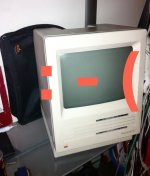
i have also have a Macintosh SE Dual 800K, the only issue with that is the Rear Video Board was bad, other then that it was 100% both 800k drives
i took apart and re adjusted and lubed, upgraded it with 4mb ram etc, it was ready for a video board and it would have been great...
so against my better judgment, i Pulled apart the FDHD and the SE, Put the ROM and Floppy controller chips from the FDHD to the SE board, put the se board in the FDHD put the FDHD all back together,
and Wala my FDHD is now flawless, works just fine! super drive and all!
however, my poor se now, i popped the SE chips into the bad FDHD board, and now the screen is not only messed up from the bad video board, but it looks to have the Checker board pattern now. oh and.,,, when it flip on the SE, it no longer makes the apple Tone...
So basically all that is good on the se now is, the tube, the case, the drives, the analogue board, the power supply, the video board and the main board are toast!

also i did not try the 5 1/2 drive in any of my mac's it says on quite a few apple disk drive websites that it's not electrically compatible, witch is fine...

 Hello Guest! We're hosting a challenge to welcome vintage Intel macs to the MLA during the month of July! See this thread for more information.










