Welcome!
That blinking icon means that there's no system/OS installed where the computer can see it. Does your SE have an internal hard drive? If not, you'll have to boot with an external HDD with a compatible Macintosh System Software installed or get ahold of some bootable floppy disks. But then, what specs your SE has will determine what floppies it can take.
If it does have an internal HDD, that means the system isn't being recognized and it will need to be fixed or a new OS re-installed. Some pictures of the front and/or back of the computer will help us help you identify it more thoroughly and troubleshoot it all!
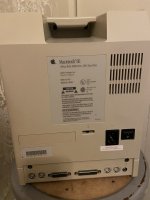
If it's not the FDHD/Superdrive floppy disk model (which will be screen printed on the front name plate or on the back model plate), you'll have to get some Macintosh 800k floppy disks, which aren't terribly common but can be sourced. Like I say, some photos will greatly help identify the specs of the machine, at least what the stock configuration of the SE was. Not necessarily a guarantee that it's that way if a previous owner changed some things around.
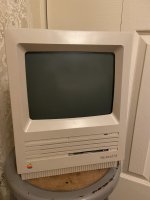
Edit: example of the areas that would be helpful to photograph:

If there are two floppy drives (shown in the front pohto) odds are there is no HDD, but that's not always the case.












 If you need a temporary (i.e. vintage) 20-or-so MB HDD with system 7.0.1 installed, send me a private message and we can work something out. I have a few sitting around I could part with.


