• Hello MLAers! We've re-enabled auto-approval for accounts. If you are still waiting on account approval, please check this thread for more information.

macintosh se blinking icon

I recently bought a macintosh se m5011, when I turn it on the screen appears with a floppy disk icon with a blinking “?”. what does this indicate and what do I need to do? I apologize in advance if this is a dumb question with a simple fix but this is my first macintosh and I am fairly new to this community. 

5EDA4DA6-8001-449E-93E2-FEA167A2D5C4.jpeg

 
Welcome!

That blinking icon means that there's no system/OS installed where the computer can see it. Does your SE have an internal hard drive? If not, you'll have to boot with an external HDD with a compatible Macintosh System Software installed or get ahold of some bootable floppy disks. But then, what specs your SE has will determine what floppies it can take.

If it does have an internal HDD, that means the system isn't being recognized and it will need to be fixed or a new OS re-installed. Some pictures of the front and/or back of the computer will help us help you identify it more thoroughly and troubleshoot it all!

If it's not the FDHD/Superdrive floppy disk model (which will be screen printed on the front name plate or on the back model plate), you'll have to get some Macintosh 800k floppy disks, which aren't terribly common but can be sourced. Like I say, some photos will greatly help identify the specs of the machine, at least what the stock configuration of the SE was. Not necessarily a guarantee that it's that way if a previous owner changed some things around.

Edit: example of the areas that would be helpful to photograph:
p3kX1Ek.jpg.b98c360a206a788b316b6a90e2543cb0.jpg


If there are two floppy drives (shown in the front pohto) odds are there is no HDD, but that's not always the case.


 
Last edited by a moderator:
Welcome!

That blinking icon means that there's no system/OS installed where the computer can see it. Does your SE have an internal hard drive? If not, you'll have to boot with an external HDD with a compatible Macintosh System Software installed or get ahold of some bootable floppy disks. But then, what specs your SE has will determine what floppies it can take.

If it does have an internal HDD, that means the system isn't being recognized and it will need to be fixed or a new OS re-installed. Some pictures of the front and/or back of the computer will help us help you identify it more thoroughly and troubleshoot it all!

If it's not the FDHD/Superdrive floppy disk model (which will be screen printed on the front name plate or on the back model plate), you'll have to get some Macintosh 800k floppy disks, which aren't terribly common but can be sourced. Like I say, some photos will greatly help identify the specs of the machine, at least what the stock configuration of the SE was. Not necessarily a guarantee that it's that way if a previous owner changed some things around.

Edit: example of the areas that would be helpful to photograph:


If there are two floppy drives (shown in the front pohto) odds are there is no HDD, but that's not always the case.

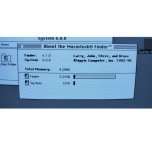
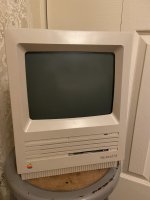
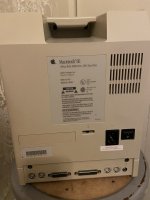
thank you for helping out, the seller of the macintosh had this in the description “Vintage Apple Macintosh SE with 4MB of RAM with an upgraded 2MB disk drive...” they also mention there is no hard drive. I’ve added a photo which the seller provided and my photos of the back and front. 

C6F6E991-9665-42E5-889D-F989C2A2648F.jpeg

7B7C28D7-AEDA-47F3-94E3-7B7B9CEBF0EE.jpeg

B50A90C6-C5CD-4CEF-AD1E-9AEA489F2735.jpeg

 
At some point the Hard drive was present, hence the 20SC Hard Disk label.

Probably missing or faulty.

 
That one did come with an HDD from the factory (you can tell because it says so on the back—the 20SC is a 20mbyte SCSI internal disc.

If it is missing or not working, it's pretty straightforward to get and install a new one.  But you don't need one to make the machine run, you can boot it from a floppy, it's just that an HD is very very convenient.

The seller saying it has an upgraded 2MB floppy drive is promising, because it's a right pain to write old Apple 800K floppies on a USB floppy drive or on a PC, but HD floppies are much easier and the images are widely available.  Are you comfortable writing floppy images to floppies?

 
I wouldn't be at all confident that a proper high-density floppy drive upgrade has been performed with proper ROMs and SWIM chip.  Seems more likely that it's a frankenmac assembled from whatever was lying around.

But maybe I'm just cynical.

 
That one did come with an HDD from the factory (you can tell because it says so on the back—the 20SC is a 20mbyte SCSI internal disc.

If it is missing or not working, it's pretty straightforward to get and install a new one.  But you don't need one to make the machine run, you can boot it from a floppy, it's just that an HD is very very convenient.

The seller saying it has an upgraded 2MB floppy drive is promising, because it's a right pain to write old Apple 800K floppies on a USB floppy drive or on a PC, but HD floppies are much easier and the images are widely available.  Are you comfortable writing floppy images to floppies?
I’ll have to check this weekend to open it up and see whether it’s missing or not working. Regarding writing images to floppies, I am recently just now getting into vintage technology, I am not even into my twenties yet, but I am willing to work on my macintosh until i can get it to run properly so any advice is welcomed.

 
There are many of us willing to at least send you a proper disk with system software. When you open the machine we can help you via photos. That includes making sure the floppy drive has been gone through properly.

 
making sure the floppy drive has been gone through properly.
^^^ This for sure. If the drive hasn't been touched by the previous owner, there's more than likely a lot of dust that's collected over the years. In any case, unless it's been done, a good cleaning and lubrication definitely wouldn't go amiss ;) If you need a temporary (i.e. vintage) 20-or-so MB HDD with system 7.0.1 installed, send me a private message and we can work something out. I have a few sitting around I could part with.

 
Worse still, if it’s jammed up and he tries to eject, the gear can be busted as we all know. I’ve stopped blindly inserting disks because of this until I strip the thing down.

 
Also, I guess you'll also need to get into the computer case in order to get at anything :) The screws on the case are Torx T15 heads, and the two that are nestled by the recessed handle can be tricky to get at without an extra long tool. There are extensions/bits like this which are reasonably priced (of you already have a 1/4" drive tool of some kind): https://console5.com/store/t15-macintosh-case-tool-for-128k-plus-se-se-30-classic-t15h-extended-1-4-drive.html

Here's a guide for getting into the case made by another member: https://macgui.com/news/article.php?t=479

Since yours has been opened before, it'll likely be much easier to pry the case halves apart than if it was an untouched specimen.

And once you're in there BE EXTREMELY CAREFUL not to touch anything on or connected to the CRT until it is discharged, because there's a crapload™ of voltage stored up in the CRT (especially if the drain resistor isn't working properly). tutorial on that discharge procedure here.

As far as a more detailed teardown of the SE specifically, here's the official Apple tech reference: http://www.ccadams.org/se/MacSEservice.pdf starting at about page 29.

 
Last edited by a moderator:
the seller got back to me and explained it is just asking for a startup disk and he directed me to a website that sells them. https://rescuemyclassicmac.com/buyadisk/buyadisk.html

if this gets a greenlight i’ll purchase it, the seller also just deals in refurbishing not the software which is why he didn’t include the disk he had since he didn’t have the means to copy one. He also reassured me that he cleaned the inside. i think i’ll still look into getting a external HDD, thanks for the help hopefully this is the answer. 

 
Back
Top