Macintosh SE/30 garbled screen

Hi all,

I recently purchased a SE/30 (and a classic II but thats still "in progress" recap wise.

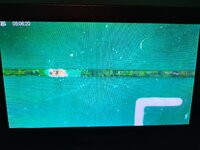
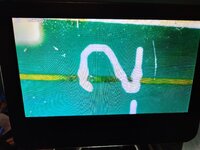
The SE/30 I bought was sold to me as spares or repairs and the seller said it powers on but nothing comes up on the screen. Well when I got it it did indeed turn on and so I removed the case and lo and behold, the logic board was completly unplugged! I plugged it all in and tried the machine again and this time it powered up and made a chime! But the screen is all garbled :(

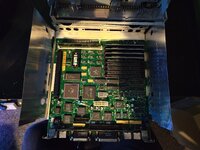
on the upside it does look like it has been recapped "recently". There was a bit of dust but no capacistor residue like there was in my Classic II. But to 100% convince me it has been recapped, someone has used radial capacitors where there should be axial. Also it looks like a previous owner has been nice enough to remove the PRAM battery before puting it into storage so no exploaded battery for me to deal with :D

I did go round the board and give it a good clean. I have heard that bad RAM could cause my issue but I cant get the RAM out of the slots, its the ones with the plastic hooks so I am afraid of breaking them. Also does anyone else struggle with connecting the Logic board up? There is so little room and especially the power cable is only just long enough to reach to the point where I can barely get my hands in to plug it in, the SE/30 has already claimed blood! I leave the speaker cable to last and I need a pair of tweezers to get that sucker in!

Ill attach some photos to this post

Cheers
 

Attachments

  • 3333.jpg
    3333.jpg
    2 MB · Views: 17
  • 3334.jpg
    3334.jpg
    1.4 MB · Views: 30
  • 3336.jpg
    3336.jpg
    2.1 MB · Views: 34
That screen is evidence of ROM issues, clean and reseat the module. Yes, it looks like it has been recapped. You can use an ATX extension cable to extend the length of the SE/30 harness for testing
 
it's been "recapped" but I can see plenty of grime. personally I don't trust anything that isn't worked on by me or someone I trust (like @cheesestraws ).

i would consider it not recapped, and start by removing all the capacitors and cleaning it thoroughly.

screen isn't really garbled, that's just the initial values of the video memory brand you have on that board
it basically means that the video circuitry is working, but no data is getting to the video memory.

you say you heard a proper power chime (not a death chime). this usually rules out ROM or RAM issues as those would cause no chime or a death chime.

1766433474567.png

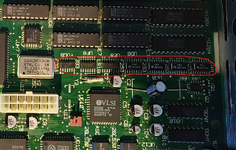
focus your efforts on this area, especially the circled area. all those multiplexers are in close proximity to leaky capacitors and often have broken traces in my experience. beep out all the lines using the redrawn SE/30 schematics
 
That screen is evidence of ROM issues, clean and reseat the module. Yes, it looks like it has been recapped. You can use an ATX extension cable to extend the length of the SE/30 harness for testing
it's been "recapped" but I can see plenty of grime. personally I don't trust anything that isn't worked on by me or someone I trust (like @cheesestraws ).

i would consider it not recapped, and start by removing all the capacitors and cleaning it thoroughly.

screen isn't really garbled, that's just the initial values of the video memory brand you have on that board
it basically means that the video circuitry is working, but no data is getting to the video memory.

you say you heard a proper power chime (not a death chime). this usually rules out ROM or RAM issues as those would cause no chime or a death chime.

View attachment 93500

focus your efforts on this area, especially the circled area. all those multiplexers are in close proximity to leaky capacitors and often have broken traces in my experience. beep out all the lines using the redrawn SE/30 schematics

I have reseated the RAM and ROM and still get the same issue. Ill have a look tomorrow around the area in red and poke around and see if I can see anything. Cheers
 
Also does anyone else struggle with connecting the Logic board up? There is so little room and especially the power cable is only just long enough to reach to the point where I can barely get my hands in to plug it in, the SE/30 has already claimed blood! I leave the speaker cable to last and I need a pair of tweezers to get that sucker in!
Like anything else "compact", there isn't much room to work inside a compact Mac :) All of us have donated knuckle skin to the compact Mac chassis gods.
 
it's been "recapped" but I can see plenty of grime. personally I don't trust anything that isn't worked on by me or someone I trust (like @cheesestraws ).

i would consider it not recapped, and start by removing all the capacitors and cleaning it thoroughly.

screen isn't really garbled, that's just the initial values of the video memory brand you have on that board
it basically means that the video circuitry is working, but no data is getting to the video memory.

you say you heard a proper power chime (not a death chime). this usually rules out ROM or RAM issues as those would cause no chime or a death chime.

View attachment 93500

focus your efforts on this area, especially the circled area. all those multiplexers are in close proximity to leaky capacitors and often have broken traces in my experience. beep out all the lines using the redrawn SE/30 schematics
Just had a quick look. though ill be honest I am new when it comes to circuitry and I struggle to read schematics :( not found anything just yet but I did find a trace that looks a bit worse for wear. The trace directly under (if you have the board with the connectors facing away from you) the power socket. The trace goes from under the glue chip to a hole directly under the U in UE10. Not sure if the trace just passes through underneath or if it connects to the glue chip in anyway. I have taken some photos of the trace showing the dark areas and one point where the masking of the board has come away and you can see the copper trace.

I guess I better get my study cap on and learn how to read electrical schematics!
 

Attachments

  • 1.jpg
    1.jpg
    2.3 MB · Views: 11
  • 2.jpg
    2.jpg
    2.6 MB · Views: 5
  • 3.jpg
    3.jpg
    2.1 MB · Views: 7
it's been "recapped" but I can see plenty of grime. personally I don't trust anything that isn't worked on by me or someone I trust (like @cheesestraws ).

i would consider it not recapped, and start by removing all the capacitors and cleaning it thoroughly.

screen isn't really garbled, that's just the initial values of the video memory brand you have on that board
it basically means that the video circuitry is working, but no data is getting to the video memory.

you say you heard a proper power chime (not a death chime). this usually rules out ROM or RAM issues as those would cause no chime or a death chime.

View attachment 93500

focus your efforts on this area, especially the circled area. all those multiplexers are in close proximity to leaky capacitors and often have broken traces in my experience. beep out all the lines using the redrawn SE/30 schematics
Just had a brainwave, you mentioned a "death chime" and to be honest, I know nothing of what the chime is meant to be. So I have just uploaded a short video of the SE30 powering on, I have only plugged in the power and speaker but its the same chime when the HD and Floppy are plugged in.

Looking around on youtube, it sounds to me like its a death chime, so if thats the case it is a RAM and/or ROM issue? ROM is easy to source but I have no idea where I could purchase RAM for the machine (apart from ebay....) I do have the 2 x 1mb sticks from my classic II I could plug in as I beleive the RAM is the same(?)

Link to video:
 
Made a bit of progress, I ordered some new RAM and a new ROM sticks (purple RAM and BMOW ROM) and I get a new sound from the SE/30 but still get the simasimac on the screen. Ill attach a link to a video:


At this point I would confidently say that what @finkmac said before about there being a damaged trace under those multiplexers is correct. Though I would say that my original ROM is also the reason for the death chime as I did test the new RAM with the old ROM before to make sure and it still made the death chime. So one problem solved(?) just another to get on with....
 
It sounds like you now have what's known as the fast-chime, not the regular speed, or slow-chime.

From watching CayMac Vintage repair videos on YT, he found issues with memory with the fast-chime condition. There is an SMD cap that leaks below the first memory slot, might be worth inspecting with a magnifier/phone zoom.

I can't be of much more help than that unfortunately. I would definitely recommend if you're serious about fixing this yourself, to go through this guide:

It has helped me more than anything with the simasiama pattern.

But at least you get sound, and can use the troubleshooting cable:
 
Isn’t that just the normal BMOW ROM startup chime? That’s the same chime I get on my IIsi with one installed, and it works fine.
Yes, that is a normal chime speed, assuming the routine playing it is the same as the one on the ROMinator Carbon. Some accelerators will even cause the chime, stock or otherwise, to slow down.

Given that the slow death chime seemingly disappeared when switching to a BMOW ROM, I don't think that eliminates bad RAM (or bad traces to the memory) at all. Those ROMs bypass the memory test done by the stock ones, so a known good stock ROM may actually be more helpful while working on this part. I'd guess the issue is more likely a broken trace than a bad component, seconding the opinion from before.
 
Back
Top