• Hello MLAers! We've re-enabled auto-approval for accounts. If you are still waiting on account approval, please check this thread for more information.

Macintosh Quadra 800 BlueSCSI

Hi, I would like to move my Quadra 800 into the modern age of BlueSCSI, I have ordered an external and internal,
this will be my first time backing up the original SCSI drive, unfortunately one of the SCSI backups have gone and I am now left with the main drive.
It's important I clone this drive as a few years ago I was lucky to have this system refurbished by an old friend who used to work for Digidesign back in the 80's and has turned this system an audio workstation sound design power horse.

From research, the idea I have is to create a system 7.5.5 image utilizing basilislk or infinitymac, then prepare on the external BlueSCSI.
Main question is can I insert into the back of the Quadra SCSI port?, and from there can I simply drag and drop everything from the old drive to the BlueSCSI, or will I need something like disk copy or another SCSI cloning software? I have read people simply drag and drop everything.

I would be keen to hear other ideas and approaches to complete this task,

Thanks :)
 
I've not tried something like this, but I think a non-destructive way to try is:

1. on a modern mac, grab some blank disk image files, I think I used these (hosted on mega, sorry if you get weird popups) https://mega.nz/folder/8hA3AQCJ#pWUq92L70yDXlogy9lk5Dg/folder/01hkVLoC
2. expand one of the appropriate size (I just use the 2 gig one, that's the max for HFS)
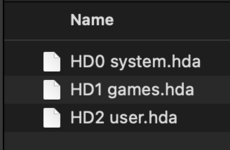
3. name it something like "HD1 Q800 copy". The "HD1" will make it mount at SCSI ID 1, since the internal HD is probably SCSI ID 0. If you have two devices with the same SCSI ID, your computer won't boot properly! It will just hang with a grey background as soon as the cursor shows up - so if you see this situation and the computer was working before, this is probably what is causing it. You could then try naming the file "HD2 whatever" to change the SCSI ID
4. copy it to the SD card you're using with the BlueSCI
5. this is where I don't know how to fix it exactly! you then need to connect your BlueSCSI, I've not used an external one. If I was using the internal one, I might try connecting it to the CD's SCSI connection.
6. If step 5 worked out ok, you can now fire up your mac. The BlueSCSI probably won't show up, since you need to format the blank disk image. For me, I used apple's HD set up utility. I don't have any great advice about how to get that software on to your old computer if you don't already have it, since it depends so much on what your environment is. Maybe a floppy disk if you have a working floppy drive AND a way to make floppies, maybe FTP from macintoshgarden if you have Ethernet and an OS that supports it and an FTP client, etc.
7. If everything worked, you should now have a gigantic 2GB blank "hard drive" mounted in addition to your spinning platter internal HD. Copy everything across, maybe in stages so you can keep an eye out for any failures! Start with the system folder.

Once you have everything copied across:
1. take out the SD card and stick it in your modern machine. I suggest renaming the disk image on the SD card from "HD1" to "HD0" if you want it to function as your main internal hard drive, since the Apple convention seems to be to have the main boot drive be internal SCSI ID 0
2. make a copy of the now populated disk image to your modern machine. You can try to mount it in Sheepshaver if you want to test!
3. Moment of truth - reinsert the SD card into the BlueSCSI, take out the old spinning platter SCSI drive, and replace it with the BlueSCSI. Fire it up!

Good luck! I am super happy with my BlueSCSI. I keep a couple of SCSI drives around for historical reasons but I would never go back for practical reasons :D
 
I've not tried something like this, but I think a non-destructive way to try is:

1. on a modern mac, grab some blank disk image files, I think I used these (hosted on mega, sorry if you get weird popups) https://mega.nz/folder/8hA3AQCJ#pWUq92L70yDXlogy9lk5Dg/folder/01hkVLoC
2. expand one of the appropriate size (I just use the 2 gig one, that's the max for HFS)
3. name it something like "HD1 Q800 copy". The "HD1" will make it mount at SCSI ID 1, since the internal HD is probably SCSI ID 0. If you have two devices with the same SCSI ID, your computer won't boot properly! It will just hang with a grey background as soon as the cursor shows up - so if you see this situation and the computer was working before, this is probably what is causing it. You could then try naming the file "HD2 whatever" to change the SCSI ID
4. copy it to the SD card you're using with the BlueSCI
5. this is where I don't know how to fix it exactly! you then need to connect your BlueSCSI, I've not used an external one. If I was using the internal one, I might try connecting it to the CD's SCSI connection.
6. If step 5 worked out ok, you can now fire up your mac. The BlueSCSI probably won't show up, since you need to format the blank disk image. For me, I used apple's HD set up utility. I don't have any great advice about how to get that software on to your old computer if you don't already have it, since it depends so much on what your environment is. Maybe a floppy disk if you have a working floppy drive AND a way to make floppies, maybe FTP from macintoshgarden if you have Ethernet and an OS that supports it and an FTP client, etc.
7. If everything worked, you should now have a gigantic 2GB blank "hard drive" mounted in addition to your spinning platter internal HD. Copy everything across, maybe in stages so you can keep an eye out for any failures! Start with the system folder.

Once you have everything copied across:
1. take out the SD card and stick it in your modern machine. I suggest renaming the disk image on the SD card from "HD1" to "HD0" if you want it to function as your main internal hard drive, since the Apple convention seems to be to have the main boot drive be internal SCSI ID 0
2. make a copy of the now populated disk image to your modern machine. You can try to mount it in Sheepshaver if you want to test!
3. Moment of truth - reinsert the SD card into the BlueSCSI, take out the old spinning platter SCSI drive, and replace it with the BlueSCSI. Fire it up!

Good luck! I am super happy with my BlueSCSI. I keep a couple of SCSI drives around for historical reasons but I would never go back for practical reasons :D
Thank you so much for that lengthy response, so to confirm I can just copy everything across like the system file and all the software installed into the BlueSCSI image, sorry that goes over my head as I am used to modern computers having stuff written a the registry then installation files in different folders, I guess around before 95 things were more easier to move around. I do have a working G3 with a SCSI card for external, I guess that could be an option.
 
I am 90% sure that just copying the files should work! It's a super simplistic file system. And anyway, this is not a destructive test and there's not so much component tinkering involved, so this is where I would start at least.

I also forgot that you can get a pre-made BlueSCSI with a system install on it which you could add as a second image on the SD card, in case you need the HD Setup utility.

Btw, my BlueSCSI images are .hda, not sure if that is a requirement though! Just mentioning it since you've probably seen .dsk and .img files kicking around if you're working with emulators or grabbing stuff from Macintosh Garden
 

Attachments

  • Screenshot 2024-06-27 at 10.36.35.png
    Screenshot 2024-06-27 at 10.36.35.png
    18.3 KB · Views: 1
I just backed up my physical 80MB SCSI drive on my SE/30. Here is what I did:

1. Download a blank 2GB image from the premade ones linked on the BlueSCSI site. (https://mega.nz/folder/8hA3AQCJ#pWUq92L70yDXlogy9lk5Dg)

2. Extract and copy the blank 2GB image to an SD card after formatting the SD card to exFAT as recommended by BlueSCSI setup.

3. Put the SD card on your external BlueSCSI, then connect it to the back DB25 port and then booted the Mac as normal which when fully booted will ask you to format the blank image and name it.

4.Open the new image folder on the desktop which will be empty as well as open the original HDD folder on the desktop, you will have two windows open.

5. Select all files on original SCSI HDD drive window and Drag and Drop them to the new image HDD window. This process took a few minutes but when done you should have a carbon copy of the drive including system folder and all.

6. Power down the Mac and disconnect the original SCSI HDD and simply leave the external BlueSCSI connected. (This is temporary and just a test)

7. Boot up the Mac and it should boot off of the new BlueSCSI image you created. Mine froze up the first time for some reason but a simple power down and back on again got it booted up and so far I have not had any issues.

8. Go ahead in install the internal BlueSCSI and swap over the SD and now you know have a "safe" physical SCSI drive in storage as well as copies you can backup on the cloud for security sake.

Should be a fairly straight forward process especially since you have the external BlueSCSI, that makes things o much easier if you ask me.

Goodluck!
 
If you bought recent enough model of BlueSCSI v2, then you can configure it in Initiator mode so it will image your hdd on your sd card for you automatically

I don’t have a recent one with this feature so to image my old drives, I connect them on a Mac with 9.1 and use Disk Copy 6.5 to image them. Then transfer the image on my sd card.

DC 6.5 is the only one version that is able to image an entire device.
 
Thank you for your replies, I did manage to back up the Quadra800 on BlueSCSI by simply drag and dropping the files.
Yes correct, I bought the BluSCSI v2, both DB25 and internal, DB25 to do backups and file transfer and internal to replace the SCSI drive
I'm now backing up the G3 it's running System 8 and has diskcopy installed, and will drag and drop img onto the SCSIBlue. Though will try out changing the jumper to initiator mode as that is pretty interesting how it automatically reads and copies and img.

Again this has been a big help, thank you!
 
Last edited:
Thank you for your replies, I did manage to back up the Quadra800 on BlueSCSI by simply drag and dropping the files.
Yes correct, I bought the BluSCSI v2, both DB25 and internal, DB25 to do backups and file transfer and internal to replace the SCSI drive
I'm now backing up the G3 it's running System 8 and has diskcopy installed, and will drag and drop img onto the SCSIBlue. Though will try out changing the jumper to initiator mode as that is pretty interesting how it automatically reads and copies and img.

Again this has been a big help, thank you!
By doing so, you’re missing hidden files and sometimes there are some for licenced software
 
If you bought recent enough model of BlueSCSI v2, then you can configure it in Initiator mode so it will image your hdd on your sd card for you automatically.
This - it is how I imaged the Drive in my Brother's SE30. Very easy and images bootable in emulator without too much hassle.
 
This - it is how I imaged the Drive in my Brother's SE30. Very easy and images bootable in emulator without too much hassle.
Lucky you. My BSv2 predate Initiator mode support so I have to use my Yikes! to image them with disk copy 6.5 then transfert the image through usb 🤯
 
basically dumps a bit by bit copy of hour hard drive into an image file, latest BlueSCSI supports it, ZuluSCSI does it too.
 
Back
Top