• Hello MLAers! We've re-enabled auto-approval for accounts. If you are still waiting on account approval, please check this thread for more information.

Macintosh portable clutch mechanism

Hi all

I have bought a Mac Portable last week end. Since it was VERY dirty, I started disassembling it to wash the plastics.

I used the Macintosh Portable service guide to take it apart.

I washed everything using soap and hot water. I left the parts in water about 5 minutes to get rid of the soap completely.

It's been a week now. But I CAN'T OPEN the display any more!

I managed to disassemble the display once more and I realised the clutch mechanism was to blame.

It doesn't rotate anymore... 

Now I know that I shouldn't have dipped the clutch mechanism in hot water like the other plastic parts but what can I do?

I followed this guide: http://appletothecore.me/files/mac_portable_disassembly.php

He washed the clutch mechanism and nothing happened...

 
Last edited by a moderator:
That guide is horrible, a great way to break the display.

There are two clutches, one on each side. They dont rotate by hand easily.

 
^ Bad idea. It will kill the plastic as it ages. Petroleum lubricants and plastics don't mix. A silicon lube would be okay.

 
Earlier this week I tried to retrobrite my spacebar with no luck (the sun disappeared) and when I tried to open it I noticed it was a lot harder! Now it's impossible.

I'm not the kind of person who uses silicon lube everyday...(if you see what I mean) I did a google search and it is very hard to find some for anything else than latex and other things... 

I did finally find some, rather cheap actually, on amazon for 6€, it's a Facom silicon lubricant. Facom is a French brand, you probably haven't heard of it.

It says it's for rubber and plastics.

What matter of terrible thing have gone wrong with it?! I thought it was just some plastic but apparently it was lubrificated and what I did is get rid of what made it work. Silly me.

You're sure it won't damage the plastics?

BTW: I didn't really follow this guide. I knew it wasn't the right procedure for the screen. I used the Apple service video for the Mac Portable on Youtube instead

 
Last edited by a moderator:
Around here silicon lubricants can be picked up anywhere. Hardware stores sell spray. Plumbing section sells grease for plumbing fixtures.

Physics 101: Things like to equalize and break down to the common denominator. If you put ice in water, you will get water. If you put a liquid petroleum and hard petroleum product together, the hard product will break down. Plastic is a petroleum product. This is also very evident in synthetic rubber. Grease used in fittings with synthetic rubber boots will break down the boots until they fail. Or with plumbing, silicone grease is used in faucets because petroleum based grease will break down the rubber o-rings and the faucet will fail.

Silicone based lubricants work because they are inert.

By the way, check your center cable cover in the middle-bottom of the display. That small "C" shaped cover can easily get bound up. Apple made several changes in the display and cover because of issues there.

 
As long as CLP is has no petroleum it will be fine. Any in it, then no, your can not get around physics.

 
I will try the one I found on Amazon.

My Portable is model 5126, made in late '91 in Cork, Ireland. Even with revisions, the display cable still gets damaged every time you take the display apart...

Mine is slightly worn (about ¾ of a millimetre). As a result I will NEVER take it apart again. Except if the cable is too damaged to work properly, then I'll have to crack it open again... 

I don't know for now, I've never seen the goddamn thing working. I will send the battery to be reconditioned on Tuesday. In the meantime I will try the silicon lube.

 
Thats the backlit model. Is it the ribbon cable that is getting damaged? You can cover with strong tape if needed. But replacements are rare :( But taking apart the display should not damage the cable at all.

 
I found difficult to remove the center pivot cover. I was afraid of breaking it and I may have tortured the cable by doing so  :-/

Why didn't they use an angled cable for the backlit? I think the orange cable is more fragile than the grey one from the non-backlit model.

I have a lot of things to mend on this computer:

1/ Battery (as of every mac portable)

2/ Hard Drive which spinning up and down (according to the seller), maybe because of the power to the hd getting degraded because of the rubbish battery.

3/ Restore the Owner's manual. (sticky and lots of stains, mold spores etc...)

4/ Retrobright that space bar.

5/ Find a way to remove that terrible smell from the case.

but I do have a 8mb Ram card ! ;)

 
The cover is more durable than it seems. But since its not required, best to leave off until full restoration is done. if you manage to break it, I probably have a spare.

2 - It will do this as a matter of power saving. It can also mean bad caps on the mobo.

 
5 - smell, Scrubbing Bubble cleaner. I use it to clean all my cases, the stuff is lethal yet will not damage the plastic or dull it.

 
About the case, I meant the cloth bag that came with the mac. sorry ;/

About the hard drive, that is interesting. I haven't changed the capacitors. 

 
Last edited by a moderator:
I will receive the lubricant on Saturday. Maybe sooner.

I know I should post a new thread about the hard drive, and I probably will but I have a question first:

Which capacitors could be "responsible" for a Hard Drive failure?

I'm told the drive itself is ok, but it won't boot up. Either the card on the hd is dead or the mobo can't boot it properly.

I would have asked Uni to do it but shipping back and forth between France and the US IS bloody expensive.

I want to know if I have to replace the radial capacitors as well as the SMD ones.

I recapped my SE/30 but I didn't change the big radial ones (I think they are 220uF and 440uF respectively, both 16V), and it works now.

As ever, thank you very much for your help ;)

 
You have to change them all. I mean ALL. Once you do that, try it again and see if the HDD runs again. If not then try reformatting it.

 
So I received the silicone lube earlier than I thought.

I tried it over and over, nothing happened. I even tried to rotate the thing with some multigrip pliers, it wouldn't obey.

The only thing that I noticed was that some brownish powder was coming out. That could have only ment one thing: rust

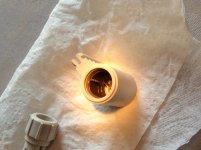
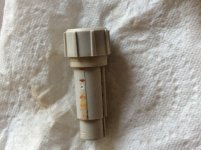
Then I decided to crack the damn thing open, using those pliers and here are the pics:

photo 1.JPG

photo 2.JPG

Rust, rust and rust everywhere. It's amazing how much rust it generated after only 10 days. I took a can of WD40 (I read somewhere that it wouldn't harm the plastics too much), and I applied some on the metal frame. I couldn't get it out of the plastic thing, that's how much damaged it was.

In my opinion, the frame moves with the second thing on the second picture as there are grooves on it. and it rotates inside the plastic thing in pic one. 

^_^ I couldn't find a better name than "thing" to describe those plastic parts. Sorry.

Maybe I'll give you some more info later tonight as the wd40 start to pay off.

I learnt one thing though, and I hope it will help idiots like me who tried or will try to wash their plastics:

DO NOT EVER IMMERSE THE CLUTCH MECHANISM OF THE MACINTOSH PORTABLE IN WATER. 

Physics 101 bis: IRON + WATER = RUST  :)

 
Back
Top