• Hello MLAers! We've re-enabled auto-approval for accounts. If you are still waiting on account approval, please check this thread for more information.

Macintosh Plus won't boot from rare HDD

bushok

6502
Hi,

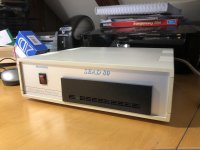
I've got a Macintosh Plus and I want to hook it up with a SEAD80 hard disk drive. I think this drive is quite rare. This drive is manufactured by SEA Software Nederland (the Netherlands) in 1990. It probably has 80MB storage capacity and I got it some time ago with an Apple IIGS.

I never got it to work with the IIGS, but probably the system on the drive is not suitable for my Plus.

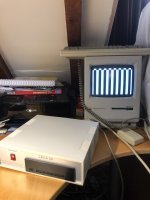
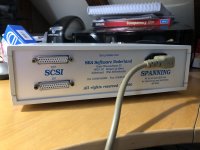
Question: my SEAD80 drive has got 2 SCSI ports (IN and OUT [Dutch: UIT]). I think I'll need to use OUT when connecting to the Plus right? When I do so, I have the hard drive boot first before starting up the Plus. When I switch on the Plus, on the screen of the Plus appear big fat white and black vertical lines and it does nothing...

What can I do to make this combination working?

Greetings,

Rob
IMG_3720.jpg

IMG_3721.jpg

IMG_3722.jpg

 
Two questions: Does the Plus work normally without the drive? Does the Plus, if it works otherwise, work with any other SCSI equipment properly?

 
It does work normally when booting from the floppy drive. I have never used a SCSI device before on the Plus (and don’t have any other then this) so I am not 100% sure this port is ok. 

 
Remember SCSI does require termination. My guess would be your cable goes into "IN", and a terminator would need to be plugged into "OUT". Some drives had internal termination (my ProAPP20S does, for example).

It's also possible that given the Plus's wonky implementation of SCSI, you might want to try an Apple spec cable (these can be found on eBay).

 
I’ve never seen SCSI terminators for these old SCSI connectors (I know about the 80 pin terminators), do they exist?

The cable is not Apple SCSI, true. 

 
There are 50 pin terminators out there although the Centronix D-sub style terminator is a LOT more common.

I'm also curious if your drive/drive enclosure has termination circuitry built into it and if so, is it enabled?

I feel like this could also be a simple matter of assigning the drive a different SCSI ID.

 
I would think the other way: you should terminate the IN port, and send the OUT port to the Plus. At the same time, with no other hardware to try, you cannot rule out some sort of SCSI port/chip problem on the inside. The only other thing I would think of is trying the drive with another Mac, if available.

 
Yes, see what it produces on the IIfx. If it makes that machine hang up on starting, then I would suspect something with the drive. If it works fine, look at the Plus. I'm interested to see your results.

 
Well the drive probably has ProDOS installed as I got it with a IIGS. So that will not work in the IIfx. I will test things tomorrow and let you know

 
No, but if you are able to start the IIfx up with it connected at least, that would make me think that it would not be causing issues with the Mac Plus SCSI system.

 
What about booting from floppy, and then turning on the drive? Assuming it boots, the Mac won't see it, but you might be able to reformat it. Dead McAfee Scrolls suggests this, and using Silverlining 5 to reformat it...

Edited to add: Remember the Plus doesn't provide termination power, so if your drive doesn't provide it, you'll need to add it in the SCSI chain. You can find pass through SCSI terminators easily enough on eBay. If I recall, you pug the DB25 into the Plus, the 50 pin into the passthrough, and the passthrough to the drive. Also, if the drive has a selectable SCSI id, try 5 or 6 (I think the Plus reserves 0 for itself).

 
Last edited by a moderator:
What about booting from floppy, and then turning on the drive? Assuming it boots, the Mac won't see it, but you might be able to reformat it.
This probably won't work. If the drive isn't powered on and responding to SCSI commands at boot time, then the Operating System won't add the drive to the Drive Queue.

You were always supposed to power on all SCSI devices before powering on the Macintosh.

 
Last edited by a moderator:
The cable is not Apple SCSI, true. 
You just identified the problem.

It's your cabling. Check the pinouts, as this hard drive and your cable for it are very likely using a different pinout than Apple's SCSI configuration (which by the way was non-standard), which is why your Mac Plus won't boot.

 
This probably won't work. If the drive isn't powered on and responding to SCSI commands at boot time, then the Operating System won't add the drive to the Drive Queue.

You were always supposed to power on all SCSI devices before powering on the Macintosh.
To be fair, I pulled this suggestion from Dead Mac Scrolls, but it might make sense here. The drive is likely formatted for the IIgs, and the Plus can't read it, and therefore chokes on it.

 
I picked up one on eBay from blairdus, reasonably priced. It isn’t apple branded, but listed as supporting the Plus, and it does in my case.

 
Back
Top