• Hello MLAers! We've re-enabled auto-approval for accounts. If you are still waiting on account approval, please check this thread for more information.

Macintosh IIsi freezes on all Systems after 5 minutes

MrGasS27

6502
Hi everybody!

I want to repair my father's Macintosh IIsi who bought it new in 1991, I have a lot of Macintosh in my home but this was my childhood computer and I love it a lot.

So, since 2007 it freezes on any System and on any drive (internal SCSI, external SCSI, Floppy Drive) after a little bit of time, 5 minutes for example.

In 2016 original IIsi PSU completely died, so I modded an ATX (that I use everytime on my IIci that works perfectly) and the IIsi freezes also with the new PSU.

There is another problem, sound is very, very, very quiet, I can hear it only if I attach a powerful pair of speakers (sound remains quiet)

Somebody has repaired this issue on this Macintosh? Thank you :)
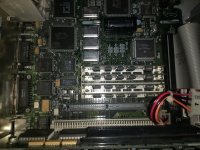
IMG_20180122_152232244.jpg

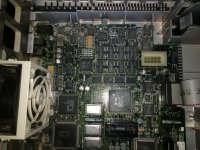
IMG_20180122_152240051.jpg

 
I see original, leaky smd caps on the logic board. Wash the board and replace all caps. That’s definitely why the sound is quiet. It’s most likely why it’s freezing too. Bad caps cause all kind of weird issues.

 
Now I remember that it took at least 10 seconds to go to the boot grey screen for show the question mark... I have already found the capacitors on the web and a very low price, so I'll wash and re-cap the motherboard.

 
Last edited by a moderator:
If it's still there after recapping, try to do a RAM check/diagnosis. And check with another/fewer ram attached.

 
I also tested the IIsi without additional RAMs and it freezes anyway, I'll recap it

 
Last edited by a moderator:
I would also try some troubleshooting before suspecting the logic board.

Disconnect as many internal and external device as possible, this includes the PDS slot, RAM, hard drive, floppy drive and external devices. Then turn on the machine, see how it behaves past the 5 minutes you mentioned. If it continues to operate albeit, not much is going on, connect the HD and startup (still with no keyboard or mouse), check past the 5 minutes period again. If it still works shutdown and reattach the floppy drive. Turn on again and test past the 5 min period. Continue with this strategy one device at a time until you find the suspect device. If it fails on the HD, try starting up from the internal floppy drive with the HD disconnected.

It could even be a bad cable.

 
Original HDD is completely dead and the FDD is in my IIci, I did a lot of tests in past but no luck, I tried everything and every combination.

However, 2 days ago I desoldered all 47 uF 16 V caps, I'll wash it, I'm waiting for new capacitors.

 
UPDATE - 14/03/2018

DID IT!

I changed all the 47uF 16V caps on the motherboard and on the FPU card, now it works like a charm!

Now I have sound from speaker and I kept power on the Macintosh for 1 hour, it booted 7.1.2 and 7.5.3 from SCSI2SD and I played Shufflepuck, Shatterball, Prince of Persia and Spectre without issues, it runs good.

I also washed the motherboard, obviously.

I used electrolytic chinese caps from Aliexpress, they works.

However, It does the boot chime after 10 second, I didn't changed the two Axial 220uF 16V caps yet, I think that this problem is related to them, but I'll solve it!

I'm so happy :)

 
Last edited by a moderator:
UPDATE 30/3/2018

Changed the two 220uF 16V Axial caps but the IIsi still takes a while before chiming, however, this doesn't affect system performances and it runs like a charm :)

 
Some re-capped machines do seem to have a slight boot delay. I've seen this in some of the re-capped LCs I have on hand.

 
My re-capped Macintosh LC does the chime immediately, the IIsi still has this delay, but it isn't a problem for me

 
Back
Top