• Hello MLAers! We've re-enabled auto-approval for accounts. If you are still waiting on account approval, please check this thread for more information.

Macintosh IICX short circuit

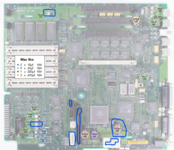
A few months ago I got two Mac IICX, of which one was unrecoverable due to a damaged battery, so I decided to restore the other one which was in good condition and supposedly “turned on” but did not turn on, and as it had some leaking caps I decided to change all the ones on the motherboard, before changing them I did not notice significant leaks so I assumed everything was correct, however I still can't get it to turn on, the caps are correctly placed, however I noticed that there is a very suspicious continuity, some caps have continuity in both poles, even without the cap installed, and both my motherboards have these strange continuities in the same places, I am new in the electronics field, but I am not sure it should exist in continuity this way, there is a battery connected to the motherboard, and it works correctly, so if it is needed, it should have no problem to turn on.

I need help, as I have never been able to get a computer like this to work :(


In this image I marked the continuities that I found
1727036874371.png
 
I think the SCSI continuity is fine. I believe those are ground wires. However, the power connector and capacitors you marked suggest a short across +5V and ground. If all of the pins on the hard drive connector really are shorted, then you also have a short across +12V and GND.

I tried diagnosing a IIci with similar issues. I injected current and looked for a hot spot with infrared. I was never able to find the short.
 
Multimeters will have some kind of a threshold for what they consider to be "continuity" for the beep when testing resistance. For example, the manual for my UNI-T UT60A-CN says it will beep if the resistance is less than 100Ω. This originally surprised me when I learned this, because once you're up in the tens of ohms it's not really continuity anymore.

I would recommend measuring to see exactly what the resistance reading is across +5V and GND. It's actually very normal for Mac logic boards to have a low enough resistance there that your multimeter will trick you into thinking it's a short. My IIci, for example, measures about 16Ω. Others have reported similar results. See this link (and my subsequent reply) for more examples.
 
Is correct, there is a "short" between the +12v pin and ground, sadly I was sold this Mac IICX as “turns on and POST”
Multimeters will have some kind of a threshold for what they consider to be "continuity" for the beep when testing resistance. For example, the manual for my UNI-T UT60A-CN says it will beep if the resistance is less than 100Ω. This originally surprised me when I learned this, because once you're up in the tens of ohms it's not really continuity anymore.

I would recommend measuring to see exactly what the resistance reading is across +5V and GND. It's actually very normal for Mac logic boards to have a low enough resistance there that your multimeter will trick you into thinking it's a short. My IIci, for example, measures about 16Ω. Others have reported similar results. See this link (and my subsequent reply) for more examples.

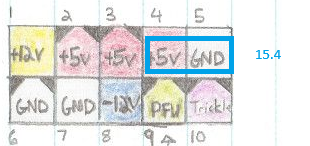
back to the topic, it makes sense to get these readings with what you just told me, between these two points I found a resistance of 15.4 in my case, and my multimeter beeps when the resistance is less than 30Ω, I tested capacitor C4 which is supposedly shorted and it has 15.4 resistance, which is a good thing, all the capacitors I marked have the same resistance, also the molex pins, which is something that reassures me a bit.

I still can't get the machine to turn on, and I will continue to investigate the reasons why it won't turn on, considering the PRAM battery is working, the capacitors are in good shape and what components must be connected to turn on.

I am trying to turn it on with the back button set horizontally, without the graphics card, floppy or hard disk, the ram memories are installed as I heard they are necessary.

1727065243721.png


1727063521891.png

1727064530347.png
 
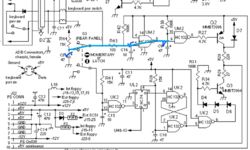
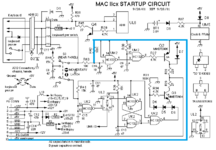
Following this diagram I was able to check that the capacitors are working correctly, although I found that C16 receives 4.1V instead of 5V, it may be a minor problem but we have to check it, the reading on C9 also seems to be 4.1V.

1727132982998.png
 
Following this diagram I was able to check that the capacitors are working correctly, although I found that C16 receives 4.1V instead of 5V, it may be a minor problem but we have to check it, the reading on C9 also seems to be 4.1V.

View attachment 78733
If the 5v line from the PSU is only outputting 4.1v you might want to start with recapping the PSU instead.
 
If the 5v line from the PSU is only outputting 4.1v you might want to start with recapping the PSU instead.
I checked the PSU but it doesn't seem to be in bad shape, I also checked the output voltages (5V) on the continuous output going to C16, however C16 doesn't reach 5V, I don't know very well what behavior C16 should have, because I saw that it charges very slowly, and gives me readings of 2 to 4V, the capacitor was changed by one of 10uF 16V which is the same that the computer had before, I am investigating if that is a normal behavior in the computer when the PSU is in standby state, and what voltages it should have in standby and on.

1727239950963.png
 
Back
Top