• Hello MLAers! We've re-enabled auto-approval for accounts. If you are still waiting on account approval, please check this thread for more information.

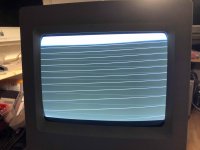
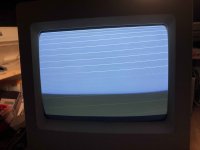
Macintosh Classic II display horizontal thin lines

pep_one

6502
Hi, the story of my Macintosh started some years ago... 

In short: I've recapped A/B and Logic board, after many repair session where I've bad voltage at 5V rails, now, after last isopropyl alcohol cleaning of A/B, the voltage is stable, the Mac boot and "Boing" playing (eureka! It's never boing).

But display always these thin horizontal lines. The lines is stable, after last cleaning, while before was flickering.

Do you have any idea of what is the culprit?

If I arrived at this point it is thanks to the posts of this forum. Thanks to all!

P.S: sorry for my poor english :(
IMG_2849.jpg

IMG_2848.jpg

 
It looks like replace 2N3904

let us know if that works out for you. 


Last edited by a moderator:
Wow, great!

it seems like my problem!

I’ll try to replace this transistor as soon as possible.

Thank you very much jimjimx!

 
Unfortunately the replacement of the transistor had no positive results :(

Now I've search the equivalent of SE/30 UE8 chip for reflux the solder point 

 
I think that UE8 is the chip from Mac SE/30, I don't find it on logic board of my Classic II.

So I ask for the equivalent chip on my Mac.

Really I've replaced 2N3904 last night immediately after your answer, I taked it from an orphan A/B (I think is in good conditions), so I was very quick :)

 
Last edited by a moderator:
Cheers,

Maybe i can piggyback on this thread as it seem a related problem:

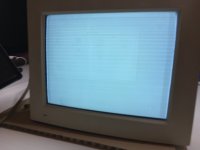
Macintosh 12" Monochrome Display M1050

Picture faintly visible.

Some recaping but not much. Seems related to brightness / contrast setting but that could be just the visibility.

any hints before i unmount the rather unpleasant video board casing?

thanks!

IMG_1809.JPG

 
I’m gonna recommend the link above I posted from UniServer. 

See if that works out for you, gets you on a good path. 

Theres a lot of learning in there. 

 
Last edited by a moderator:
Caps are starting to fail in the CRTs too, the 12" RGB version has a known issue with this in the horizontal drive stage. 

For future reference, the issue you describe are whats known as "retrace lines" The fact that your screen looks like that (Referring to classic II), means your video signal is driven full on. So the CRT is literally biased well into the hot range, as retrace lines are usually blanked by the beam killer. (or blanking interval). 

So, you either have a video amp IC thats on the classic II analog board thats bad, or the video IC on the logic board is bad. its one of the two. So unless you simply want to go on a parts swapping exercize, you need an oscilloscope to trace the video signal back through to figure out at which point its dying off. 

The Monochrome LC monitor, it could be anything. My immediate thought is the contrast is way up. Again, biasing the CRT well beyond its range. Also, you could have a video amplifier issue. 

This almost screams caps, or dirty/bad brightness/contrast pots. 

Also, much more rarely, and only if someone has messed with it, the G2 (screen) drive on the flyback could be turned way too far and cause the issue as well on CRT monitors. 

To sniff out bad capacitors, you could simply take the back off, grab a blowdryer, and start heating up the analog board in various areas. Even the CRT neck board if that fails, if the picture begins to improve drastically, then it needs a cap job. 

Also look for wet/corroded/crusty areas near caps, this gives it away sometimes, but not always. 

 
Last edited by a moderator:
thanks for this very precise and educating answer.

the blowdryer method is new to me (love it) and i'll certainly try that.

there are no indications of leaking caps or other obvious things.

parts have arrived and i'll open the video board casing and see what's happening :)

as the retrace lines strongly react to the contrast / brightness dials i also would guess theres the root.

thanks!

 
Yea the blowdryer method is a real good way to troubleshoot bad dried out caps. 

Just be careful as to not overheat everything. Plenty of heat, but not overheat. 

 
Back
Top