• Hello MLAers! We've re-enabled auto-approval for accounts. If you are still waiting on account approval, please check this thread for more information.

Macintosh Classic II blank screen after recap

Yeah, however I thought that these boards are only 4 layer (bottom, ground, power and top plane)... If it is in a layer that I can't see, is it even possible to repair it somehow?

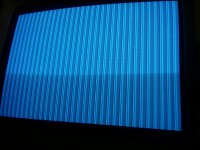
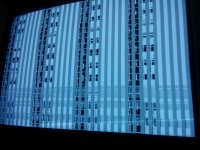
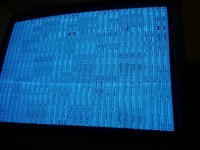
I also reflowed the capacitors on the bottom side, but it also did nothing. Also replaced the memory chips... It will chime when it is warm (not just under Egret, but also under sound ASIC area), but it freezes immediately after that, so if I reset it, it will do a chime of death and picture will still sometimes come, and sometimes won't after resets. Sometimes it will do a jailbar and sometimes a checkerboard. Also very commonly these two patterns are a bit scrambled, but not much, just pixels shifted a bit...

Any thoughts on that?

 
Not that this helps, but i registered because I recapped my classic II 2 years ago, when i pulled it out for use after working for 8 hrs or so i got the lines down the screen and no chime, so I ended up taking the board out and scrubbed it real good put it back in and its working fine, I must have missed some corrosion.

 
These guys arnt 4 layer, I believe they are 6 layer. But, the SE/30 its hard to tell if its 4 or 6, but they definitely run traces on the inner layers. But, its also possible it is a 4-layer, but they only use 1 layer for ground fill, and they use a 2nd layer for VCC traces, and regular traces. 

Only way to tell is take a sacrificial/battery acid board, strip it down to the bare PCB only, and grind/shave it off. one layer at a time, and document. 

 
Last edited by a moderator:
sure with a patch wire and the schematics.
That def. seems like something someone would send to you rather than try themselves. On the other hand, maybe I'm just a wuss. I just prefer professionals fix my stuff, I love my compacts too much to risk them on my own repairs.

 
ill tell you guys what... i have seen some battery destroyed boards fixed by techknight. with traces/pads and VIA's complete shot... 

and wires ran all over like spaghetti that techknight fixed,  That man has some sickening patience.  

 
Last edited by a moderator:
I tried this mac after almost 6 months. I still hope that I might be able to fix it, as it is a very nice machine.

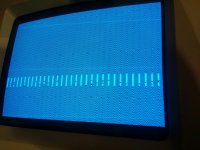
Tried it today and got some activity, but not much. I hit the reset button about 30 times, and I got blank screen about 30% of the time, in other cases, I got patterns like these, so it is very random. I tried heating every chip on the board with an SMD station (at about 140 deg. C) with the board working so a bad one might pop up... but I got no differences..

Can anyone suggest what should I check?

2016-01-13 00.48.46.jpg

2016-01-13 00.49.23.jpg

2016-01-13 00.38.19.jpg

 
Done some work in past few hours.

I've replaced the memory before with some from the LC III. I now decided to put the original memory back. At first I had about the same results, but then I reflowed each solder joint of the chip with a lot of flux and now I it chimes with an error chime, but still kinda garbled screen and chime is also a bit distorted. Now it will chime and show screen every time.

Video: https://www.dropbox.com/s/vplqumnpmnz60o8/2016-01-13%2002.21.29.mp4?dl=0

Could there be a bad memory chip?

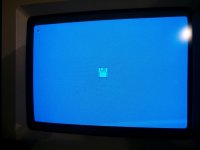
2016-01-13 03.21.09.jpg

 
Again update. I replaced one memory chip and now I get clear chime and screen. However, I still get chimes of death 2 seconds later.

 
I removed the SCSI chip. Booted it without it. It now goes to a blinking floppy disk icon and I get mouse pointer. If I insert bootable floppy, it will boot from it, but it hangs on the "Welcome" screen.

Is the SCSI chip culprit, or do I perhaps have problem somewhere else?

So I am getting there :)

2016-01-13 18.56.59.jpg

 
My bet would be SCSI chip. Check every trace and pin that connect to the chip, if they check out, chuck the chip and try a transplan

I had to admit. SCSI, never would have guessed.

 
Last edited by a moderator:
I've only heard about the SCSI Chip doing this a few times on this forum mostly on the SE\30 repairs but it is a difficult diagnosis to figure out. Good thing is that you can replace it with a SCSI from a dead board or buy a new and faster SCSI 5380 Chip (I think the 5381 is pin to pin compatible). It is cheap to at around $15 new from Mouser & Newark.

The Floppy might need lubing as well, if not it is either a bad disk, incompatible system or iffy bornes filter. But you got the machine working again! Congrats!

 
Last edited by a moderator:
Without a SCSI, you won't get any further, it needs the SCSI chip present and working to complete the boot process

 
I replaced the SCSI chip from a dead LC III, but I get the same problem with the other chip present. It will sound chimes of death after few seconds.

But there is a possibility that this chip is also dead. I doubt that there could be anything else wrong besides SCSI chip, but still...

I will try replacing the chip from a known working Classic II board, so I can be 100% sure that it is the SCSI chip that is the culprit.

I searched Mouser for 5381, but I did not find anything.

 
Thanks. I guess I moved the files instead of copying them... anyways the Dropbox links are not relevant anymore, as they showed mid progress status (garbled screen, etc.).

The SCSI chip is good.

I replaced the SCSI chip with a known good from another Classic II and put the original chip on the working Classic II board. The suspected bad chip works fine, I am booting from internal HD and from external CD. Of course it is on another board now.

So to sum the things up: the SCSI chip is good, but the board won't boot if it is present. When SCSI IC is removed, it will boot to question mark and try to boot further.

I am a bit tired of replacing big SMD chips. It will happen when you have dead donor boards and if you can swap ICs you will. I will save ton of my time if I just throw these boards away :)

So... a bad trace... or perhaps something else? Is there anything else connected to SCSI chip? I can do a diode (voltage drop) measurement on each pin of SCSI IC and compare them with another board, but the other board is Rev. 1 so the readings may not match 100%, and the process is very time consuming.

 
you can do resistance checks between pins to ground. 

The revisions probably wont matter on that front, the design is overall the same. 

Any open traces or shorted circuits on the lines will show a drastic difference between a good and bad board. 

 
Last edited by a moderator:
Back
Top