



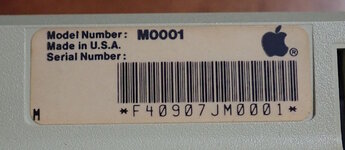
After several unsuccessful purchases, I've obtained an original unaltered Macintosh 128K. Model M0001 serial number F40907JM0001 (the 256th Mac manufactured during the 9th week of 1984 in Fremont, California, USA.)
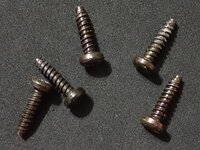
The screws are all black and of the 'tapping' variety. I suspect these are original, although the Apple Service Guide claims it should be the usual pair of black machine-thread screws at the bottom, and silver tapping screws elsewhere. My guess is they weren't picky when they first started manufacturing.
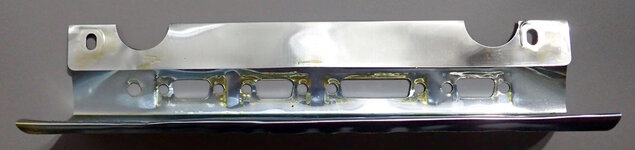
Disappointingly, it appears someone added some oil to the rear connector housings. Oil seeped onto both sides of the logic board shield around the connectors.
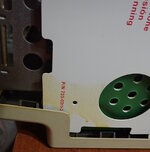
The oil dripped(?) onto on side of the interior of the case -- maybe during storage or shipping. My removal of the cover caused the oil to transfer to the cardboard analog shield. I cleaned this off shortly after taking the picture.
Additionally, over the years the oil seems to have migrated and dispersed onto the motherboard, resulting in a light gunky sheen everywhere. (That being said, the metal is not corroded anywhere, so I suppose that's a benefit.) Below is a photograph prior to cleaning.
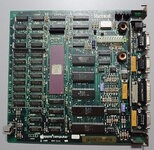
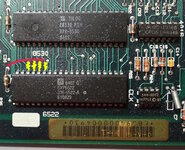
The board does not include the 6522 VIA pull-up resistor array bodge on the address lines, suggesting it was not serviced or swapped out by Apple.
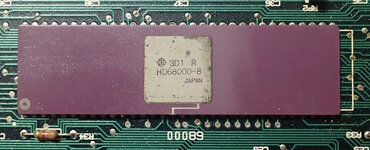
It's nice to have a purple ceramic package. This is the Hitachi HD68000, which would be an alternative supplier to Motorola
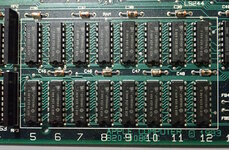
The RAM is also Hitachi. It has a smaller, but cute, Apple logo in the lower right of the chip. More commonly, I've seen photos of Micron chips with a large Apple logo on the left side of the chip. The Micron's have a reputation for failing. Are the Hitachi chips more reliable?
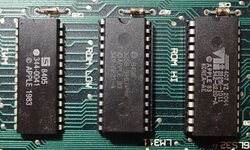
The ROMs are period correct as well. This is the 342-0220-A variety that was superceded by the -B variety when the newer Sony floppy drives were used. See https://68kmla.org/bb/index.php?threads/macintosh-128k-mac-plus-roms.4006/post-45807
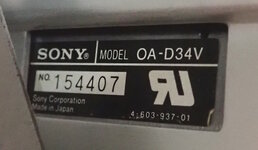
As expected, this has the original Sony floppy drive, OA-D34V.
Analog Board
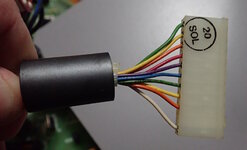
The wiring harness appears a bit wimpy. @JDW reminds us to measure the diameter of the conductors, not the insulator, as a thickness of the sheath may fool you into thinking its a thinner/thicker gauge.
Speaking of @JDW, this Mac's analog board contains...
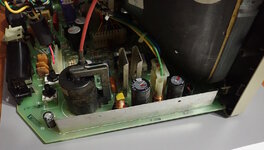
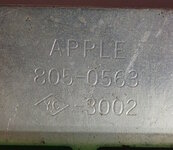
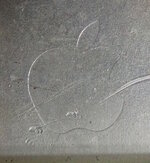
This is Apple part number 805-0563-3002. It even has a cute Apple logo stamped on one side.
I believe @JDW removed the metal shield from his Mac, out of concern that it interferes with airflow. Apple removed it from subsequent analog boards, so it is either unnecessary or a hindrance. Since I do not intend to run this Mac, I will leave the metal shield intact.
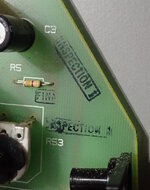
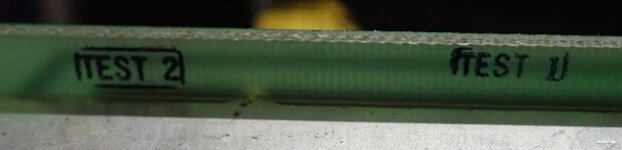
There are a few inspection and test stamps on the analog board.
Philosophical questions
What to do with this old Mac? I already have a recapped working Mac 128K and 512K. So, to keep this one as original as possible, I am inclined to not recap this, or add the VIA resistor fix, or remove the aluminum RF shield. Under the right conditions, will the capacitors just dry out or is it inevitible that they will leak and cause damage?
1. Should I recap it, even though it will lose those original parts? What do museums do with old electronics? Just watch it for signs of leakage?
2. What is the best way to remove the grime and light oil sheen from the motherboard without losing markings? An ultrasonic cleaner seems too harsh, as it has removed crystal and CPU markings from other motherboards that I've cleaned. Should I just toothbrush scrub it in IPA? Or, use a hexane based cleaner like WD-40 Specialist Contact Cleaner?
In anticipation of strong opinions, let me address a comment from a different thread.
Yes, my intended goal is to keep this particular piece for 'collector' purposes rather than a running model. They seem to be difficult to locate in an unaltered state.
- David
The screws are all black and of the 'tapping' variety. I suspect these are original, although the Apple Service Guide claims it should be the usual pair of black machine-thread screws at the bottom, and silver tapping screws elsewhere. My guess is they weren't picky when they first started manufacturing.
Disappointingly, it appears someone added some oil to the rear connector housings. Oil seeped onto both sides of the logic board shield around the connectors.
The oil dripped(?) onto on side of the interior of the case -- maybe during storage or shipping. My removal of the cover caused the oil to transfer to the cardboard analog shield. I cleaned this off shortly after taking the picture.
Additionally, over the years the oil seems to have migrated and dispersed onto the motherboard, resulting in a light gunky sheen everywhere. (That being said, the metal is not corroded anywhere, so I suppose that's a benefit.) Below is a photograph prior to cleaning.
The board does not include the 6522 VIA pull-up resistor array bodge on the address lines, suggesting it was not serviced or swapped out by Apple.
It's nice to have a purple ceramic package. This is the Hitachi HD68000, which would be an alternative supplier to Motorola
The RAM is also Hitachi. It has a smaller, but cute, Apple logo in the lower right of the chip. More commonly, I've seen photos of Micron chips with a large Apple logo on the left side of the chip. The Micron's have a reputation for failing. Are the Hitachi chips more reliable?
The ROMs are period correct as well. This is the 342-0220-A variety that was superceded by the -B variety when the newer Sony floppy drives were used. See https://68kmla.org/bb/index.php?threads/macintosh-128k-mac-plus-roms.4006/post-45807
As expected, this has the original Sony floppy drive, OA-D34V.
Analog Board
The wiring harness appears a bit wimpy. @JDW reminds us to measure the diameter of the conductors, not the insulator, as a thickness of the sheath may fool you into thinking its a thinner/thicker gauge.
Speaking of @JDW, this Mac's analog board contains...
the aluminum RFI shield that ran along the top edge of the board
This is Apple part number 805-0563-3002. It even has a cute Apple logo stamped on one side.
I believe @JDW removed the metal shield from his Mac, out of concern that it interferes with airflow. Apple removed it from subsequent analog boards, so it is either unnecessary or a hindrance. Since I do not intend to run this Mac, I will leave the metal shield intact.
There are a few inspection and test stamps on the analog board.
Philosophical questions
What to do with this old Mac? I already have a recapped working Mac 128K and 512K. So, to keep this one as original as possible, I am inclined to not recap this, or add the VIA resistor fix, or remove the aluminum RF shield. Under the right conditions, will the capacitors just dry out or is it inevitible that they will leak and cause damage?
1. Should I recap it, even though it will lose those original parts? What do museums do with old electronics? Just watch it for signs of leakage?
2. What is the best way to remove the grime and light oil sheen from the motherboard without losing markings? An ultrasonic cleaner seems too harsh, as it has removed crystal and CPU markings from other motherboards that I've cleaned. Should I just toothbrush scrub it in IPA? Or, use a hexane based cleaner like WD-40 Specialist Contact Cleaner?
In anticipation of strong opinions, let me address a comment from a different thread.
So the only reason to search for an early "stock" board would be bragging rights. In fact the lack of the D15 resistor array could lead to random crashes.
Yes, my intended goal is to keep this particular piece for 'collector' purposes rather than a running model. They seem to be difficult to locate in an unaltered state.
- David




