Hi Everyone,
I recently began a hobby project of resurrecting a Classic II that I bought at my elementary school's yard sale 20 years ago (for the equivalent of about 2 dollars). It was working fine for a few years, but it hasn't been able to boot for a good 15 years. I have close to zero experience with such repairs (or soldering), but tried my best to read up on the matter. I think I made good progress, but I can't quite figure out a reason why there's no sound coming out of it, not from the internal speaker, nor the jack output.
What I did so far:
There was a lot of capacitor juice on the logic board, and some on the analog board, but very minimal corrosion was visible, and the battery bomb from '92 hasn't detonated either. Cleaning the logic board got me from tiny jailbars to the startup question mark screen, and after fully recapping the logic board and the analog board (except for the big 220 μF 400V one on the analog board), the SCSI drive spun up and it actually booted. It was just as I left it. I so was happy to find some childhood drawings and notes of mine. I feel lucky that both the SCSI and the floppy drives seem to be working just fine. No sound whatsoever though.
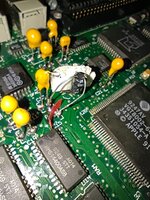
Now, I did mess up recapping C15, as I lifted both pads, and that one coincidentally goes to the sound chip. I tried to solder to the traces during my initial go, and after I noticed the sound issue, I inspected it again with a multimeter this time. One of my solderings seemed a bit unstable, so I made the world's ugliest jumper wire job directly to one of the legs of the sound chip that the trace seemed to go into (and which did produce connectivity with my first trace soldering when pressing down the cap a bit). The good news is that the thing didn't explode after my hatchet job of repair attempt, but I still have no sound.
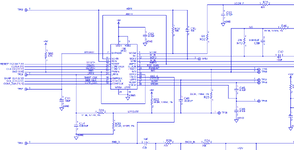
I'd also like to mention that I tried checking the logic board schematics, but it's a bit greek to me. From what I can see, both poles of C15 connect with multiple legs of the sound chip (I don't know which number is which in practice) which they do seem to be doing now.
Seeing as how both the internal speaker and the jack output is out (and assuming C15 is fine-ish), my best guess is that the next step should be desoldering the sound chip, cleaning up any potential goop underneath and resoldering it, but I want to make abosolutely sure before I try something like that. Does anybody know what else I could check for, or tell me which cap end should connect with which legs of the sound chip? Or if someone has a picture of where the traces go underneath the chip, that could also be of use.
I'd really appreciate any help you could give me, and I can say that after years of neglect I'll never leave my little machine in such a state again; in fact, I have big plans for it, having already ordered 4MB RAM SIMMs and a BlueSCSI v2 with the Wi-Fi thing.
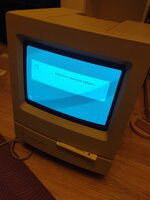
I recently began a hobby project of resurrecting a Classic II that I bought at my elementary school's yard sale 20 years ago (for the equivalent of about 2 dollars). It was working fine for a few years, but it hasn't been able to boot for a good 15 years. I have close to zero experience with such repairs (or soldering), but tried my best to read up on the matter. I think I made good progress, but I can't quite figure out a reason why there's no sound coming out of it, not from the internal speaker, nor the jack output.
What I did so far:
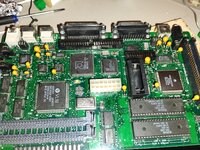
There was a lot of capacitor juice on the logic board, and some on the analog board, but very minimal corrosion was visible, and the battery bomb from '92 hasn't detonated either. Cleaning the logic board got me from tiny jailbars to the startup question mark screen, and after fully recapping the logic board and the analog board (except for the big 220 μF 400V one on the analog board), the SCSI drive spun up and it actually booted. It was just as I left it. I so was happy to find some childhood drawings and notes of mine. I feel lucky that both the SCSI and the floppy drives seem to be working just fine. No sound whatsoever though.
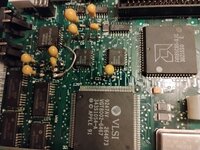
Now, I did mess up recapping C15, as I lifted both pads, and that one coincidentally goes to the sound chip. I tried to solder to the traces during my initial go, and after I noticed the sound issue, I inspected it again with a multimeter this time. One of my solderings seemed a bit unstable, so I made the world's ugliest jumper wire job directly to one of the legs of the sound chip that the trace seemed to go into (and which did produce connectivity with my first trace soldering when pressing down the cap a bit). The good news is that the thing didn't explode after my hatchet job of repair attempt, but I still have no sound.
I'd also like to mention that I tried checking the logic board schematics, but it's a bit greek to me. From what I can see, both poles of C15 connect with multiple legs of the sound chip (I don't know which number is which in practice) which they do seem to be doing now.
Seeing as how both the internal speaker and the jack output is out (and assuming C15 is fine-ish), my best guess is that the next step should be desoldering the sound chip, cleaning up any potential goop underneath and resoldering it, but I want to make abosolutely sure before I try something like that. Does anybody know what else I could check for, or tell me which cap end should connect with which legs of the sound chip? Or if someone has a picture of where the traces go underneath the chip, that could also be of use.
I'd really appreciate any help you could give me, and I can say that after years of neglect I'll never leave my little machine in such a state again; in fact, I have big plans for it, having already ordered 4MB RAM SIMMs and a BlueSCSI v2 with the Wi-Fi thing.