CENTERING THE SCREEN QUESTION:
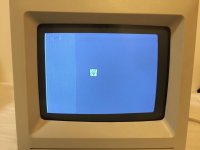
The visible display has moved to the left of the screen area, but I don't see any adjustments for this anywhere. I know how to take the case off, and I can see all the adjustments, but no adjusting moves the display back to the center.
Should any of the visible adjustments (four pots) make the display move back to the center? If so, which one?
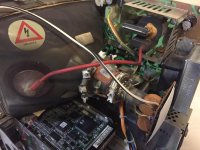
ANSWER 1: No. This extremely dangerous operation is accomplished by rotating the two metal rings on the back of the CRT. These rings are usually glued together and they move the image diagonally. By adjusting the two diagonals one can achieve the desired position.
The rings will need to move separately in order to adjust them, so the dab of paint that glues them together will need to be cracked (this can usually be accomplished by just rotating the rings, but sometimes they will have to be gently pried apart). Let me repeat this is a very dangerous adjustment as it is impossible to do with the machine off and the tabs on the rings are within millimetres of 9k volts. The preferred method is to rotate the rings with a non-conductive probe (laymen call these unsharpened pencils or plastic pen barrels.
ANSWER 2: I don't think any of the 4 pots are going to accomplish what you're wanting. There's also an adjustment on the yoke of the CRT, just in front of the small video board that plugs into the back of the CRT. If you look closely there should be a small lever/arm that you can move. As you move this, the alignment of your CRT video should also move right/left. Since this area is right in the middle of some high voltage and has to be done with the system/CRT on, it's not exactly something for the faint of heart or inexperienced to attempt.










 It should be 0.033uF (maybe slightly different on some models), and I would use a part rated at 250V, or more if it's labelled that way on the part you're replacing.