• Hello MLAers! We've re-enabled auto-approval for accounts. If you are still waiting on account approval, please check this thread for more information.

Mac SE - No bong on boot; 00000002 0000FFFF

Spite

6502
Hello friends. I got this Mac SE SuperDrive off eBay that functioned mostly perfectly. Ever since I disassembled it for inspection, I've been having a bunch of issues on startup.

THE PROBLEM:
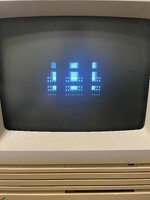
This is what I've been dealing with for the last 4 days or so. This fragmented (in 9 different parts?) Sad Mac shows on power on along with error code 00000002 - 0000FFFF. Someone here on the forum had an identical issue to mine but he said it was spontaneously resolved, so no joy on that.

WHAT I'VE DONE SO FAR:
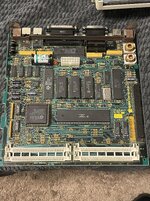
  • Disassembled the entire machine & inspected both the logic and analog boards. Nothing that looks like a problem sticks out to me.
  • Sprayed some contact cleaner in the SIMM sockets and cleaned them vigorously with a toothbrush.
  • Metered all the contacts on the RAM sockets. (Pins 5, 19, 24, 26, 28, and 29 on all sockets showed no continuity?)
  • Swapped my 4 RAM SIMMs with some modules that are known good ones.
  • Cleaned both ROM sockets & pins and reseated them.
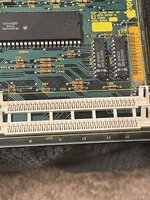
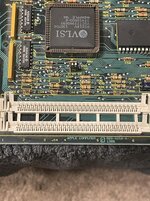
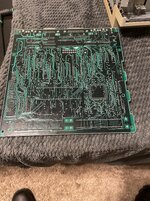
I'm not sure how to proceed trying to fix this. Below are some some high res photos of the logic board in case y'all see something that I don't. I just hope that I haven't just accidentally trashed this board like an idiot.

Any advice or guidance is sincerely appreciated!
 

Attachments

  • MacSE01.jpeg
    MacSE01.jpeg
    960.1 KB · Views: 33
  • MacSE02.jpeg
    MacSE02.jpeg
    1.3 MB · Views: 25
  • MacSE03.jpeg
    MacSE03.jpeg
    1.3 MB · Views: 20
  • MacSE04.jpeg
    MacSE04.jpeg
    1 MB · Views: 18
  • MacSE05.jpeg
    MacSE05.jpeg
    1.4 MB · Views: 27
0002 means that there is a problem with the ram:
The first small chunk of RAM failed. The Z field indicates which RAM Bit(s) failed. This small chunk of RAM is always in Bank B. Using $AABBCCDD as a guide:
AA=8 bit mask for bits 31-24
BB=8 bit mask for bits 23-16
CC=8 bit mask for bits 15-8
DD=8 bit mask for bits 7-0

But in your case perhaps there seams to be a problem with the vram too? May be some rotten adresslines?
 
does the SE even use dedicated video memory? I thought the framebuffer was stored in main RAM on the plain SE..
 
Some more new RAM has arrived today. I will test that, and while I'm at it I'm gonna meter the lines against each other and see if there's anything funky going on with them. I will report back soon.
 
Well, the fresh RAM did not work. Phooey. Retesting continuity between the RAM sockets instead yielded the same results.
I would appreciate if someone could meter their board as a sanity check.

Someone on Reddit suggested testing my voltage rails; I've got no idea on where to start on that one but I don't suspect that to be an issue.
 
Last edited:
Does the repeating Sad Mac graphic reveal anything about the RAM addressing?

I'll power up my SE today and see what I can offer in terms of internal RAM testing advice.
 
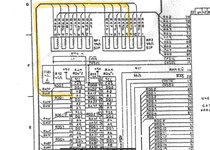
I checked the Apple schematic for the SE. You mentioned that some RAM SIMM socket pins showed no continuity. Of the ones you mention, all are no-connection except pin 5. Are you sure you had contact with that pin? Pin 5 should be signal RA1F (A1 for each SIMM) and be continuous to pin 9 of resistor array RP2.

1749668880641.jpeg
 
Thank you for the insight, Addicted.
I've tested that RA1F line for all SIMMs and they were continuous.
(I should've mentioned in the OP that I metered everything from the ATX plug, oops.)

I did have a look at the SE Reloaded gerber files as a reference to follow some of the traces. SIMM Pin 5 doesn't show any continuity past RP2: nothing from the SN74F257N, or the VLSI gate array or even the 68k.
 
Back
Top