• Hello MLAers! We've re-enabled auto-approval for accounts. If you are still waiting on account approval, please check this thread for more information.

Mac SE no bong, no display. not getting anywhere with troubleshooting

Picked up an untested SE that turns on but no bong or display output.

I can hear CRT initialize
Power supply is giving out correct voltages
RAM and CPU get slightly warm when left on
no capacitor or battery leakage on motherboard

Tried:
maxing display brightness
external speaker for startup tone, still nothing
reflowing solder joints on analog board
activating diagnostic mode by holding interupt button with serial port connected, no output. Also couldnt find a ton of docs on this for the non /30 so could be doing it wrong.
Known good ram
cleaned motherboard to remove grime and look for bad traces, didn't see anything out of ordinary.

Anyone have any other ideas? Unfortunately the only other compact I have is my Plus so not much to swap between them.
 
Looks like a Logic Board issue to me.
Maybe a broken trace somewhere, hard to say, the SE is reliable.
Yea I think it’s gotta be at this point. Going to take a closer look at board but other than rust by the mount where the board screws in it's super clean.

Also surprised the diagnostic mode didn't work so bad chip maybe?
 
When the computer is powered up with the bucket off, try wiggling the harness between the logic board and the analog board. If the computer provides the normal startup "bip", and starts running, then you need a new harness. I had an SE in 2022 that would randomly not boot. The difference is that I would usually get a checkerboard pattern on the screen when it would act up. Replaced the harness with another, and it was reliable again.
 
When the computer is powered up with the bucket off, try wiggling the harness between the logic board and the analog board. If the computer provides the normal startup "bip", and starts running, then you need a new harness. I had an SE in 2022 that would randomly not boot. The difference is that I would usually get a checkerboard pattern on the screen when it would act up. Replaced the harness with another, and it was reliable again.
Still nothing unfortunately. I even tried powering up the board with a bench power supply and didnt get a startup sound so gotta be something wrong with the board at this point.
 
I was just testing resistors on the board sense it is easy to do any the big green one marked L1 is almost a dead short when its supposed to be 27Ohm
No idea if that is important enough to make the system not work but, that isnt right
 
Last edited:
Not a 100% sure, but for me L is for inductors, not resistors.

Any mean to test the main CPU for frequency and reset ?
 
Not a 100% sure, but for me L is for inductors, not resistors.

Any mean to test the main CPU for frequency and reset ?
Oh i think your right this is not a resistor, ig that makes sense why i didnt read a resistance Lol. I am not exactly an electrical enginee

All i have is a multi-meter unfortunately. I have been looking at starter oscilloscopes for another project tho so maybe eventually?
 
Keep following up on the other paths, but also check the connection to the CRT - there could be multiple issues. Make sure the nipple on the back of the CRT has not broken and while you are there, when powered on, with the rear bucket off, you should see a faint glow at the back of the CRT while it is running.
 
Keep following up on the other paths, but also check the connection to the CRT - there could be multiple issues. Make sure the nipple on the back of the CRT has not broken and while you are there, when powered on, with the rear bucket off, you should see a faint glow at the back of the CRT while it is running.
Yea I see the glow you are talking about. I have looked over crt connections and I dont seem to see anything.

I do have a Macintosh Plus that works, I could maybe grab the video, h sync, v sync and gnd from there and see if the crt works? Unsure if the crt frequency is the same though.

EDIT: after researching the video signal and crt freq should be the same so i may try this.
 
Last edited:
Yea I see the glow you are talking about. I have looked over crt connections and I dont seem to see anything.

I do have a Macintosh Plus that works, I could maybe grab the video, h sync, v sync and gnd from there and see if the crt works? Unsure if the crt frequency is the same though.

EDIT: after researching the video signal and crt freq should be the same so i may try this.
Ok tried this and CRT showed the plus board output. The plus board didn't seem to like this though and would show video for a second and then reset, making the Bong again. The plus board also does this when i have no CRT connected so not entirely sure what to think of that.

This was my test setup:
The SE CRT is powered by its original power supply
The Plus CRT and logic board are powered by the Plus powersupply
I depinned the video, hsync, and vsync on the plus crt side so it does not receive a video signal
Then I just connected hsync, vsync, video and ground from the Plus logic board to the SE analog board

Video attached
 

Attachments

I think if you don’t get the shime first, probably you won’t get a video either.

Maybe posting some pictures here… can be a ram issue, a processor issue or a Rom one.

Your best option will be to swap logic board with another SE or Se/30 for a first test.
 
I think if you don’t get the shime first, probably you won’t get a video either.

Maybe posting some pictures here… can be a ram issue, a processor issue or a Rom one.

Your best option will be to swap logic board with another SE or Se/30 for a first test.
Dont have any other SE or SE/30 boards unfortunately. I did do some testing though, I posted it right before you responded so you might have missed it.

If you notice the non-original ram, I tried it with original 256k sticks from my plus as well.
 

Attachments

Dont have any other SE or SE/30 boards unfortunately. I did do some testing though, I posted it right before you responded so you might have missed it.

If you notice the non-original ram, I tried it with original 256k sticks from my plus as well.
Can’t tell for sure from the photo but looks like you have some cracked solder joints at the J11 connector on back side of the logic board. Maybe try reflowing those with fresh solder?
 
Can’t tell for sure from the photo but looks like you have some cracked solder joints at the J11 connector on back side of the logic board. Maybe try reflowing those with fresh solder?
J11 meaning the speaker connection? i dont see anything that looks cracked but i can try reflowing. I already reflowed J12, the main power/video connector to make sure there wasnt any cold joints there.
 
Last edited:
J11 meaning the speaker connection? i dont see anything that looks cracked but i can try reflowing. I already reflowed J12, the main power/video connector to make sure there wasnt any cold joints there.
Sorry I meant J12, the main connector. Glad you reflowed that.

Are you getting 12v and 5v at the external floppy drive connector pins?

How about continuity check on those J12 main harness wires?
 
Sorry I meant J12, the main connector. Glad you reflowed that.

Are you getting 12v and 5v at the external floppy drive connector pins?

How about continuity check on those J12 main harness wires?
Yea im getting all the necessary voltages on the logic board from J12 and on the floppy connector.

12 volts is around 13.5 now which i didnt think was the case before. Is the 12 volt rail used for chips themselves or just HDD/FDD drive?
 
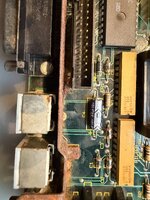
I see a lot of corrosion on this board, and mainly around the battery. Are you sure this one did not have a leak at some point and the battery wasn't removed and board cleaned quickly ?

I will remove the battery holder to have a look below.
 
I see a lot of corrosion on this board, and mainly around the battery. Are you sure this one did not have a leak at some point and the battery wasn't removed and board cleaned quickly ?

I will remove the battery holder to have a look below.
When I removed the battery from the holder it didnt have any holes or anything where it could have leaked from but maybe I missed something. The bracket at the back is pretty rusty I will say though.

I’ll take a look under battery holder.
 
A lot of rust also in the other side of the board, some legs are rusted in the ROMs area.

I will remove everything in a socket for checking purposes.
 
Back
Top