Follow along with the video below to see how to install our site as a web app on your home screen.
Note: This feature may not be available in some browsers.
Hello MLAers! We've re-enabled auto-approval for accounts. If you are still waiting on account approval, please check this thread for more information.
Sorry for my bad english,
I have a Mac Plus with radius upgrade and want to push a monitor on the FPD card.
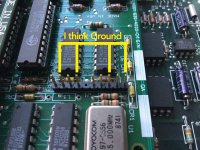
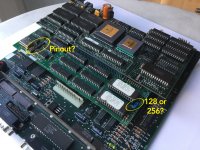
Which pinout does the card have?
Which monitors can I use?
Interesting bit of kit there. My guess is that it's a dedicated card for the FPD at first release. You're probably going to have one heck of a time trying to get that output do display anything on a modern display.
This is what appears to be a later version of the FPD, running off a PDS card or a NuBus Card in the IIsi NuBus Adapter.
A couple of us were working on getting the Radius TPD Card for the Macintosh SE up and running. Not a whole lot of progress, but look around for the thread and you might get some usable info.
I can't find a link to the Radius Q&A Archive ATM.
IIRC it was on a site called "mainlyneatstuff" and it appears to have disappeared along with vintagemacworld.com :-/
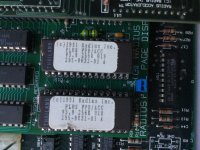
Missed your graphical question about the 128/256 jumper. You're in luck, it seems you have the latest ROM available from 1991, which is 256K. I'm guessing the jumper provides the additional address line for accessing the higher capacity ROM.
Don't remember the thread, but someone linked to another source the Radius Docs Archive (Thanks much!) and there's good info there on the older vs. newer FPD interface cards and FPD model compatibilities.
First Q's A poses a problem you may face even before worrying about video signal compatibility and where it is on the pinout:
Q: When I double click on the Classic/SE/Plus control panel, I receive an error message stating it cannot be used with this Macintosh. Why?
A: The software is not detecting the presence of the Radius FPD interface and monitor. The Classic/SE/Plus Control Panel will not open unless there is a monitor connected to the interface card. If the monitor is connected . . .
So the first hurdle looks to be spoofing the interface card so as to make it believe the proper display is attached. Running the control panel without getting that documented error should put you in your next step, noodling out the remainder of the pinout.
Check out the Q&A to see if anything makes sense. I'll be checking out the SE PDS TPD card we've been trying to get up and running on a multisync display. Thanks, you've opened up a new line of research for that stalled project. []
Forgot to ask about the Model Number of your card? Can you take and attach high resolution pics of both sides of you card for reference? That would be a big help.
This site uses cookies to help personalise content, tailor your experience and to keep you logged in if you register.
By continuing to use this site, you are consenting to our use of cookies.




 ]
] 


