Mac Plus Ticking Noise...

boh726

6502
I recently found a Mac Plus that someone was planning to throw away. After bringing it home, it turned on and worked perfectly, except for the lack of a startup disk. After getting the startup disks and trying to put them in, I realized the floppy drive wasn't taking them.

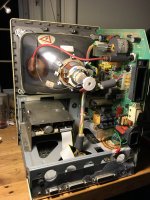
Fast-forward a month, I opened it up, took it apart to down to the drive, and cleaned and fixed the floppy drive. When I put the whole thing back together, it started making this clicking/ticking/chirping noise, with no startup sound and a black screen. 

I've been through the whole thing, and can't imagine that it's one of the capacitors if it was just working. I looked at the Dead Mac Scrolls (of course) and both options for what is pressumable the flup-flup-flup noise dont seem be it. (The analog board is out of adjustment. The voltage is too high./The power/video cable is disconnected.)

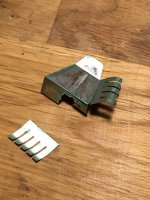
I attached the sound, and also this piece of metal I found loose in the case. Maybe some connection. Hope someone has any idea what's going on.

View attachment clicking.m4a
IMG_3627.JPG

IMG_3629.JPG

 
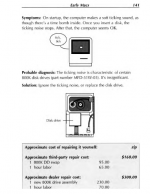
FYI, it may not be your exact issue but a ticking noise is normal with certain 800k drives until a disk is inserted and booted. And check your brightness dial.

post-1852-0-89515600-1459536160_thumb.png

EDIT: I coud not get your file to play, but now I did. I will leave the above for anyone else searching but its not the issue with yours. You have a problem with the sweep/analog board. It may be something as simple as a cold solder joint. Check all your connections and specifically where they are soldered in.

 
Last edited by a moderator:
FYI, it may not be your exact issue but a ticking noise is normal with certain 800k drives until a disk is inserted and booted. And check your brightness dial.

View attachment 27336

EDIT: I coud not get your file to play, but now I did. I will leave the above for anyone else searching but its not the issue with yours. You have a problem with the sweep/analog board. It may be something as simple as a cold solder joint. Check all your connections and specifically where they are soldered in.
Great, Ill look into it. Anywhere specifically, or should I just visually inspect the whole thing

 
I would first replace the 1000uf and 2200uf caps then check to see if your connector needs cleaning. If non of that works I would check the MB to see if your tsm chip has fried I have 2 boards with dead chips. I would also check to see if your flyback is good and if any other caps are cracked ot leaky. I have.had many macs that died during working on them. The mac plus I think is by far the worst and not fun either because they are so random even in perfect condition. 

 
FYI, it may not be your exact issue but a ticking noise is normal with certain 800k drives until a disk is inserted and booted. And check your brightness dial.

View attachment 20380

EDIT: I coud not get your file to play, but now I did. I will leave the above for anyone else searching but its not the issue with yours. You have a problem with the sweep/analog board. It may be something as simple as a cold solder joint. Check all your connections and specifically where they are soldered in.
Hey is that what this sound is on my Mac plus. Upon boot up with no floppy disk and I hear this faint clicking in my video I put my phone on top of the Mac, so it sounds a lot louder. When I put a floppy disk in it goes away. Even after, but if I take it out, I hear it again. But I wanted to know if this is my issue.
 

Attachments

Hello

Today I’ve had the same issue… my recent bought Mac plus was working fine using an external bluescsi
After turned it off and removed and reinserted the memory the Mac started tickling. Louder if the Logic board is connected, some quiter if it’s disconnected . The screen is black.
I’ve tried renew the solder joints of the connection cables to the joke and to the Logic board and the flyback on the analog board without any improvments.
The fuse near the corner of the board is fine and there isn’t any exploded or leaking caps
Any suggestions on what could have caused the issue?
 
Have you verified that the RAM SIMMs are inserted correctly?

Also, try disconnecting the floppy drive and turning on again, just to see if the clicking goes away (a harmless, if annoying, defect in some 800k drives of that period). Inserting a diskette also makes that particular ticking stop.
 
Have you verified that the RAM SIMMs are inserted correctly?

Also, try disconnecting the floppy drive and turning on again, just to see if the clicking goes away (a harmless, if annoying, defect in some 800k drives of that period). Inserting a diskette also makes that particular ticking stop.
Yes I’ve tried without the ram and always without the floppy drive since I was using bluescsi
 
I'm not able to look right now, but search for a pdf of "Dead Mac Scrolls" by Larry Pina, there should be an entry or two that describe "ticking" with regards to the analog/sweep board.
 
Here’s my grain of salt regarding the clicking/ticking/chirping noise combined with a black screen and no startup chime:

When I was designing and testing the RAM expansion board for the Mac 512K, I noticed that every time I had a loose or bad connection to the CAS lines, the multiplexed address lines (RA0–RA8), or the RAS line, or when I forgot to connect all those lines to the board entirely (which, BTW, I did quite often since I was using THT series resistors on a breadboard for all those connections during testing), the machine most of the time behaved exactly as described here by Fabiob76: a ticking sound, black screen, and no chime.

Both machines (the Plus and the 512K) are almost identical regarding the RAM controller logic. The only real difference is that the Plus has more CAS lines, and additional RA line (RA9) and more memory configurations, so it has an additional PAL for managing those CAS lines and multiple RAM sizes (CAS / U3E) among other things

So, it's almost certain the ticking noise issue with black screen has to do with either a poor connection in one of the SIMM sockets, a bad SIMM, incorrect jumper settings, or, worst case, one of the PAL chips involved in the CAS signal generation (U3E or U1D) is fried.
 
Last edited:
Yes I’ve tried without the ram and always without the floppy drive since I was using bluescsi
The machine will never boot up without any SIMMs installed. I’d bet that the cause of your problem is the SIMM sockets. Inspect them carefully and try using some electrical contact cleaner spray to clean them and the pin contacts on the SIMMs.
 
Back
Top