• Hello MLAers! We've re-enabled auto-approval for accounts. If you are still waiting on account approval, please check this thread for more information.

Mac Plus floppy drive making loud banging noise

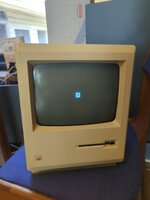
I have a mac plus I'm working on and when turned on, it makes a loud banging noise. I cleaned and re lubricated the floppy drive and completely disassembled the computer, but it still makes the banging noise. I disconnected the floppy drive inside the computer and the noise stopped, so I think the noise is coming from the drive. Also the screen looks like the attached image. Is there supposed to be a white background or is it fine? I've also attached a video that shows the screen and the sound. How do I go about fixing the mac?

 

Attachments

Looking at the dead mac scrolls, page 66 seems like the closest problem to mine, except the problem in the dead mac scrolls has more of a white background than mine (on mine, the only white that can be seen is in the top right corner of the floppy icon, in the supplied diagram, the floppy icon has a white background surrounding it completely). The dead mac scrolls say that my mac is most likely an upgraded 512k, which mine is! The front panel has a model number of M0001K, while the back says M0001A. The logic board is also that of a mac plus. The dead mac scrolls say to look for damaged traces near the 74LS244 chips at board locations E12 and E13, however my board doesn't have a column 13, nor does it have any 72LS244 chips in row E. The closest chips I can find are SN74LS245N chips at E9 and E10.
 
Also, the contacts for the battery on the back of the mac are corroded (the battery has been removed). Could this have something to do with the problem?
 
Also, the contacts for the battery on the back of the mac are corroded (the battery has been removed). Could this have something to do with the problem?
corroded battery contacts probably have nothing to do with it, but I would recommend cleaning the contacts with white vinegar
 
The banging could be ejector related. Sounds vaguely familiar to me but I can’t remember exactly which problem I had produced that sound. When you cleaned and regreased the drive did you check the yellow gear I. The ejector motor assembly that, at this age, is 95% of the time dead? The sound makes me thing of the main stepper motor gear tho. Do you have an external drive by any chance? If so you can open it up, take off the cable and attach it to your internal drive (having removed it from Mac) and plug it in externally and then turn on the computer to see what it’s doing.

I’ve never seen a plus screen like that exactly. It doesn’t look like a video hardware problem. Maybe memory failure though. Would be interesting to see what happens when you get a drive working.
 
Thanks. I didn't check the eject motor at all and that's probably where the noise is coming from. I'll take a look at it when I next have time. The only other mac floppy drive I have is a dubious internal superdrive from a corroded classic, and I don't think those are compatible anyway. Memory is an interesting idea, but the only other similar ram I've got is equally dubious ram on an expansion card from the same corroded classic. I'll be sure to give it a try if they're both 30 pin though.
 
No, it will turn on just fine without it...but you have a larger issue than just the floppy with that dark screen.
 
Back
Top