• Hello MLAers! We've re-enabled auto-approval for accounts. If you are still waiting on account approval, please check this thread for more information.

Mac Plus Internet Success!

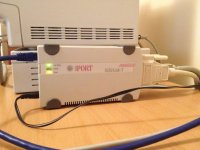
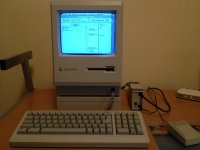
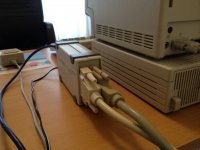
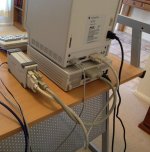
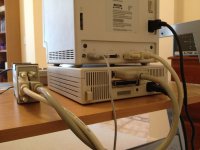
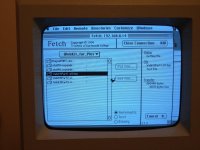
I've had a Mac Plus project on the go for a while now, it's been upgraded to 4 meg or ram, it also came with a CMS 20 meg HD and I've also added an original HD20SC. Most recently I also got a DaynaPort SCSI/Link-T ethernet adapter. The CMS hd works fine with the Plus without a SCSI terminator, but I found that the HD20SC doesn't. But luckily the Dynaport has termination built in so when used with the HD20SC, all works fine. I bought the DynaPort adapter off ebay from a guy in the U.K, it came only with the main unit, no power supply, cable or most importably drivers. But I scrounged around and found a suitable adapter, a 12v 300ma did the trick. I was also able to use the 25 pin male/male SCSI cable off of the CMS hd. And most importanly I found the drivers on the Mac driver museum website. I managed to get it working with the Dynaport 7.5.3 driver package (see link below). Installing the driver took several attempts and it would only install off of a floppy wich had to be named "DynaPORT Installer". I had the DynaPort plugged in and powered on during the driver install and the unit was detected by the install process. Once the drivers are installed there's also a hardware diagnostic program you can run and it will detect the DynaPort. I've now created a 800k image of this disk if anyone is in need of it. Another great resource for getting the Plus on the net was the page on the Jagshouse website (see link below), he has a three part web kit on there wich allows you to install MacPPP and MacTCP, it also has some internet apps like Fetch FTP and Eudora. Once I configured MacTCP with my router settings and plugged everything in, it all worked, I was up and running transferring files with Fetch!

See pics below!

Dynaport 7.5.3 - http://www.macdrivermuseum.net/nic/daynaport-installer-753.hqx

Jagshouse web access for system 6 - http://www.jagshouse.com/internet_on_system_6.html
IMG_0312.jpg

IMG_0307.jpg

IMG_0309.jpg

 
Congratulation - and thanks for the well done pictures.

May I ask what you paid for the SCSI to Ethernet adapter?

Is that a CAT5 patch cable or 10baseT? Just wondering about the thick cable without termination.

 
May I ask what you paid for the SCSI to Ethernet adapter?Is that a CAT5 patch cable or 10baseT? Just wondering about the thick cable without termination.
I paid around $60 for the DaynaPort adapter, these are pretty rare, in my time looking around ebay I've only ever seen a couple posted for sale, so if you can get one go for it.

The cable attached to the DaynaPort is a CAT6, just using standard ethernet connectors. Throughput is quite good, I can transfer around 3 meg per minute to the plus.

 
Nice. You can also use a Asante EN/SC adapter, or a serial cable to a computer sharing the internet as I mentioned here.
I first attempted to connect the plus to my Win7 pc via serial but could not get it to work. My next task is to try and connect the 512k I have to the plus via serial.

 
I think that's a good story, kingchops. If you stick to the recipe -- install appropriate drivers and configure MacTCP in its arcane way -- it really just works.

The problem now is to find resources on the internet that use FTP and Telnet. I daresay if you scan hard enough, you'll find a Unix host that is permits rlogin (see http://en.wikipedia.org/wiki/Rlogin).

 
The major benefit for me is being able to transfer files to and from the Plus without messing around with floppies. I've got a pc on my network which has an ftp server and I also have that location mapped as a drive from my Win7 pc. So I can download stuff for the Plus via my Windows machine then access it right away by using ftp on the Plus. I took some screen shots the other day and inserted them into a Word doc on the Plus, then I just fpt'd the doc and accessed it via Word 2010 on my Win7 machine, pics and all.

 
I got my SE online and using Fetch. One problem, all the files I try and download (like macpaint, applications and .image files) just download as text files. I tried Automatic, Bin, everything. The files just get converted to text files. They have the right extension, but MacWrite wants to open them all and the icon is a macwrite file. Am I doing something wrong?

 
I figured it out how to get around it. Using mini vMac on my Mac Pro, I first Stuff the file into a .sit and then upload that to my FTP server. I can then Fetch it on my SE as a binary. Stuffit then unpacks it on the SE and it's good to go.

7452410420_bd5786aafe_o.jpg.727ab9d5b8002c184abce6b1bea1cdfd.jpg


Back
Top