• Hello MLAers! We've re-enabled auto-approval for accounts. If you are still waiting on account approval, please check this thread for more information.

Mac Plus Floppy Eject Motor Won't Stop

CC_333

68040
Hi,

Why is this? I thought I saw somewhere that I could cut a wire on the ribbon cable to fix this, assuming it's not the drive itself that's acting up (it seems to otherwise work fine, booting up the machine and all, so I kind of doubt the drive's at fault).

Any ideas out there?

c

 
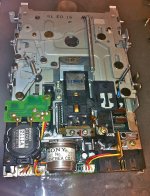
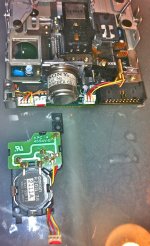
There is a mechanically actuated switch mechanism, in the motorized disk eject unit.

- You could swap that whole unit out for a working one

- You could just unplug the eject unit

- You could take apart your eject unit and see why its not auto shutting down the eject motor.

IMG_1543.jpg

IMG_1544.jpg

 
Hi,

I checked it, and it seems to be OK.

I suspect a replacement eject motor would behave the same way.

I will try borrowing a floppy cable from another machine tomorrow to see what happens.

I definitely thought I saw somewhere that cutting a certain wire of the cable disables some sort of sensor or cut's off some sort of control signal from the floppy drive which can cause this problem in certain machines.

c

 
I had SE FDHD with a bad filter chip on it, the issue with that was, It would randomly tell me the disk i have inserted is unreadable, and would I like to eject it? Even when there was no disk in the drive.

 
Hi,

Well, I tried different cables, different drives, even a different logic board. All had the same problem.

Why??

Any thoughts or ideas?

c

 
Hi,

I found what I thought I saw before:

Floppy drive won't stop ejecting

It says to delete pins 9 and 20 to restore proper operation.

I did pin 9 (I think), so I just need now to understand where pin 20 is.

The wire which corresponds to pin 9 is 3 wires to the left of the right edge of the cable if the colored stripe is on the left. What wire corresponds to pin 20?

c

 
you can try this lift the green board at the front of the motor. just lift it a little.

there is a reed switch under it clean out the dust, than push the board back down

 
On all three drives?

I checked on the first one, and aside from seeming a little fatigued, it was OK. I bent it back tinto shape and reassembled it to find the same exact problem.

I think it has to do with the cable problem as described in the thread linked above. I just would like to know how to modify my cable such that those two pins (9 and 20) are disconnected. Maybe then it'll work.

I might add that this cable isn't original to this computer.

c

 
Problem Solved!

I found a spare, yellow-stripped cable, and, for reasons unknown to me, it works perfectly! I now have yet another fully functioning Plus.

I still have the other cable, and, even though I cut a hole in it, it seems to work just fine, so I'll keep it for something else (other than a Plus).

This should be documented more thoroughly and completely.

Thanks!

c

 
Back
Top