


• Hello MLAers! We've re-enabled auto-approval for accounts. If you are still waiting on account approval, please check this thread for more information.

Mac OS 9 scroll bar problem

ken27238

6502
I did a clean install of os OS 9.2.2 to get everything working snappy again and it work fine. i got all of they extensions and control panels moved over and i was working for about 10 minutes and I noticed that there were two set of scroll arrows (see picture for what I mean). I restarted without extensions and control panels and the problem is still there. its not effecting anything its just annoying.

any ideas?
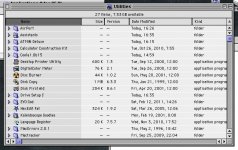
Problem.JPG

 
If memory serves me right there is an option under Appearance that will let you change how the arrows are displayed on the scroll bars.

 
yea, I did that first and checked or unchecked it did nothing at all. i'll zap the pram and try it again to see if that fixes it :beige:

 
Try deleting any preference files that refer to the dual scroll bars - not in front of an OS 9 machine, but delete whatever preference file the control panel refers to for scrolling (eg. Appearance prefs).

 
never mind I fixed it!!! Kaleidescope (a theming control pannel) had double scroll arrows on. Alls good now :beige:

 
Back
Top

