I have a genuine copy of an iMac/266MHz Software Restore CD. I've always wondered if it was possible to install the version of Mac OS 8.5.1 from it on my PowerBook 1400c. In my mind I was always concerned about how much of the installation was tailored for an iMac.
The answer is basically none of it.
But in the meantime I'd tried the normal installer, and even trying to pick apart the individual files TomeViewer and comparing it with the set of Mac OS 8.6 System files from a hard disk image on Infinite Mac. Admittedly, that was going a bit far. More recently, I'd done a bit of googling about how to bypass the iMac check in the main installer, but then I saw @Phipli 's account of installing Mac OS 7.6.1 on his iBook/700 and after he confirmed the same trick of double-clicking on the actual installer, figured that might be a solution.
It didn't seem to work for me. I found the System Software Installer, but option-double-clicking on the installer file just led to an alert saying it needed Installer App version 4.5.1. Surprisingly, there were plenty of installer apps on the CD, including Installer Engine (which was version 4.5.2), but none of them matched 4.5.1.
Then it occurred to me that I could try the Restore CD since it basically does the same thing as the Install (beats me why there were two). Running the Restore app from the CD at least ran, but when it failed to auto quit background apps (Mac OS 8.1 on the main SD). But I could run it properly after I booted from the CD (obviously not iMac dependent).
And the installation basically worked OK. I installed on my external 16GB CF card. I needed to delete a few duplicated extensions (because I installed over an existing Mac OS 8.1). I rebooted into Mac OS 8.5.1; then I downloaded the British Mac OS 8.6 update and found that too installed OK. Well, almost - there was some issue with the Mac OS 8.6 help file being invalid.
But at last, here it is...
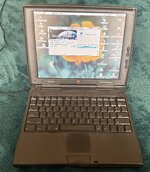
(Desktop pic is 1024x768 24-bit colour on a 800x600 LCD in 8-bit colour mode).
The Good
Given my extensive 5 minute testing:
I always thought that the specific machine Mac OS Install CDs were perfectly tailored to the target machine, but basically they're generic installs with a machine check; which isn't even present on the Restore CD. With surprisingly minimal fooling around I was able to install Mac OS 8.6. OK, sure I could have simply downloaded a Retail CD image, but even after 25 years I'm apprehensive about "Stealing" a version of Mac OS and I don't think it's worth buying an actual copy. Nevertheless, what this means is that the relatively worthless Restore/Install CDs you find on eBay can be used on the machines they're not intended for.
The answer is basically none of it.
But in the meantime I'd tried the normal installer, and even trying to pick apart the individual files TomeViewer and comparing it with the set of Mac OS 8.6 System files from a hard disk image on Infinite Mac. Admittedly, that was going a bit far. More recently, I'd done a bit of googling about how to bypass the iMac check in the main installer, but then I saw @Phipli 's account of installing Mac OS 7.6.1 on his iBook/700 and after he confirmed the same trick of double-clicking on the actual installer, figured that might be a solution.
It didn't seem to work for me. I found the System Software Installer, but option-double-clicking on the installer file just led to an alert saying it needed Installer App version 4.5.1. Surprisingly, there were plenty of installer apps on the CD, including Installer Engine (which was version 4.5.2), but none of them matched 4.5.1.
Then it occurred to me that I could try the Restore CD since it basically does the same thing as the Install (beats me why there were two). Running the Restore app from the CD at least ran, but when it failed to auto quit background apps (Mac OS 8.1 on the main SD). But I could run it properly after I booted from the CD (obviously not iMac dependent).
And the installation basically worked OK. I installed on my external 16GB CF card. I needed to delete a few duplicated extensions (because I installed over an existing Mac OS 8.1). I rebooted into Mac OS 8.5.1; then I downloaded the British Mac OS 8.6 update and found that too installed OK. Well, almost - there was some issue with the Mac OS 8.6 help file being invalid.
But at last, here it is...
(Desktop pic is 1024x768 24-bit colour on a 800x600 LCD in 8-bit colour mode).
The Good
Given my extensive 5 minute testing:
- Obviously, the funky new (for 1999) nano Kernel! Real multi-tasking-ish!!
- Smooth fonts, which I believe I like in a sort of Windows XP cheesy way, though they're rubbish compared with Mac OS X!
- Full-screen desktop images instead of patterns!
- It only seems to take 12MB and I haven't been ruthless in excluding extensions I didn't think I needed.
- It's happy with dates after 2019! No special tricks to accept 6/7/2029 as today's date!
- The MetroNub debugger I use with MetroWerks Gold 11 won't load - it throws an unimplemented instruction. I had to remove it. I suspect debugging MW apps will be tricky.
- It takes ages to boot compared with Mac OS 8.1
- It seems slower, though I haven't run any apps, nor any Benchtests, so I haven't been able to test the newer DRE emulator.
I always thought that the specific machine Mac OS Install CDs were perfectly tailored to the target machine, but basically they're generic installs with a machine check; which isn't even present on the Restore CD. With surprisingly minimal fooling around I was able to install Mac OS 8.6. OK, sure I could have simply downloaded a Retail CD image, but even after 25 years I'm apprehensive about "Stealing" a version of Mac OS and I don't think it's worth buying an actual copy. Nevertheless, what this means is that the relatively worthless Restore/Install CDs you find on eBay can be used on the machines they're not intended for.