• Hello MLAers! We've re-enabled auto-approval for accounts. If you are still waiting on account approval, please check this thread for more information.

Mac lc 475 no sound

Cera

6502
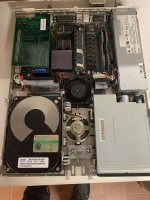
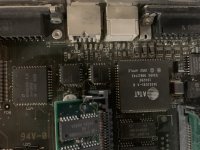
Hello, my lc 475 internal speaker stopped workin after a pair of up and down and cutting volume noises. the output jack works well and I can use it with my vintage creative but I'm scared of this, I love my lc and I want to be 100% functional. I tried the speaker through a sound output and it's good, I suspect a corrosion in one of the two small chips you can see in the photos.

The strange thing is that it seems to be an old corrosion and there's no leaking fluid out from the nearby cap or traces on the board....I tried to clean the pins with some alcol but no result, all I can hear is a very very low sound if put my ear near the speaker. I read something about this problem but nothin about the 475 itself, I hope it's not some chip cause I don't have the flux. 

It's not recapped, all original, psu never recapped...any suggestions? thanx.

p.s it has pharallon ethernet card I put several years ago and never gave problems. taking off change nothing.
IMG-3406.jpg

IMG-3407.jpg

IMG-3405.jpg

IMG-3409.jpg

 
Last edited by a moderator:
Has this thing been re-capped? Although you do not see any obvious goo, small amounts of that electrolyte slowly leak under the chips where you cannot see. I’ve had this happen on more than one occasion.

 
No, never recapped, psu never recapped, caps are all good lookin'. I don't know if there's corrosion under the chips but they all look very good, the only lookin bad is J22 in the photo.

where's the sound chip on the lc 475? and why the output jack is still workin? it sounds strange to me...

 
Yes it is odd. I am suspecting something interrupting the output to the internal speaker. Alternatively, something could be shorting the external port, which makes the machine “think” there is something plugged in there all the time, cutting off the internal speaker.

No matter how good caps look, they always need to be changed at this age if they are surface mount electrolytics.

 
Mmm could be a problem on the output jack... interesting theory i’ll check. Btw yes i’ll change the caps but with same type, have you got some links for kits? I live in italy btw. 
i usually use a jbc 40s with a 0,5 point, it’s a good classic solder i think it should be good  for the task, or i need a solder station?

Should i remove the old caps gently with plyers or there are better ways to detach/desolder them from the board? Sorry for my english, as i told i’m italian. Thank u for your kind info!

P.s. i read somewhere bad caps can cause a little down of the volume but not cuttin it at all.... what u think?

 
Last edited by a moderator:
Hi,

i cut the head off the old capacitors first, then remove the legs. 

That way, there’s no pressure on pads. 

You can have a drop of sound in the first place, then a lack of it. 

 
Recap the board. Most Macs which lose their internal speaker do so because of this.

Also, check the contacts of the speaker on the board at its connector. It's less of an issue with the 475 or other newer LCs (the contact pads do create problems sometimes on the original LC, which uses a different speaker assembly) but still worth investigating. That being said, caps are likely your primary culprit.

 
I'm not completely sure but the cap next to U22 (partly obscured by the SIMM) looks suspicious. The PCB around it has that "dusty/oily" look that I associate with a leaking electrolytic cap.

Of course this also could be "normal" dust...

 
I'm not completely sure but the cap next to U22 (partly obscured by the SIMM) looks suspicious. The PCB around it has that "dusty/oily" look that I associate with a leaking electrolytic cap.

Of course this also could be "normal" dust...
That cap is definitely leaking. The pins on U22 are noticeably more tarnished than those of its neighboring parts.

I tried the speaker through a sound output and it's good, I suspect a corrosion in one of the two small chips you can see in the photos.
I believe those two small chips are for the serial ports. The corrosion that is causing problems is more likely in the corner of the board with the audio jacks. That's where the sound chip is, and it's surrounded by four electrolytic caps, which have all probably leaked. When you recap the board, make sure to clean the area around the sound chip well.

 
Back
Top