Mac iisi remove logic board

ive looked and I haven't found a really good guide on how to remove the board from the case. ifixit which normally has great guides was a bit vague. instead of a how to remove the logic board guide its a how to disassemble the computer guide. do I need to remove the fan and speaker to get the board out of the case? that seems weird to me.

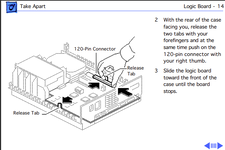
I have tried to push on these stupid clips and then the board moves? my board doesn't move has someone hot glued it into the case?
 
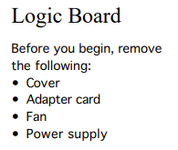
Yes, you need to remove PSU and fan, once that done, the Logic Board will be free. you have to remove the HD and floppy also for easy access.
 
The trick is little plastic tabs on the side of the logic board that keep it in place. After removing the PSU and fan, you have to pull them apart and the slide the board forward. I always feel like I’m going to break the tabs—it is not a pleasant experience.
 
The point is that you don't need any tools to remove anything except on the optional Nubus adapter or the drive sleds. Perhaps Apple expected frequent parts replacements for this model or they wanted to make assembly efficient and low cost. Of course after 30+ years parts might be a bit stuck in place but you can do it. You won't have any left over screws to figure out where they go. You might as well get a pencil eraser ready for the speaker contacts while you're there.
 
Back
Top