ive looked and I haven't found a really good guide on how to remove the board from the case. ifixit which normally has great guides was a bit vague. instead of a how to remove the logic board guide its a how to disassemble the computer guide. do I need to remove the fan and speaker to get the board out of the case? that seems weird to me.
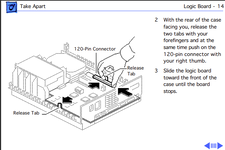
I have tried to push on these stupid clips and then the board moves? my board doesn't move has someone hot glued it into the case?
I have tried to push on these stupid clips and then the board moves? my board doesn't move has someone hot glued it into the case?