• Hello MLAers! We've re-enabled auto-approval for accounts. If you are still waiting on account approval, please check this thread for more information.

Mac IIfx SuperMac Spectrum/24 video to VGA Monitor

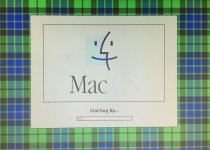
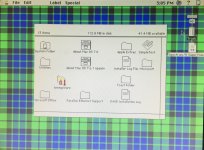
I just received a Mac IIfx w/ Supermac Spectrum/24 video card. The computer is running OS 7.6.1. I am connecting it to my trusty old Dell 15" LCD VGA monitor via a Mitsubishi Mac to VGA adapter with 6 dip switches. The video is in color and readable, but washed out. Specifically, it seems like gray colors (like grayed out menu items) simply display as white (so they are invisible in the menu bar). The same applies to the tops of finder windows, which display as white. Also, Mac OS splash screen colors are washed out. Please see attached pics. I've tried:

- all combinations of dip switches

- replaced video cable

- checked Monitors settings (256 colors)

- factory reset my Dell monitor

None of this helps.  Any ideas?
FullSizeRender-1.jpg

FullSizeRender.jpg

 
Last edited by a moderator:
"

Q: When I connect my display to my Spectrum card, instead of getting a usable picture, I get a distorted, scrambled image. I know the monitor is supposed to be compatible with this card -- what else do I have to do?

A: SuperMac cards must be configured for the specific display to which they are connected. If you move the card to a different slot in your Mac, connect a different monitor to it, or zap your Mac's PRAM, you will need to reconfigure the card to output the proper signals and timings required by your display. To reconfigure your SuperMac card, hold down your keyboard's Option key at startup. Continue to hold down the Option key until the "Round Robin" configuration cycle begins. When you see an image of a keyboard that is clear, centered, and at the resolution you want to use, press the Space bar. The computer will then restart, and the card and display should now be properly configured.

"

I just discovered this when I got a Spectrum  for my IIsi, hope this helps.

 
Back
Top