• Hello MLAers! We've re-enabled auto-approval for accounts. If you are still waiting on account approval, please check this thread for more information.

Mac II with Turbo 040 - Unimplemented Trap

Really? I had no luck when trying that for a while a few days ago while I was unable to get the Mac to boot at all.
Can you share a photo? I'm confused. Did you install it yourself?

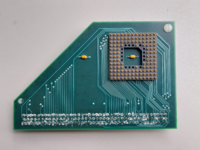
I have a very basic adapter in my IIx, it looks like this removed (it only needs to go into one socket, yours goes into two sockets).

1693496099632.png
 
But it is only worth removing if you have something to put back into the sockets, and can remove the CPU without damaging it.
 
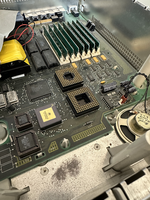
I got the adapter out pretty easily today, but the parts of it that attach directly to the sockets stayed put (i.e. there are pins sticking up from the sockets instead of down from the adapter). I've just put it back in as-is and it's booting again, so no harm done I suppose, but I wasn't able to run the test with the original CPU installed.

1693500284806.png
 
Weirdly, though QuickTime 2.1 gives me a bus error on boot ever since installing the accelerator (it worked previously), I tried QuickTime 3 on a whim and it works absolutely fine, with Myst successfully playing videos and Doom successfully playing music. I really don't understand what's going on with this machine.

I've tried disabling Mode32 to have it only use the subset of RAM that it was able to access before the accelerator went in, but that didn't have any effect on things either. I haven't yet tried putting the original RAM sticks back in.
 
Weirdly, though QuickTime 2.1 gives me a bus error on boot ever since installing the accelerator (it worked previously), I tried QuickTime 3 on a whim and it works absolutely fine, with Myst successfully playing videos and Doom successfully playing music. I really don't understand what's going on with this machine.

I've tried disabling Mode32 to have it only use the subset of RAM that it was able to access before the accelerator went in, but that didn't have any effect on things either. I haven't yet tried putting the original RAM sticks back in.

I've had machines behave like this when they don't like their hard disk, because of drivers or settings. But it could be anything. The symptoms are basically "something ain't right". Which really doesn't help you.

I have an LC behaving in a similar way, but I'm fairly sure it is the disk in that. It behaves (mostly) in System 7.1, but is crazy unstable in 7.5.3.
 
Back
Top