



Accessing Modern Websites from a Retro OS (OpenStep 4.2 + OmniWeb 3.0)
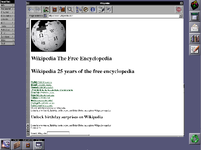
The screenshots below show OpenStep 4.2 running the OmniWeb 3.0 web browser accessing the website of Apple Inc.
(the company behind macOS, which can be seen as a descendant of NeXTSTEP) as well as browsing Wikipedia.

For many retro-computing enthusiasts and IT collectors, this has long been something of a dream project.
The world’s first website, created at CERN, is still accessible from any browser today as part of digital heritage preservation.
However, accessing modern websites from retro operating systems has traditionally been nearly impossible.
On mainstream operating systems like Microsoft Windows or macOS, it has still been possible until relatively recently using older 32-bit browsers.
But on retro operating systems—especially those whose companies no longer exist or whose development has completely stopped—modern web compatibility is usually out of reach.
That’s why I want to give credit to the developer who created this ~80MB program that makes it possible.
(The developer is Korean.)
https://github.com/DINKIssTyle/DINKIssTyle-RetroProxy
Legacy Web Proxy for HTML 3.2–4.01 Browsers (1995–2010)
go install github.com/wailsapp/wails/v2/cmd/wails@latest
build.bat
build.sh
The Windows executable will be located at:
C:\source_path\build\bin\RetroProxy.exe
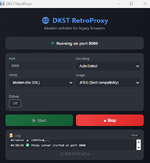
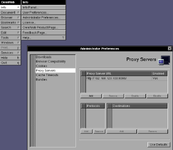
Simply configure the proxy settings to point to RetroProxy.
My RetroProxy IP:192.168.123.103:8080
With the correct configuration, websites load without major issues.
However, do not expect modern multimedia support such as streaming video or audio.
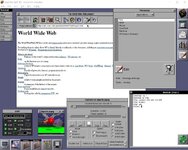
The screenshots below show OpenStep 4.2 running the OmniWeb 3.0 web browser accessing the website of Apple Inc.
(the company behind macOS, which can be seen as a descendant of NeXTSTEP) as well as browsing Wikipedia.
For many retro-computing enthusiasts and IT collectors, this has long been something of a dream project.
The world’s first website, created at CERN, is still accessible from any browser today as part of digital heritage preservation.
However, accessing modern websites from retro operating systems has traditionally been nearly impossible.
On mainstream operating systems like Microsoft Windows or macOS, it has still been possible until relatively recently using older 32-bit browsers.
But on retro operating systems—especially those whose companies no longer exist or whose development has completely stopped—modern web compatibility is usually out of reach.
That’s why I want to give credit to the developer who created this ~80MB program that makes it possible.
(The developer is Korean.)
How I Did It
In my setup:- I installed RetroProxy on Windows 11
- I ran OpenStep in a virtual machine
- Then accessed the internet using OmniWeb through the RetroProxy server
Proxy Server Program
RetroProxy (GitHub):https://github.com/DINKIssTyle/DINKIssTyle-RetroProxy
Legacy Web Proxy for HTML 3.2–4.01 Browsers (1995–2010)
Prerequisites
To build the proxy server, the following tools are required:- Go (programming language) version 1.18 or later
- Node.js version 14 or later
- Wails CLI
go install github.com/wailsapp/wails/v2/cmd/wails@latest
Building the Program
Windows
Run:build.bat
Linux
Run:build.sh
The Windows executable will be located at:
C:\source_path\build\bin\RetroProxy.exe
Browser Configuration
Browser used: OmniWeb 3.0Simply configure the proxy settings to point to RetroProxy.
My RetroProxy IP:192.168.123.103:8080
With the correct configuration, websites load without major issues.
However, do not expect modern multimedia support such as streaming video or audio.
A Small Piece of Internet History
As a small tribute, I also captured a screenshot of the world’s first website.Retro Operating Systems Tested So Far
(Works with browsers that support proxy configuration. OS versions listed from ~1995 onward.)- Windows 95 – tested by user
- Mac OS 7.5 – tested by developer
- OpenStep 4.2 + OmniWeb 3.0 – tested by user
- OS/2 (eComStation 2 + Firefox) – tested by user
- BeOS / Haiku (Firefox fork) – tested by user
- Solaris 11.4 (Firefox) – tested by user
- IBM AIX


