• Hello MLAers! We've re-enabled auto-approval for accounts. If you are still waiting on account approval, please check this thread for more information.

Let's see your best disk speeds( PPC )(68k)

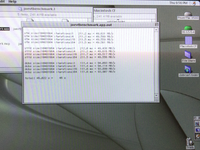
This one adds the dcbz test.
Renamed the previous tests to the names of the instructions they use.
There's a ### ms = ### s line that compares the Microseconds timer to the time of day (seconds) timer. DingusPPC currently doesn't have a Microseconds timer that is related to real time yet. SheepShaver seems to have a closer match but I should test that with a different app that takes more time to get a more accurate test.
I wonder how the memory benchmarks compare to Gage Pro's Moving Memory Rate, which I never really looked into what exactly they were measuring or how, but it was always pretty much on par with the memory performance of my PPC systems.

It did speed up if you interleaved the memory or added a G4.

As the moving memory rate went up, so did the PCI Bus performance, but that had as much to do with systems bus speed as it did ram.

Did PC's suffer from the slow PCI Bus performance of OWM's? When PCI 1.0 came out and PC's still used EDO or FPM RAM at 60ns or 70ns?

One of the benefits of this thread was to push the PCI Bus and see what real world throughput was on real Mac's.

I never had an OWM with better than a 500Mhz CPU, did the faster CPU's improve PCI Bus performance much if at all?

I clock chipped my Sonnet 450MHz G3 in my PM8600 with a 48.000MHz occelerator but I don't recall if I ever saw any gains on the PCI Bus.

It was a 3Mhz gain, to an under clocked Kansas board, because Sonnet wanted compatibility with the 45Mhz Bus Macs. Later all their upgrades went to 50Mhz chips anyways, I think.

I know some people have taken their boards to 60Mhz and one guy even took his PCI OWM to 66MHz PCI.

I wonder what the combination would yield in RAM and PCI performance with on of the 500MHz+++ G4 upgrades??

Could we get anywhere close to the 133MB/s max theoretical throughput of PCI?

Could we exceed it?

The best real world numbers I verified was the SiL3112 in the MDD with 91MB/s peak on the SSD benchmark.

That's pretty good for 33MHz PCI, and all the overhead of drives and controller cards.

If I remember correctly the 1.6Ghz G5 I have did slower than that with the same card and drive, I'll have to test it again to be sure.

The MDD is the 133Mhz bus version, so pushing it to 167Mhz or beyond may speed things up too.
 
New test gives a comparable increase to Joe’s:

A565FBBC-6F44-49F9-95DC-E9C556ED3BB6.png


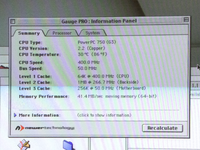
I wonder how the memory benchmarks compare to Gage Pro's Moving Memory Rate, which I never really looked into what exactly they were measuring or how, but it was always pretty much on par with the memory performance of my PPC systems.

I happened to have Gage Pro on this machine too. The results it gives are closer to the stw/stfd results in joe’s utility. Like you, I’m not really sure how their test works:

60892333-0F68-4E60-8085-425310A2111E.png
 
Moving is reading and writing. See the ppc/bcopy.s xnu code.
My tests are just doing writing. See the ppc/bzero.s xnu code.
I should copy those into the benchmark...
 
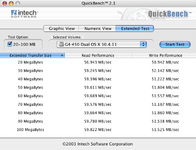
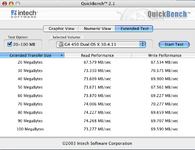
Update ... StarTech IDE ---> SATA bridgeboard vs. RHC 3112 SATA card flashed with dosdude's firmware in the G4 450 Dual (Gigabit).

The drive is a 120GB OWC Mercury 3G SSD.

StarTech bridgeboard:

Picture 4.png

RHC 3112 SATA card:

Picture 6.png
 
Moving is reading and writing. See the ppc/bcopy.s xnu code.
My tests are just doing writing. See the ppc/bzero.s xnu code.
I should copy those into the benchmark...
If one day you fell like it, you could also add a move to VRAM from RAM, pretty soon you'll have a pretty complete benchmarking tool!

Throughput moved data CPU/FPU/AltiVec/CopyBits to the PCI or AGP card, I don't think it was ever updated for OS X, so it might be nice to clone that functionality and do a Carbon or pure Cocoa App with your RAM benchmarks.

I'd move a lot of data, or allow the user a few options to see how games may fare that move a lot off data across the bus from RAM.
 
Last edited:
Here's some mostly-legible figures for Quadra 605 & 650, and a SE/30 with one of my Booster cards in it, all using the same zuluscsi slim. System 7.5.5, Norton system info.

Also a sneak peak of what compactflash in a SE/30 can do :)
 

Attachments

  • 20250209_130049.jpg
    20250209_130049.jpg
    1.9 MB · Views: 43
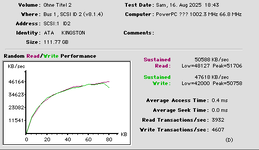
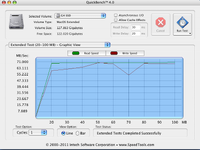
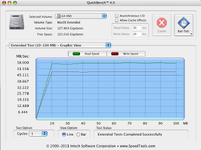
I see comparable numbers like @GorfTheChosen in my G4/450 Sawtooth. SATA SSD on the UltraATA/66 bus peaks out at 58mb/sec while the same SSD on the SATA Card peaks out at 71mb/sec. In essence, the Adapter SATA card inside the G4 will move to the G3 b&w where it makes much more sense as it will be be more than twice as fast as the UltraATA/33 interface.

Did a mSATA to 44pin Notebook surgery with my PowerBook G3 bronze/Lombard and it's reaching almost the theoretical maximum of the PIO Mode 3/4 interface of that machine (16mb/sec). 1/30 of the speed that the mSata SSD can deliver but no more spinning rust :cool:. The Lombard uses the same Paddington GLUE chip as the PowerMac G3 b&w - but the latter has an additional UltraATA/33 chip for the HD.
 

Attachments

  • SSD an Sata Card.png
    SSD an Sata Card.png
    93.2 KB · Views: 21
  • SSD a UDMA66.png
    SSD a UDMA66.png
    90.7 KB · Views: 14
Last edited:
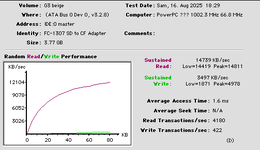
Beefed up my beige G3 Minitower. Now with Radeon 7000, Adaptec SATA Card and a Connect G4/1000 ZIF Upgrade. The SATA Card tops out at about 50mb/sec. That's nicely a bit more than 3x faster than the theoretical max. of the PIO MODE 4 IDE Bus on the beige G3s. The internal IDE Bus on the other hand maxes out at 14.7mb/sec - just shy of the theoretical max. of 16mb/sec.
 

Attachments

  • Bild 4.png
    Bild 4.png
    13.1 KB · Views: 9
  • Bild 2.png
    Bild 2.png
    13.5 KB · Views: 13
If one day you fell like it, you could also add a move to VRAM from RAM, pretty soon you'll have a pretty complete benchmarking tool!

Throughput moved data CPU/FPU/AltiVec/CopyBits to the PCI or AGP card, I don't think it was ever updated for OS X, so it might be nice to clone that functionality and do a Carbon or pure Cocoa App with your RAM benchmarks.

I'd move a lot of data, or allow the user a few options to see how games may fare that move a lot off data across the bus from RAM.
I've done some microbenchmarking for the Performa 5200 (ram/vram/specific instructions etc). If anyone would go this route I can recommend: use mftb for a highly accurate timer, it ticks every 4th bus cycle (and for instruction level micro benchmarks, do isync and sync, wait for mftb to tick then do your work and measure, and use an assembler or retro68k inline asm as even codewarrior pro 7.1 won't respect volatile inline asm, I think 7.2 or some minor update to 7.1 fixed that but I anyway lost confidence once I noticed it).

The 603/603e cpu's (and I believe also 601) will quickly stall while writing/reading to vram/IO (because on cache miss, the LSU stalls, which quickly leads to the whole CPU stalling as you can't load data to the registers). Had a quick look now, the G3 (740/750) allows *one* out of order cacheable load, so it won't completely stall on IO read/write. And then G4 (7400) improves on this a lot with "multiple outstanding misses" and six-entry store queue. Although on these ones, perhaps there was already DMA so it didn't have to go via CPU for a copy? I'm not so familiar with the G3/G4 machines.
 
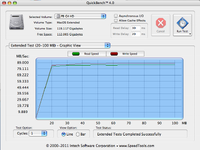
Today's experiment: upgrading a final generation PowerBook G4 15-2" 1.67GHz Power Book G4 with a newer drive. The PowerBook has an ATA-100 interface. So I combined the same mSATA SSD with the same 44pin ATA Interface board as in my PowerBook G3 tests above. As expected, the mSATA SSD almost saturated the 100mb/sec theoretical bandwidth. 89mb/sec and no more seeking makes the PowerBook G4 feel quite snappy with MacOS X 10.4.
 

Attachments

  • mSata SSD in PB G4.png
    mSata SSD in PB G4.png
    93.7 KB · Views: 14
Interestingly, XBench even saw 95mb/sec for 4k blocks sequential uncached write (read maxes out at 80mb). 95mb/sec is pretty close to the interfaces maximum.
 
Had to break out the G5 Quad with RAID 0 PCIe AHCI SSDs. A single SSD isn't much slower than two so I'm not sure it's worth me putting a third in. I would have to take about my fx 4500 to fit it.Picture 1.png
 
Had to break out the G5 Quad with RAID 0 PCIe AHCI SSDs. A single SSD isn't much slower than two so I'm not sure it's worth me putting a third in. I would have to take about my fx 4500 to fit it.View attachment 90750
The Quad G5 Developer Note says the HyperTransport bus to the Mid Bridge that hosts the x4 and x8 slots is only 1600 Mb/s
https://leopard-adc.pepas.com/docum...510_archi.html#//apple_ref/doc/uid/TP40003917
1600 Mb/s is only 200 MB/s so they must mean to multiply that by the width which is 16 bits = 3200 MB/s which should be enough for the x8 slot = 2.5 GT/s/lane * 8 lanes * 8b/10T * 1B/8b = 2 GB/s
with room left over for one x4 slot = 1 GB/s.

The developer note says "bi-directional throughput" so maybe that needs to be halved for single direction throughput.
= 1600 MB/s
which means you can't get full performance from an x8 slot or two x4 slots.

Open Firmware dump-device-tree says the HyperTransport clock frequency is 400 MHz. HyperTransport is double data rate so that's 800 GT/s. With 16 bits, that's 1600 MB/s which matches the previous calculation.

But your raid (645 MB/s) is achieving less than half of that (800 MB/s).

What speed did you get for a single SSD?
 
The Quad G5 Developer Note says the HyperTransport bus to the Mid Bridge that hosts the x4 and x8 slots is only 1600 Mb/s
https://leopard-adc.pepas.com/docum...510_archi.html#//apple_ref/doc/uid/TP40003917
1600 Mb/s is only 200 MB/s so they must mean to multiply that by the width which is 16 bits = 3200 MB/s which should be enough for the x8 slot = 2.5 GT/s/lane * 8 lanes * 8b/10T * 1B/8b = 2 GB/s
with room left over for one x4 slot = 1 GB/s.

The developer note says "bi-directional throughput" so maybe that needs to be halved for single direction throughput.
= 1600 MB/s
which means you can't get full performance from an x8 slot or two x4 slots.

Open Firmware dump-device-tree says the HyperTransport clock frequency is 400 MHz. HyperTransport is double data rate so that's 800 GT/s. With 16 bits, that's 1600 MB/s which matches the previous calculation.

But your raid (645 MB/s) is achieving less than half of that (800 MB/s).

What speed did you get for a single SSD?
I think the highest I got was about 515MB/s. I agree on spec they should be able to get more. These are SM951 which should with ease hit the PCIe 1 4x limit of ~1GB/s. Makes me think it is an issue with the Leopard AHCI driver (of which the Snow Leopard one isn't working without a kernel panic).
 
I think the highest I got was about 515MB/s.
Well, anything > 500 MB/s is definitely at least in the PCIe gen 1 x4 range.
It would be nice to know if it's possible to get into the PCIe gen 1 x8 rage (>1000 MB/s).

515 MB/s is without RAID.

645 MB/s is with RAID. That's 322 MB/s per disk. That's 60% of the single disk performance.
The drop is either because of a bandwidth limit or RAID overhead. I guess we can't know for sure without adding an additional disk to the RAID 0.
 
Well, anything > 500 MB/s is definitely at least in the PCIe gen 1 x4 range.
It would be nice to know if it's possible to get into the PCIe gen 1 x8 rage (>1000 MB/s).

515 MB/s is without RAID.

645 MB/s is with RAID. That's 322 MB/s per disk. That's 60% of the single disk performance.
The drop is either because of a bandwidth limit or RAID overhead. I guess we can't know for sure without adding an additional disk to the RAID 0.
Well I do have another so we can have some fun with this theory tomorrow/when I get to it ;)
 
Virtually identical performance to the dual drive with a third drive. Doing a 16GB write at 256K blocks with DD gave ~330MB/s writes and 1.2GB/s reads but that read is probably a caching situation.
 
Last edited:
Back
Top