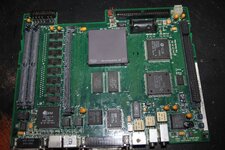
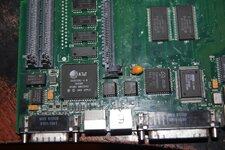
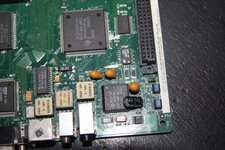
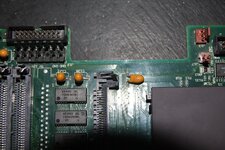
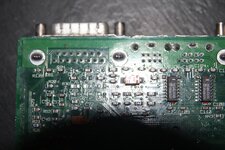
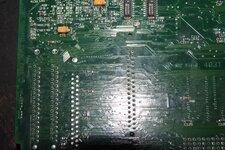
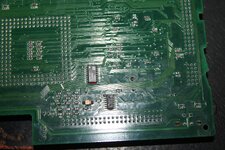
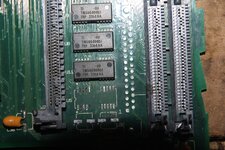
LC475 with no video

falen6

6502
Hi all

recently got me an LC475

battery did not leak

caps did

removed old caps and solder - scrubbed board - recapped with tants

power on gives good chime but no video display

have tried different vram pairs , tested on another machine

have tried different ram sims , also known to be good

still no video

when i add a ram simm i get bad chime , so thinking ram problem

then i pressed on first onboard ram chip next to c128 and c127 and hit the power , i get very fast chimes of death

i dont press on anything and i get good startup chime

c127 and c128 ( along with all the other caps ) leaked all over the place

the board has been thoroughly cleaned over and over with iso , acetone , ..... even boiling water !! - still no video

also - when i add ram expansion i always get chimes of death

so im thinking it is the onboard ram , bad pin / pad / trace connectivity

I have already reflowed all the onboard ram chip pins , still no video

If I have an onboard ram problem how come I am getting a good chime

also - even thought i have no video output I think the computer is crashing after the good chime as it will not boot from floppy or reboot when doing the command, option , p , r reset - nothing

i DONT have a pram battery installed ( have to get one ) but even the quick off and back on trick yields no video

im thinking of using hot air to take off the ram chips next to c127/128

just wondering if anyone has had similar issue

cheers
 
I never had any luck with the quick on and off, I only get video with the pram battery installed
thanks storm

i have a 3 volt dc power adapter - u rekon it would be ok to wire that into the battery holder terminals just to see ? , just to test it

i really dont want to blow this up !!!!
 
also - i have tested the power , even swapped out the psu from my working lcIII , thats where i swapped the simms just to see

they all come up good
 
ive ordered up a few of those 'macbatt' things

i had a 475 before and the quick on/off/on always worked for me as well

who knows

maybe its part of the startup sequence , that if the video is not initilized the start up freezes
 
From my experience a battery is required in order to get video display.
Ditto on the battery with this model. And I have much better luck since I started using a white vinegar soak to eliminate the cap juice (followed by DI water and 99% alcohol) for what its worth.
 
Last edited:
well , just tried it with a 3 volt battery and still no video

good chime

no video

does not try boot from good floppy in a good floppy drive

it appears to chime and then just freeze

as i said before , i got this , battery removed , no sign of any acid damage , caps leaked but no bad signs of the usual corrosion from electrolite

its even chiming now with the ram extension installed - im using 2 good vram simms

but no video

have not seen a video display on this since i started working on it

ill try the vinegar both sides , see if that helps

has to be something stupid !!!
 
tried the vinegar bath ........ no change - let it soak for an hour

why is this machine giving good startup chime , but no video .. zip ..... nada

anyone know of the chips/ traces that could be at fault

from the condition of the board ( very very good ) it has to be something close to the old caps that leaked .......... or im jinxed and their is a dead chip or something on here

kinda giving up here
 
Ooh that’s a tough one to diagnose.

If I had to guess I’d say broken trace rather than bad onboard RAM, maybe you could tone out the traces between the memory controller and the RAM.
 
well , just tried it with a 3 volt battery and still no video
What was your arrangement for this? The normal lithium battery (14250) is 3.6 volts.
I will test out mine with a lower voltage and see if there is a point where I can recreate the issue.

Alternatively if it is a broken trace, here are the 475 schematics from the MacDat site (nice place btw). I don't know where to direct you next, hopefully someone else does?
 
What was your arrangement for this? The normal lithium battery (14250) is 3.6 volts.
I will test out mine with a lower voltage and see if there is a point where I can recreate the issue.

Alternatively if it is a broken trace, here are the 475 schematics from the MacDat site (nice place btw). I don't know where to direct you next, hopefully someone else does?
Presumably a CR2032 as OP mentioned Macbatt. This should be fine as I run one of my LC475’s (as well as several other vintage Macs) like this.
 
i have ordered the macbatt - so in the mean time to test it i just soldered 2 x 1.5 batteries - gives 3.12 volts - thats good enough to test it , made no difference

the fact that the machine is not booting from the floppy ( known good disk and drive ) tells me the machine is stuck / crashed

if it was just a video issue the machine should start booting from floppy , even with no video i would hear it reading the floppy

i dont think the 475 can create a video signal without a pair of vram simms installed

i have tested the pair of vram that came with the machine on my lciii and thy work fine

on my lcIII i turn it on , there is a delay , then the chime , then about 2 seconds later the video signal is output

at a guess would the startup be something like , power on , self test , test ram , chime , test vram , initilize video , boot ?

i get as far as chime so im thinking the machine is getting stuck testing vram - ill have to start checking traces

thanks for the schematics Juror
 
ive gone over this board , looking for anything wrong

can anyone see a point of electrolite corrosion that could have broken something

as i said , no battery leak - caps leaked - day i got it i inpected board for any obvious problems , then powered it up - it gave bad chimes .........that was the condition i got it

giving chimes , even bad chimes of death , is a good sign

i cleaned it , recapped it , cleaned it again , many times ......... and it now gives good chime

appears that the machine was never taken apart , so chances of external damage on the board appear to be minimal

I have reflowed every component that was anyway near a capacitor - all the onboard ram chips , the pins of the ram and vram slots , the pins of the video connector itself ............ did not see any signs of corrosion on any of them

either a compnent died somewhere , or electrolite broke something , but again i dont see any dark/dull solder on chip pins , on vias or trace rot - there is no sign of elecrolite corrosion that i can see


god dam mystery to me
 

Attachments

  • a.JPG
    a.JPG
    2.4 MB · Views: 26
  • b.JPG
    b.JPG
    2.5 MB · Views: 20
  • c.JPG
    c.JPG
    2.4 MB · Views: 16
  • d.JPG
    d.JPG
    2.2 MB · Views: 12
  • e.JPG
    e.JPG
    2.2 MB · Views: 9
  • f.JPG
    f.JPG
    2.9 MB · Views: 9
  • h.JPG
    h.JPG
    2.7 MB · Views: 18
Last edited:
instead of going “horizontally”, I’d now take the time to check all the traces, starting from the address lines, and the video circuits. Another option is debugging the boot sequenze using the serial output, checkout for Adrian Black video
 
On one of your first pictures, near the video connector, i can see dull pins on the 343S0161 chip legs and this one is :

343S0161GazelleVideo clock generator, LC 475/575, Quadra 605

Can you remove the chip, clean underneath and solder it back ? not saying it's your problem here but worth a try.
 
Thanks for all the tips folks

I found the problem

Earlier in this thread i said that if i pressed on onboard ram chip next to c128 , c127 at power up I was getting different chimes , from good chime , to chimes of death , to very slow chimes of death

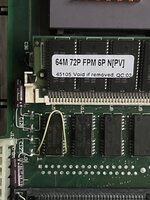
while searching for clues to this problem i found one chap that had similar problem. He said he found 1 broken trace around onboard ram chip next to C128 and C127. Posted a pic of his repair ( first picture - white jumper lead from ram chip pin to via )

So I metered out this connection and found mine too was broken. The electrolite had eaten away the traces

Instead of just doing what he did , I decided to remove the ram chip so i could follow all the traces and test all the pads

I have removed many chips over the years folks without doing any damage.

but this one !!!!

oh dear god !!!

6 pads came away with the chip - im still in shock !!! - how in hell can this be fixed

to add insult to injury in tried the board in its 'new' condition ......... and it gives good chime ...... it made no difference

so the 475 does appear to have a different start up sequence ........ power on , self test , chime , THEN TEST THE RAM //// and this is where it freezes.......... im not surprised


so now the question is , can this be repaired

those vias around that chip are tiny........ doubt i could get a wire into them

ive heard people are using 'sticky copper tape' for such repairs

........... so sad here ......... every time i look at that picture i feel like crying ..... hahahha


well , i was the clown that TRIED to remove this chip so people can see the traces and vias under the chip SO YOU DONT HAVE TO DO THE STUPID THING I DID

Before deciding to remove the chip i was looking for a pic of the board with that chip removed , was looking for a pic of an unpopulated reloaded LC475 board but couldnt fine one , just the populated board

aw well .......... ill have to get a dam microscope to fix this mess
 

Attachments

  • IMG_7959.jpeg
    IMG_7959.jpeg
    1.1 MB · Views: 5
  • IMG_6051.JPG
    IMG_6051.JPG
    2.7 MB · Views: 6
Last edited:
All is not lost. It looks as if all the lifted pads are adjacent to via's. Run some thin through those holes and flow solder in from the other side. You should be able bend the wires outwards on the top and solder them to the DRAM pins. Only one of the holes seems visibly obstructed and can probably be cleared with a sewing needle.
 
Back
Top