


LC does not see any memory - dead chime

feltel

6502
Long time ago I aquired an spare LC motherboard which I safely put away and forgot about it. As far as I remember it was sold as non working. Upon getting the board I removed all caps, right before they started leaking. Only one pad was lost. Recently I recapped my LC475 and wanted to attack the spare LC board. So I installed new (tantal) caps onto it and fired it up. It chimes but then it "dead chimes". There is no video at all.
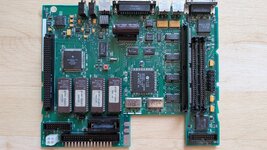
PXL_20260619_134711660.MP.jpg

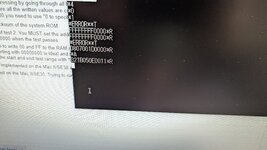
I remembered a video by Adrian Black which talks about a serial diagnostic method on 68k macs. According to https://docs.google.com/spreadsheet...LH6ruCiAVE/edit?gid=1705532296#gid=1705532296 the LC does not see any RAM at all. The error code 0011 leads me to believe this. If I try to store some values into the RAM I always get back FFFFFFFF.
PXL_20260619_113326039.MP.jpg

If I check the RAM chips with my cheapo oscilloscope the lines A2 and A5 look noticible different than the other lines. There are no broken traces as far as I could check them.

I dont know how common RAM errors are on the LCs but I dont think that all the memory chips are bad. I suspect the two LS245s which are the bridge between the memory and the rest of the computer. Is this a common fault?
 
This was done from factory I suppose. I only changed the SMD ones. It is glued onto the chip below and also the soldering on the back side looks factory.
 
is there a reason that you've installed a 2200uF capacitor where a 47uF capacitor goes?
This was done from factory I suppose. I only changed the SMD ones. It is glued onto the chip below and also the soldering on the back side looks factory.
Yeah, it is a common thing on LCs, so much so that some PDS cards include a cutout for the giant cap sat on the SCSI chip.
 
In the meantime I checked the temps of both LS245s. They are warmer then I think is usual. Right after power on they are warm to the touch. Also the CPU gots warm in short time. The RAM chips are stone cold like the other chips on the board. I think I'll swap the ICs. I have a battery bombed Classic board which uses also two LS245. Wish me luck. I'll report back.
 
In the meantime I checked the temps of both LS245s. They are warmer then I think is usual. Right after power on they are warm to the touch. Also the CPU gots warm in short time. The RAM chips are stone cold like the other chips on the board. I think I'll swap the ICs. I have a battery bombed Classic board which uses also two LS245. Wish me luck. I'll report back.
I suggest a comparison with a working machine temps first. Some chips get warm, some don't. Don't start pulling chips off the board and potentially adding issues just because they are a temperature when you have nothing to baseline it against.
 
Yes, would be a good idea. The temps are 33°C on the CPU and 30°C on the 245s on the good machine vs. 37°C on the CPU and 35°C on the 245s on the bad logic board. All temps measured on the same spots an about 25°C ambient. Not much difference but noticable.
 
Yes, would be a good idea. The temps are 33°C on the CPU and 30°C on the 245s on the good machine vs. 37°C on the CPU and 35°C on the 245s on the bad logic board. All temps measured on the same spots an about 25°C ambient. Not much difference but noticable.
Nothing there is hot. Hot burns your finger.
 
Yes, I know. But I need a starter. The result of the serial diag leads me to believe that those two 245s are likely candidates for such an error of no RAM seen at all. The error code also does not change when I populate the SIMM slots.
 
Hi,

I just fixed a 475 with a somewhat similar symptom, it would not see the onboard RAM (although it could see the one on the slot, but would play the chime of death way more often that actually booting). The problem was a broken trace between pin 4 of the first and second DRAM chips (DRAS 0, IIRC). The CPU and memory controllers also got warm quickly, that is normal. As Phipli said, if you can keep your finger on it, it's not hot. :)

I would start by checking all the traces not just between the first DRAM chip and the memory controller, but also between each DRAM chip (and ground/power as well, obviously). Leave the slot for now, focus on the onboard memory. Also make sure pins are not shorted between themselves. There's always the possibility the memory controller is bad, but… first things first.

Good luck!
 
Back
Top
