• Hello MLAers! We've re-enabled auto-approval for accounts. If you are still waiting on account approval, please check this thread for more information.

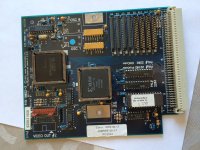
Lapis ColorServer 17-30

Hi

I've just bought on ebay a Lapis color card for my SE/30. The seller didn't test the card himself as he had no external monitor... but the SE/30 which came with the board when it was new did work perfectly (as I'm told)

Anyway, the card looks okay, I've downloaded tonnes of drivers from the Macintosh Driver Museum (which is now back up!  :)  ), including the Colorserver 17 driver. It is a control panel extension that I put in the control panels folder. Rebooted the machine and nothing happened. The monitor control panel sees nothing new, nothing color-ish at all, just the standard internal display.

I thought the drivers were not okay, so I've asked OlePigeon (who just bought one of those boards) where to get them. he gratefully gave me an archive but the results are the same...

Yesterday, I've downloaded a software called slots on knubbelmac.de (I can't find the page anymore, but I still have the archive on my Sheepshaver Emulation) and here are the results:

View attachment 5783
 
View attachment 5784
 
If I have time, I will compare these results with a new test but this time without the card.
 
I was so happy to finally own a color card for the SE/30, but I am a bit disappointed now...
 
It may be a software related problem, as a matter of fact I installed a lot of video cards on this machine, with their drivers. (Lapis Double Page Display, Radius IIsi Color Card and finally this one.)
But I don't have a ZIP/JAZ drive to do a clean install of os7 and then try it again.
If anyone could help  ;)

Thanks

 
So I had enough time to redo the test without the card. 

The results are the same...

I guess the card is dead then, or my tool is not good enough.

I've now had a closer look at the card, and it seems (I am probably wrong) that a capacitor has been replaced by a resistor and another capacitor (C22, bottom left corner) . It is not a neat job. My board is revision 3. Uni, can you check with yours? 

IMG_2148.JPG

 
Last edited by a moderator:
Hi BadGoldEagle,

 I have one of these cards although I haven't tested it yet.

I take it that you aware that there is an external port to this board?

It plugs into the orange pins in the lower left. It may be that this is required electrically in order for the port to work.

 
Yes I have it. I left it on the SE/30 when I took the board out.

I have a question about that cable though: Will the card "boot up" without an external display connected to it? Can I see it on the monitor control panel without it being connected to a monitor?

I've tried an Apple Macintosh Color Display (14 inches) and a DA-15 to VGA adaptor on a Samsung lcd already, nothing happens.

Tomorrow I will try another video card for the SE/30 (the one that came with it when I bought it a year ago), another Lapis, but a Double Page Display card, which is working! I'll be able to run the test once more with that card. Maybe the software I use doesn't detect things properly... It told me I was using a Mac II and a SE/30 at the same time!

 
Do let me know how you get on. I have analogue-board blues with my SE/30 at the moment. I also Lapis drivers from da Internet, should you want to try them.

 
IIRC, with a lot of these cards, you didn't seen the second monitor in the "Monitors" control panel unless there was actually a monitor plugged in.

But I could be wrong! :)

 
I think ScutBoy is right.  With this card, you have to have a monitor plugged in or it won't initialize the driver.

 
But what sort of monitor?

The card was build so it could accommodate a 17 inch display.

I have at my disposal as I said above a 14" Apple display and a 17" Samsung LCD (connected using a DA-15 to VGA converter).

This card wasn't really build for this kind of hardware. Would the driver boot up anyway?

Plus, I've already tested the driver OlePigeon gave me in the archive on his post and the one I got directly from the Macintosh Driver Museum (the archive was not corrupted for me...) AND I rebooted again and again with the display(s) connected.

What worries me now, is that I think the SE/30 can't "see" the card because of hardware failure on the card.

Is there a good way of testing cards in the SE / SE/30 /IIsi or even the LC PDS slots?

I wanted to test my other Lapis card tomorrow but since it uses a 9 pin D-style connector, I have no adaptor or display to attach it to, so the driver won't boot up as you said... I'll give it a try anyway. 

I'll let you know.

 
I did the test on the Radius Pivot IIsi because the other Lapis booted without any driver on the external screen, which wasn't there because I don't have a DB-9 screen or converter, so it was useless. I had to figure out how to shut down the mac without any screen. As a result the desktop had to be rebuild when I restarted it without the card...

Anyway, I have a screenshot of the Radius card working:

IMG_2149.JPG

As you can see, the software saw another slot (in this case slot A) with all the info you need on the Radius pivot.

Unfortunately, It displays nothing when the Lapis is in.

I noticed however that there was a bit of play between the Lapis and the mobo connector (about 1 cm), the card could swing left/right easily. This is not the case with the Radius Pivot. Maybe the 120 pin connector on the Lapis is to blame?

So the card is faulty. I know a shop in Paris (in France where I live) who is specialised in repairing audio boards, maybe they can help? I'll ring them some time.

But you guys have a lot more experience than I do about repairing boards, do you thing it is possible?

 
I think there are a number of things worth trying here before you start attacking that card with a soldering iron.

De-install or deactivate the other video card drivers in your System - move them either with Extensions Manager, Symbionts, or Conflict Catcher, or manually to folders "Extensions (disabled)" and "Control Panels (disabled)" and reboot.  If there's no joy there, try a fresh System install with only the drivers for this card added.

btw, what System are you running?  There is a chance the driver is only compatible with a small range of System software.
 

Is there a good way of testing cards in the SE / SE/30 /IIsi or even the LC PDS slots?
Do not under any circumstances plug that card into an SE or LC PDS.  They are not the same, not compatible, may damage the card and/or the host computer, even if it physically fits.  "PDS" comes in many flavours.

The IIsi PDS and SE/30 PDS are identical and compatible, but not all cards will work in both.  Video cards in particular - the SE/30 has a memory address block set aside for its internal video; cards that attempt to address that same block will fail.

 
Last edited by a moderator:
I gather from the other thread that this is a card for a fixed frequency monitor.  [ETA: If that is true, then*] you will not be able to drive any modern VGA or Mac monitor, unless it specifically says that it can lock to the frequency of the original monitor.  Screen size (pixels H x V) and refresh rate (50Hz / 60Hz - screens per second) are sort of irrelevant at this stage - it's the horizontal scan rate (in kHz) that you are looking for.  Find a monitor that can cope with that and then sort out any other obstacles that might come up.

[ETA: see note below]

 
Last edited by a moderator:
I noticed however that there was a bit of play between the Lapis and the mobo connector (about 1 cm), the card could swing left/right easily. / Maybe the 120 pin connector on the Lapis is to blame? / I know a shop / who is specialised in repairing audio boards, maybe they can help?
Yeah, that doesn't sound good ...  if you have a good magnifying glass, try examining the solder joints on the PDS connector under a strong light.  Look for cracks between the solder blobs and the connector pins, and between the blobs and the board.

 
Adding random bits from the web as I find them:
 

My version of the CDEV is *not* 32 bit clean (drove me crazy when setting it up for A/UX).
BTW. It runs fine with A/UX, too. The card has to be initialized in 24 bit mode, and will run fine thereafter.
http://www.programd.com/26_5f9fa1c38d535408_1.htm

I have a Lapis pds30-21 / It drives 3 speeds of VGA, apple FPD, apple dual-page-display, several (3) 1024*768 an 832*624 and others. I'm running a sony 13"multi-scan HG in 1024*768 mode now...it is even readable. The same monitor will sync at all VGAs and 832*624 as well. I've also run an apple FPD (in both FPD and DPD modes), an NEC 3D and NEC4D from it.
http://www.programd.com/26_525092f20664a7c0_1.htm

So it may not be fixed frequency only after all.  NB this is the 30/21 version, not the 30/17.


Last edited by a moderator:
I wasn't even thinking of installing the card in an se or lc. I used a software called slots I downloaded somewhere and I was wondering if it was any good and if it was the only way to test cards.

Unfortunately, I can't do a clean install right now as I don't have a Zip/Jaz or even an external SCSI hard drive. I will try to get one in the near future, though.

By the way, My SE/30 is running system 7.5.3. It is clean enough I think

The 30-21 is the same card, with a few differences though: more VRam, and another rom chip. I thought it was compatible with all kinds of displays.

Oh and one detail i forgot to mention about the radius card: I had trouble some trouble with it in the beginning. I think that it appeared on the monitor control panel only when I selected the right Color QuickDraw profile, but then when i tested it again, without any drivers installed, I could still see it using "Slots". I tried every single profile (multi sync and fixed frequency), but nothing appeared. I even rebooted each time as I heard somewhere that changes made on the config for the Lapis needed a reboot (whereas Radius cards didn't need a reboot)

I will try to check the solder joints on the PDS connector. Since it was pulled from a working SE/30, the guy who sold it on ebay may have damaged it, who knows...

Meanwhile, I will disable every single extension apart the Colorserver 17 control panel.

Thanks anyway for your answer(s) ;)

I'll keep you posted.

 
Last edited by a moderator:
Thanks.  It's always good when people come back and tell us when something works :)

 
Well if the "dead" card isnt being detected by the slot manager, either the ROM is bad/corrupt, or the address decoder that is responsible for placing the ROM in the correct slot space is bad. 

Also any of the buffer/transceiver ICs that interface the logic to the PDS bus could be bad, and it wont be recognized either. 

 
Last edited by a moderator:
techknight, do you know if those problems can be addressed or is the card completely DEAD?

I know olePigeon has the same card, and he wanted to swap the ROM in order to have a 21-30 (21 inches instead of 17), but he couldn't find any... 

I have pulled the rom chip. The legs look ok. I didn't clean it because it was clean enough imo. I will now reseat it and test it again on the SE/30. 

I have two problems now: I don't know what an address decoder is and where it lives on the board and I can't test the ICs because they are soldered and I don't have the tools to take them out. If it doesn't work now, I'll ask a professional to repair it, if it is possible of course and not a complete waste of time and money...

I will ask someone to test the rom chip if it the test fails, as I don't have a rom programmer.

thanks for your support and ideas ;)

 
Nope. just reseating the rom isn't enough.

Next step I think is to test the rom.

Then take the board to the workshop and have its ICs checked.

I'll let you know.

 
Last edited by a moderator:
Okay, I know it's been a while but i found something on the net about the lapis card, here is the link http://www.verycomputer.com/26_37448f9d7d0d5856_1.htm

This dates back to '91. But now I know that this card works with Multisync monitors, so my 17 inch LCD "should" work.

I also know it has a programable ROM which gets written too each time the machine is restarted. So maybe there's a problem with that?

There are different versions of the ROM, some didn't work with some Daystar accelerators, some did. Don't know why tho...

This guy said he got a new ColorServer extension from Lapis themselves. Version 3.0.

Maybe my ROM is an old one and doesn't support the version I found? But the extension doesn't load on my /30 so I don't know which version it is.

Another interesting fact: the Lapis came with two connectors, one VGA and one DA15 (Macintosh). So it appears the card switches automatically from VGA to DA-15, back and forth. 

I only have the DA15 one. And I'm trying to convert it back to VGA. Maybe this "adapter" doesn't work with that card. I will try to get a simple DA-15 to VGA cable, not adapter!

I also found the email address of the guy from the post. I will try to contact him but I doubt he still uses this email address....  :p

And after that I will try to track back Jeff Marks from Lapis. Maybe they kept some of the updated ROMS !!

Maybe my card works after all...

 
Back
Top