• Hello MLAers! We've re-enabled auto-approval for accounts. If you are still waiting on account approval, please check this thread for more information.

Kanga Ethernet on OS X Jaguar

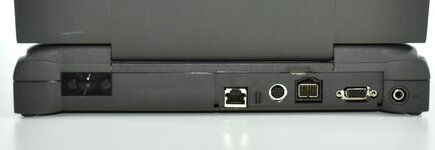
if Ethernet doesn't work there's obviously something not right with the XPostFacto install, builtin Ethernet should be recognized.
is the connector on a little daughterboard?.. maybe its loose a bit..

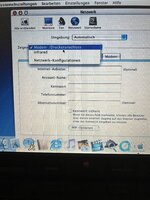
Bildschirmfoto 2024-05-22 um 08.18.41.jpg

I only have one working SCSI Ethernet card, 3Com EtherLink III, but it is 68k based, works great in my 190cs and 1400c, but doesnt at all in my 2400c. The kext is a modified Farallon driver, the author says 3400 and upwards are too new.

IFAIK, OS X 10.2 is making probs..
does it work under a regular 8.6 or 9.1 install?
 
Last edited:
Yes it works flawlessly under 9.2 (installed with OS9 Helper) and I use Classilla 9.3.4 to download softwares for it.

I only own a Xircom CreditCard Ethernet as a PCMCIA NIC. A 3com Fast Etherlink is laying around too but the pigtail is missing.
 
I remember having read here several times that OSX 10.2 is making problems, I would use it with 8.6, 9.1/9.2.2
 
I remember having read here several times that OSX 10.2 is making problems, I would use it with 8.6, 9.1/9.2.2
I never intended to replace 9.2.2 as primary OS on this machine but rather wanted to experiment a little bit ;)

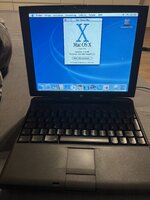
32,768 colors are also not enough to display the glass effects of OS X properly and, additionally, it gets very hot and the fan kicks in which it never did with 9.2.2. So OS X is not the best choice for the Kanga by any way.
 
so just for fun I tried it yesterday evening with my 3400c( with 144MB Ram), so no G3 here, and as you will know, the XPF homepade has some problem notes for the 2400/3400/Kanga listed there:
These are the original Powerbook G3, the 2400 and the 3400. However, there are significant limitations in the support for these machines.
The most serious limitation is that sleep does not work. On some models, the built-in ethernet connection also does not work. There are additional details below.
I should warn potential users that Mac OS X is pretty slow on the 2400 and 3400. Also, the original 603e CPU does not work in Mac OS X 10.3 or later.
The original Powerbook G3 (Kanga) is working with Panther now -- the main limitation is that the video support is limited to 256-colour mode at the moment (I will be working on 16-bit support). Also, there may be a problem with PC Cards in Panther.


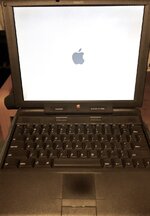
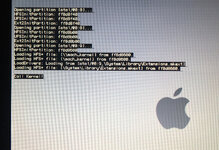
I used XPF 4 for that, so my 604e only can work with 10.2 (10.3 and up only with G3 and G4). I have a working 40GB Fujitsu IDE HDD in it, my CD drive is a little slow but it booted into the files that XPF copied onto the OSX drive..but then stops there..last line in OF is 'call kernel', so KP I guess(?), but no 'waiting for root device'..

lol, feels like HackIntoshing here..

I'll try with another distro..which one did you use?

IMG_3800.jpg IMG_3802 Kopie.jpg
 
Last edited:
I used XPostFacto 4.0. As you can see only Infrared and Modem/Printerport are selectable.

Also the glass effects are broken as 32.768 seem to not be enough colors to display that.
 

Attachments

  • IMG_1232.jpeg
    IMG_1232.jpeg
    1.9 MB · Views: 21
  • IMG_1233.jpeg
    IMG_1233.jpeg
    3.4 MB · Views: 19
oh, I wrote 604e above, I meant 603ev of course.
Your distro, I mean which exact Jaguar CD ( link) did you use? I used the 2 CD version here ,14,15.

I couldnt get it to boot further than the above mentioned line, so I took the chance to upgrade my 9.1 up to 9.2.2.
wasnt easy to find the correct matching german 9.2.1 and 9.2.2 smi files, I realized that the error XPF put out ( not a valid smi file) was related to the language version actually.

In 9.2.1 and ( again in 9.2.2) my sound and modem/Ethernet werent correctly working anymore ( as mentioned in the XPF help page), so you have to restore the two extensions, after that sound was there again and ethernet was selectable again.

but honestly in 10.2 I dont think that Ethernet will work, because the XPF developers were aware of that, but worse is that PCMCIA will not work..

 
Last edited:
If CardBus/PCMCIA work, then a CardBus Wifi card (with 802.11g and WPA2) would also work in 10.2.8. Broadcom chipsets are the ones to look for IIRC.
 
Back
Top