• Hello MLAers! We've re-enabled auto-approval for accounts. If you are still waiting on account approval, please check this thread for more information.

jmacz journey

I borrowed a Quadra 950 stock power supply from @techstep. With that stock unit, there's still a pop but it's much lower in volume compared to what I hear with the ATX converted power supply. Voltages on the stock unit: ~5.1V/~12.3V/~-12.1V. Voltages on the ATX unit: ~5.05V/~12.1V/~-12.3V. Seems fine.

But I did notice something different... I have a CayMac Vintage ROM installed. It has an LED on it. With the stock power supply, it blinks on power up and then blinks once again on shutdown. With the ATX power supply, no blink on power up, but it does blink on shutdown. This is consistent. Hmm..
 
Weird.. if I power the -12V line ahead of time before the main PSU kicks in, the speaker pop volume drops to match the stock PSU. Doesn't change the behavior of that LED on the ROM SIMM however. Must be a timing thing. Need to check for any delays on the three rails for each PSU with a scope sometime this weekend to see if there are any differences.
 
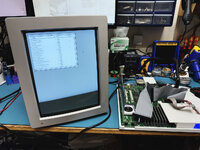
Picked up an Apple Portrait Display from @nickpunt a little while back. It wasn't able to produce anything meaningful on the screen and I suspected it was the RasterOps cable being used as beeping out the pins showed it wasn't wired like Apple's official DB15/13W3 pinout.

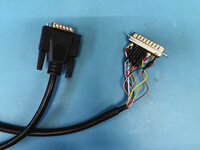
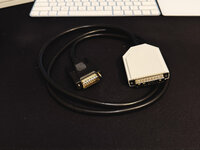
I wasn't about to pay the outrageous $99+shipping on eBay so ended up making my own cable. Bought a cable with a male DB15 on one end and individual pins on the other. Then sourced a cheap 13W3 adapter, cut it up to extract just the male 13W3 and wired up my own cable.

IMG_2618.JPG

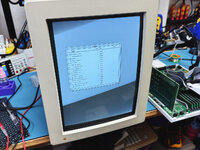
And then tested it out:

IMG_2610.JPG

The display seems to be working. Driving it using an Apple 8 * 24 display card. It's not showing in the above picture but the upper left corner image is a little wonky. Should be adjustable inside but I've seen something similar before with one of my M0401s which resolved after a recap.

This monitor will be going through a full recap.

After that I'd like to try and figure out how to get it working with my Macintosh SE in monochrome. Need to hunt for the right card.
 
RE: The Quadra 950 speaker pop issue...

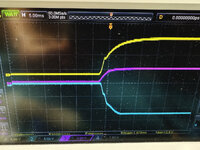
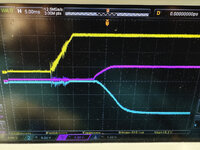
Here's the output from my oscilloscope. Yellow = 12V rail, Pink = 5V rail, Blue = -12V rail.

First the stock apple power supply.

IMG_2629.JPG

Essentially all three rails start around the same time. And the following is the Corsair HX1200 ATX PSU:

IMG_2627.JPG

The 12V rail powers up about 12ms before the 5V and -12V rails. I'm guessing this is my issue with the speaker pop. With these ATX power supplies, I don't think there's a requirement that all three rails go up at the same time, but I believe the PWR_OK signal is used to notify the logic board that everything's ready. I'm guessing I'll need to gate the 12V with the PWR_OK?
 
Actually, PWR_OK won't work... it comes up after all lines stabilize and that will just result in the 12V being late now. I'll just gate the 12V with the 5V, that should do it I think.
 
Poor man's DB15 to 13W3 cable. :)

IMG_2632.JPG

3D printed a cover for the connector and filled it with hot glue to ensure it's solid and the internal wiring doesn't fall apart.
 
Poor man's DB15 to 13W3 cable. :)

View attachment 91442

3D printed a cover for the connector and filled it with hot glue to ensure it's solid and the internal wiring doesn't fall apart.
Impressive! I have wanted to try making a 13w3 cable.. I have 3 portrait displays but only 2 cables.. it would be cool to make a 3rd cable and have all 3 hooked up to my Mac II.
 
IMG_2175.JPG

Quadra 950 Power Supply - context: the secondary side of my stock PSU was dead so I opted to go with an ATX conversion of a Corsair HX1200 PSU which provides 30A on the 5V rail AND has independent voltage regulation of 12V, 5V, -12V so that you don't have to resort to the issues in previous ATX conversions where you had to add load to 12V to get 5V to the right voltage. The voltages were solid and everything was working minus an annoying and loud pop on the speaker each time on cold boot.

Per the graphs I shared earlier from my oscilloscope, the issue was that the 12V rail was coming up about 10ms faster than the 5V and -12V rails. This is within spec for ATX because ATX motherboards use the PWR_OK signal before starting up. This is not something the vintage 68K Macs check. Comparing the graphs with a stock Quadra 950 power supply, on the stock unit all three rails come up at around the same time. The audio subsystem utilizes 12V and -12V and so the 12V rail coming up first I think causes the amp on Q950s to come alive even before the sound chip is ready causing the pop (theory). The stock PSU also has a pop from the speaker but it's much quieter. So basically I needed to get the 12V rail to wait a bit until the 5V/-12V rails come up.

I found other examples of this online for various audio components and I decided to gate the availability of the 12V rail on the presence of the 5V rail using a mosfet and a transistor. I also added an RC delay to wait a little bit more (1 or 2ms). The end result is that the pop now sounds the same as when using the stock power supply, and I resolved the weirdness with the ROM LED light which seems to be caused by various parts of the logic board circuit not powering up at the same time.

Lesson: seems like the original Apple PSUs were designed to have all the rails available at around the same time, whereas the spec for ATX does not require this behavior due to the PWR_OK signal. I may need to go back and check my other ATX conversions to see if I see something similar or whether this Corsair HX1200 is just slower. Something to keep in mind.
 
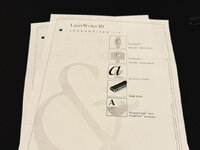
Finished cosmetics on my Laserwriter IIf. Refinished exterior to Satin Stone Gray like my other Macs. Internally it's been completely recapped, has a new main rubber roller and separation pad. Also got a donor fuser from a parts Laserwriter IInt.

IMG_2742.JPG

The print out is ok... still a little dirty due to a shot wiper blade in the toner cartridge.

IMG_2706.JPG

I just received a roll of TPU filament for my 3D printer. One of these upcoming weekends, I'm going to take the wiper blade out of my second dirty toner cartridge and see if a 3D printed TPU wiper blade could work or whether it will be a massive fail. The temperature will be fine for TPU but I just don't know if my 3D printer will print it straight/flat enough.
 
Portrait Display, fully recapped and working great. The lower left corner geometry needs a little work but I'm going to leave it for now as it's not that bad and it's really difficult to reach the magnet for the lower corner while the display is operational. Dark spot is just the refresh.

IMG_2803.JPG
 
Dramatic! You put a ton of work into this and it came out looking great. I wanted to hear the switches click, though!
 
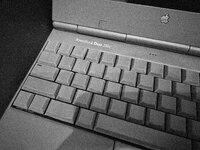
I probably should not have, but I picked up a PowerBook 540c (dead), a PowerBook 520c (working), a PowerBook 520c (dead), a PowerBook Duo 2300c (working)... I did get a PowerPC card (working) with one of them. My room is currently littered with PowerBook parts..

Working Systems
  • PowerBook 540c with a full 68040 inside overclocked to 40MHz
  • PowerBook 540c overclocked to 40MHz
  • PowerBook Duo 280c with a full 68040 inside
  • PowerBook Duo 2300c (just picked up but going to take apart to fully recap)
  • PowerBook 520c (just picked up but needs a recap)
Logic Boards
  • 500 series, seems to be ok
  • 500 series, seems to be ok but need to hold the power button down for a few seconds for it to boot
  • 500 series, chimes and seems to "boot" but no video even with a known good screen/cable
  • 500 series, no chime, no video
  • 280c, seems to be ok
Screens
  • 540c Sharp - needs a new backlight
  • 540c Toshiba - has issues (see below)
  • 540c Sharp - needs a recap but works
  • 540c Sharp - brand new old stock from China - looks awesome EXCEPT 6 bad pixels.. 4 dark, 2 light... ugh
CPUs
  • 68LC040 25Mhz
  • PowerPC 601 603e
Plastic
  • Enough to build two more 500 series PowerBooks

Toshiba Active Matrix Screen

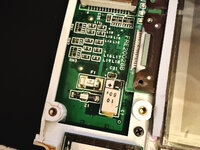
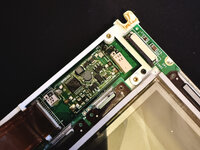
I was looking at this Toshiba screen that came with the dead 540c I picked up. I had been under the impression that the Toshiba's don't have electrolytic caps. This is confirmed on @3lectr1cPPC 's MacDat site. BUT...

IMG_2949.JPG

IMG_2950.JPG

It's those hidden caps.. they are electrolytic but bent sideways with a plastic box over them. The 25V 33uF one in the second picture actually fell right off as I touched it and there's black juice on the PCB underneath it. I don't know if I have some different revision of the Toshiba but this one definitely has electrolytic capacitors. They are not visible from outside the panel. You have to open it up and these are on the underside hidden under some ribbon cables. @3lectr1cPPC you might want to make a note of this.

The reason I opened up this Toshiba was the previous owner changed the polarizer but it's not fully glued on. AND I noticed that the right most columns of pixels (around 20% of the right side) are wonky. Applying pressure to that side of the screen makes the columns look great, but you let go and you get vertical lines. My guess is the ribbon cables have partially separated which is going to be a big problem.

 
Last edited:
I probably should not have, but I picked up a PowerBook 540c (dead), a PowerBook 520c (working), a PowerBook 520c (dead), a PowerBook Duo 2300c (working)... I did get a PowerPC card (working) with one of them. My room is currently littered with PowerBook parts..

Working Systems
  • PowerBook 540c with a full 68040 inside overclocked to 40MHz
  • PowerBook 540c overclocked to 40MHz
  • PowerBook Duo 280c with a full 68040 inside
  • PowerBook Duo 2300c (just picked up but going to take apart to fully recap)
  • PowerBook 520c (just picked up but needs a recap)
Logic Boards
  • 500 series, seems to be ok
  • 500 series, seems to be ok but need to hold the power button down for a few seconds for it to boot
  • 500 series, chimes and seems to "boot" but no video even with a known good screen/cable
  • 500 series, no chime, no video
  • 280c, seems to be ok
Screens
  • 540c Sharp - needs a new backlight
  • 540c Toshiba - has issues (see below)
  • 540c Sharp - needs a recap but works
  • 540c Sharp - brand new old stock from China - looks awesome EXCEPT 6 bad pixels.. 4 dark, 2 light... ugh
CPUs
  • 68LC040 25Mhz
  • PowerPC 601
Plastic
  • Enough to build two more 500 series PowerBooks

Toshiba Active Matrix Screen

I was looking at this Toshiba screen that came with the dead 540c I picked up. I had been under the impression that the Toshiba's don't have electrolytic caps. This is confirmed on @3lectr1cPPC 's MacDat site. BUT...

View attachment 92599

View attachment 92600

It's those hidden caps.. they are electrolytic but bent sideways with a plastic box over them. The 25V 33uF one in the second picture actually fell right off as I touched it and there's black juice on the PCB underneath it. I don't know if I have some different revision of the Toshiba but this one definitely has electrolytic capacitors. They are not visible from outside the panel. You have to open it up and these are on the underside hidden under some ribbon cables. @3lectr1cPPC you might want to make a note of this.

The reason I opened up this Toshiba was the previous owner changed the polarizer but it's not fully glued on. AND I noticed that the right most columns of pixels (around 20% of the right side) are wonky. Applying pressure to that side of the screen makes the columns look great, but you let go and you get vertical lines. My guess is the ribbon cables have partially separated which is going to be a big problem.


I love that you've got more 500 series machines, I inexplicably want more of them too. Perhaps you could have a go at the 48MB mod on one of them? I still need to do a write up.

But I'm strongly sceptical of your claim to have a 601 CPU card :P
 
Back
Top