• Hello MLAers! We've re-enabled auto-approval for accounts. If you are still waiting on account approval, please check this thread for more information.

Is my Performa 475 killing the VRAM?

Ok, I got a very nice-looking Performa 475 with a network card, HD, VRAM, RAM — but missing the PSU.
I temporarily added a known-good PSU from another LC.
The capacitors look fine. I even removed one to check underneath, and it confirmed no visible leakage. A very very nice board!

Boot time: happy chime, HD spinning, that nice old sound of the moving heads… but no video. The monitor’s LED turns green, yet it reports “unsupported mode.”

I tried a PRAM reset — nope, no luck. Then I replaced the VRAM with a new set from Silicon Insider. The originals were 80ns, and so are the new ones. (The old ones, by the way, are from two different manufacturers.)

With the new VRAM I got video, but with vertical bars. I tested different video modes: only thousands of colors worked perfectly. I figured my VGA adapter must have been set correctly only for that mode.

I then added BlueSCSI and created an image of the HD — lots of good applications were on it.
Next, I tested the floppy drive, which worked fine at first. But all of a sudden, it showed the same behavior I had with the old VRAM. :(

Tried another PRAM reset — no way. I put back the old VRAM and got video with the vertical bars again. Swapped back to the Silicon Insider VRAM and… “unsupported mode” — though the HD was still booting. WHAT?

I grabbed another known-working LC 475, added the Silicon Insider VRAM… and no way!! What the… have they been fried, or what?

At this point I need to take a break from the frustration and have a beer. 🍺
But I’m left wondering: could the real culprit be those “nice-looking” capacitors, and should I replace them?

Any thoughts?
 
Do you have a PRAM battery installed? I'm pretty sure the LC475 is unique in that form factor in needing a working PRAM battery for video to work. I think folks have some luck with quickly turning the power supply switch on, off, and on again to sort of jump start it without a battery.
 
@Fizzbinn that was my first thought too. Would be worth checking the voltage of those batteries in circuit as well to make sure they aren't toast.

Second (and IMHO more likely) are the logic board caps. At this point I'd be suspicious of any original-capacitor LC series board that hasn't been recapped, doubly so if it is having wonky symptoms.

Finally, is the PSU you're testing with working in the other system? Would be worth ruling that component out as well, they're a notorious failure point.
 
The battery is "new", meaning a couple of years old, left sitting in a drawer.
I will:
- use a new button-battery with the silicon insider adapter
- do a recal
- double test the PSU

But the VRAM SIMM are really not working anymore now :( g

"I'll be back"
 
I’ve recapped the logic board.

The PSU is fine, the voltage rails are stable, and it works with another LC475.
It’s working now, but I still need to wait and run more tests, because one of the two VRAM chips is definitely dead now after running it in here. :(
I just hope it’s not killing any more!

Note to self: always recap them all, don’t be shy, and never overestimate how shiny they look! ;)"
 
Too early… I’ve very likely destroyed the DFAC-II.

When I powered it up again, it made a nasty screeching sound and showed no sign of activity.
I checked the board, and across C136 and C137 I noticed some flux residue that was likely shorting them to ground or across the pads.


I cleaned and re-soldered the caps. It now boots, but I have no audio from either the speaker or the headphone jack.

Given the schematics:
1757319794836.png
I think I might have fried the DFAC-II, with a surge coming out from QVCC and QVEE.

I need to contain my frustration at my silliness :)


If the DFAC-II really is fried, it’ll be very hard to replace, given its position—and that’s assuming I can even find the chip, since I don’t have a donor board.


Any thoughts? Please be kind with me :( :(
 
I triple checked to traces and the four caps C137, C136, C149, and C150, they are fine, no shorts.
For what it is worth Tattletech is reporting the existence of the sound manager, but no sound can be heard from the control panel.
There is white noise and a soft squeaking sound when using it ...
I can now record the DFAC-II of this nice Performa 475 as RIP :(
Still ... it serves the BOOT function, and this works

Recap:
booting fine after a recap, video ok, the sound was strong and clear
I rebooted it, and NO SOUND.
I inspected the C136 and C137, and I noticed some flux residue below
I cleaned all the area, re-soldered the caps ... but no way, it boots but I have no sound now
end of a sad story
 
I found a (terribly) bombed LC475 with a different logic board, but the DFAC-II/ASC is the same.
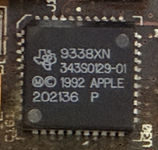
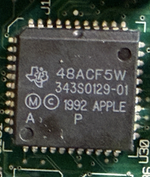
9338XN, 343S0129-01, vs 48ACF5W, 343S0129-01 (the silent one).

I plan to replace the 48ACF5W, 343S0129-01 (second in the list of attachments) with the 9338XN, 343S0129-01 (the first)
I need to be careful with the desoldering/soldering because of the surrounding connectors and passive components
Any recommendation?
 

Attachments

  • 1758541593704.png
    1758541593704.png
    630.6 KB · Views: 3
  • 1758541630533.png
    1758541630533.png
    1.2 MB · Views: 9
  • 1758541904656.png
    1758541904656.png
    3.8 MB · Views: 9
Tape up good with kapton tape to avoid getting heat in the wrong places. Just a stupid comment, but have you checked the audio connector? No sound with headphones either? It's a very issue otherwise.
 
tha
Thanks @Jockelill. I connected a jack and checked with a multimeter, but at boot I don’t measure any voltage difference (I don’t have a headset to test directly) when the chime should play. Instead, I just hear some squeaking noises.

As I mentioned earlier, the sound was working fine right after the recap, but then it stopped after a few seconds and was replaced by an unpleasant squeak. I later discovered I had left some flux under C137 and C139, which probably caused a short in the section of the schematic I shared above. D2, C136, C137, and C138 all seem fine, but it’s possible this issue damaged the DFAC-II/ASC. That’s why I’m considering replacing it.

Before I take that risk, though, I’d really appreciate any other hypotheses or troubleshooting ideas. After all, a silent LC475 is still better than turning it into a brick.
 
If headphones also are dead then it seems likely that the DFAC is fried :(, but I have never seen that before to be honest, but there is a first for everything. Have you check with scope also? The very last super stupid comment would be to do a pram reset and check the volume settings in the system, but no we are streching very far.
 
Back
Top