


• Hello MLAers! We've re-enabled auto-approval for accounts. If you are still waiting on account approval, please check this thread for more information.

Is my Apple III dead?

meall

6502
Hi all,

I have an Apple III that has been sitting in my storage for a while. Now that I have space to put it on, I installed it and started playing with it. It has an Apple II emulation card, and a parallel card installed. I was trying to make it work with my CFFA3000 card. I also bought from Option8 a small adaptor for the Apple III to connect my Floppy EMU to boot the Apple III as the internal floppy door is a little beaten.

For the first few days of the week it was working fine. But I could detect a bad smell coming out of it. I was unable to see anything that could be burning or anything bad. Considering that the motherboard may had some dust on it, I considered it could be the source of the smell. That said, the Apple III has the bad reputation of getting hot too.

I have been booting it with the SOS utility disk, Apple II emulation disk, and the CFFA3000 for a while. Everything worked just perfectly. Except that when booting with the first floppy of BOS, I had some garbage on the screen. It was like if it was using a font that was not loaded in memory. To prevent any hardware interference, I shutdown the computer and removed all the plug-in cards from the slots. I previously saw that sometimes booting in Apple II mode I had blinking characters on screen. So I was suspecting this card to be blamed.

That's when I my problems started showing up. When I put the power on the computer, without any card plugged in, all the computer was able to show on the screen was strange lines pattern and nothing else. I've attached a picture of the Monitor III screen at boot to help you see the problem.

What can I do to repair this? I cannot believe it just died like this for no reason. Maybe related to some chips of the so far known issues of the Apple III.

Any help appreciated

Many thanks!
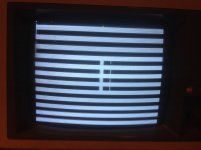
image.jpeg

 
If "bad smell" is a symptom, then you likely are having capacitor failure(s) in the power supply, or perhaps the MB, but more likely PS. This could cause the machine to "start" but not boot correctly.

Or, it could be as easy as removing and replacing the RAM chips on the memory riser. That screen looks like a RAM issue.

 
If "bad smell" is a symptom, then you likely are having capacitor failure(s) in the power supply, or perhaps the MB, but more likely PS. This could cause the machine to "start" but not boot correctly.

Or, it could be as easy as removing and replacing the RAM chips on the memory riser. That screen looks like a RAM issue.
I was thinking about RAM issue as it remembered me of similar problems reported for old Macs. The fabulous checker board on some SE/30 foe instance.

 
I removed the motherboard and investigated the RAM chips. All of them looked very well sited in their sockets. I prefer not trying to remove them and put them back as I'm afraid they may break or break the sockets themselves.

But one thing that I can tell for sure, the bad smell is coming from the PSU. That was evident just by putting my nose near each metal plate under the computer even before removing the motherboard. When I removed the PSU board an evident bad smell was enclosed in that part of the case.

I should now look at replacing the capacitor from the PSU. I know there's a gentleman on this forum selling them, I'll contact him for this need and some other Macs that need new caps.

One question, I look into this and as I'm no expert in electronic, is there a reference somewhere where I can find which capacitor I need for each machine I need to repair?

 
Another thing I forgot to ask. I know that this Apple III have only 128 meg of RAM and it can probably be expanded easily to 256k by adding more chips in the empty sockets on the RAM board. Where can I buy compatible chips for this upgrade? And what should I look for?

Thanks

 
Apple /// systems used a mixture of 16K, 32K, and 64K DRAM chips depending on the version you have.  The 16K and 64K chips are very common and should be easy to find.  The 32K chips were never that popular and will be hard find.  This info will help you identify what board you have:

"There are two types of Apple III main logic and memory board combinations.

They are typically referred to as either being "5-volt" or "12-volt".

Since there are two types of boards in the field, the first step in servicing
an Apple III is to identify whether the system contains 5 or 12-volt boards.
Apple III systems above serial number 100,000 are 5-volt systems. When the
Apple III was first introduced, 64K random-access memory (RAM) chips were too
expensive to incorporate into the Apple III design. Approximately a year
later they became economically feasible and began to replace the mixture of
16K and 32K RAM chips used until then. An additional advantage was that a
256K system would actually draw less power than the original "mixed" 128K
system.

The first and best way is to look at the part numbers of the ROM chips at
locations C11 and C13. Here is what to look for:

12-volt
Location Part #
C11 341-0044
C13 341-0042
5-volt
Location Part #
C11 341-0061
C13 341-0062 (128K) or
C13 341-0063 (256K)

The 342-0063 part number works for either a 128K or 256K configuration.
The second method of verifying which main logic you are working with is to
look at R58, which is located just above location C13. On a 12-volt logic
board a 27 ohm, 1/4 watt resistor will be present. On a 5-volt logic board
R58 will be missing and a solder bridge will connect the small solder pads on
the logic board under R58's mounting position on the board.

There are also two different types of Apple III memory boards. The 12-volt
board has three rows of RAM on it. Two rows are filled with 16K RAM (Apple
part # 334-0002) and one row with 32K RAM (part # 333-0002). A 256K 5-volt
board has two rows of 64K RAM (part # 334-0003) mounted on it. A 128K 5-volt
board has one row filled with RAM and one row empty. Five-volt boards are
also marked "5-Volt Memory Board" on the top center of the card."

 
instead of picking it up 3 inches and dropping it, maybe you could pop the chips out one by one, inspect them. and pop them back in.  maybe pick up some 1200 grit, just incise some of the I/C legs are really tarnished.

 
instead of picking it up 3 inches and dropping it, maybe you could pop the chips out one by one, inspect them. and pop them back in.  maybe pick up some 1200 grit, just incise some of the I/C legs are really tarnished.
To be honest with you, I did not really believed it would be a great idea. I did not dropped it 3 inches, maybe one inch at most. If anything, the bad smell coming from the computer was a sign that some components were falling, and I knew bad sitting of chips were probably not to blame. 

Thanks for the suggestion on the grit paper. That's something that I may look further in time. But like said previously, when I looked at the chips, they look pretty much well sited so far. And I would like to prevent removing chips from their sockets and break a leg or a socket. Anyway I need a tool to try removing them, something I do not have handy yet. I need to find a good electronic material supplier for that kind of things! 

First thing first, I'll investigate/repair the power supply. I found this video about the repairing it.

But the guy is vague on the details of the CAP required (specs of them). And looking at the PSU is not helping me too much so far! There is many CAPs to replace in there. Just amazing... 

 
Last edited by a moderator:
Apple /// systems used a mixture of 16K, 32K, and 64K DRAM chips depending on the version you have.  The 16K and 64K chips are very common and should be easy to find.  The 32K chips were never that popular and will be hard find.  This info will help you identify what board you have:
Thanks Lisa for all the details. I should have specified I already had investigated the matter lightly, and my III has the 5V board with 2 rows, one being empty. I looked into it, and could not find the the "C13 341-0062 (128K)" reference, but I guess it is the one. I guess what I need it the following: 16 times 64K RAM (part # 334-0003) to fill the 16 empty sockets. 

The question is, where do I get that? My guess is that WallMart or Newegg do not have them in stock  :p  

 
really:-) that is a good tip mike :)    

You say a smell.  I guess there are different kinds of smells.

Leaking caps to make a smell,  Burning Diodes or Resistors make a different smell.   Sometimes this old stuff just smells.

I wold assume you can differentiate between a burning smell and maybe the stink of leaking caps?

I picked up a couple Apple III's out of a trailer that was in Florida,  and they were pretty stinky...  Well maybe i was the one that was stinking.

Yeah it was probably just me :)

I would assume you did some readings of the V rails with the meter etc?

+12

+5

-5

-12

as the others have said it looks to me like you need to pull the ram chips and pop them back in at the least.

as we all know the ram of the era was junk and does go bad. Such as it commonly does in the Macintosh 128k.

 
Last edited by a moderator:
Thanks Lisa for all the details. I should have specified I already had investigated the matter lightly, and my III has the 5V board with 2 rows, one being empty. I looked into it, and could not find the the "C13 341-0062 (128K)" reference, but I guess it is the one. I guess what I need it the following: 16 times 64K RAM (part # 334-0003) to fill the 16 empty sockets. 

The question is, where do I get that? My guess is that WallMart or Newegg do not have them in stock  :p  
You can buy the correct 4164 DRAM for the chips 5V board here:

http://www.jameco.com/webapp/wcs/stores/servlet/Product_10001_10001_41662_-1

 
really:-) that is a good tip mike  :)     

I think I understood the TarnX after the fact, as a alternate solution for the grit paper. Make sense.

You say a smell.  I guess there are different kinds of smells.

Leaking caps to make a smell,  Burning Diodes or Resistors make a different smell.   Sometimes this old stuff just smells.

I would assume you can differentiate between a burning smell and maybe the stink of leaking caps?

It was smelling like if something burned in the house. In fact, even my wife when she came to the baseman said: what is burning here, it smell fire. One thing I can be sure of, the last capacitors on the end of the PSU (first being the ones near the power outlet) smelled really bad. In fact, most of the smell came from that part of the board, the other part was not so much stinking... 

I picked up a couple Apple III's out of a trailer that was in Florida,  and they were pretty stinky...  Well maybe i was the one that was stinking.

Yeah it was probably just me  :)

LOL. You're lucky too to stink that bad :)

I would assume you did some readings of the V rails with the meter etc?

+12

+5

-5

-12

Humm, I did not until now, as the burning smell was proof enough that the PSU is going wrong. That said, your suggestion make senses, so I did it. :b&w: Measuring from the C pin to the +5V or +12V gave me numbers closer to +6.2V and +16.3V. Measuring on the -5V and -12V gave me numbers really close to 0V (-0,5V). again, I'm no expert in electronic, I could have done something wrong, but hopefully I did it right. 

as the others have said it looks to me like you need to pull the ram chips and pop them back in at the least.

as we all know the ram of the era was junk and does go bad. Such as it commonly does in the Macintosh 128k.

Maybe. But I need to buy an IC extractor (something like this). Doing it with my bare hands is not going to make a good job at all. 

 
Back
Top



