I've been collecting vintage Apple hardware for a few years now and kept running into the same problem: nothing out there really fits how collectors actually think about their stuff. Spreadsheets are clunky, generic inventory apps don't seem to capture the types of things I care about in my collection and don't streamline my workflow like I'd prefer, and most tools assume you're a business tracking assets, not someone who just wants to know where they put their Macintosh SE or whether they'd replaced the caps in it.
So I built one. It's called InventoryDifferent and I'm looking for people to kick the tires before I announce it more widely.
What it does:
I built this primarily for my own use, but designed it to be useful for a range of collectors -- not just Apple, and not just computers. Whether you track 10 machines or 500, it should scale reasonably well.
If you want to give it a try, the repo and setup instructions are at https://github.com/wottle/InventoryDifferent2. I'd genuinely love feedback on what's missing, what's confusing, or what doesn't match how you actually manage a collection.
Reach out and let me know if you are interested to help beta test. Trying to get others using it before I post more broadly.
Thanks for taking a look. And if you do install, let me know what you think. What doesn't make sense, what could be optimized, what is missing, etc.
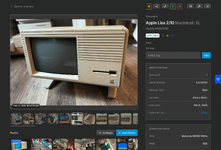
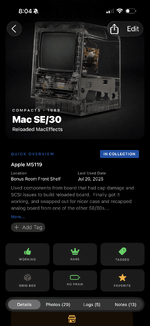
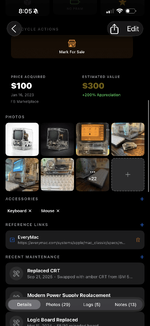
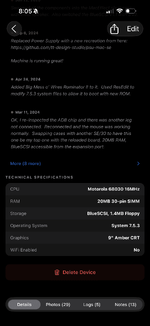
I also recently re-designed the iOS device detail screen to look a bit nicer, while adding quick buttons for transitioning a device in its "lifecycle" (e.g. from "For Sale" to "Pending Sale" or "Sold").
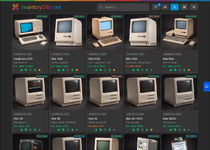
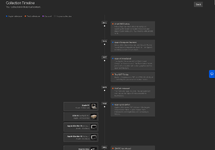
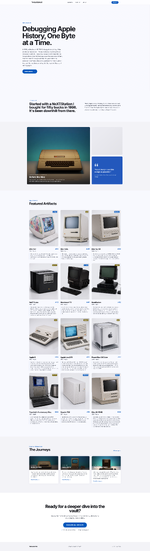
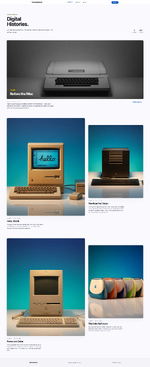
I also recently added a new container for a showcase site. You can see the early stages of mine (I need to make better "Journeys" and take some good product shots for my actual showcased devices) here: https://thearchive.inventorydifferent.com/
Anyway, I'm hoping this will be helpful to others and I can make it better to do even more as people install it and think of ways to improve it.
So I built one. It's called InventoryDifferent and I'm looking for people to kick the tires before I announce it more widely.
What it does:
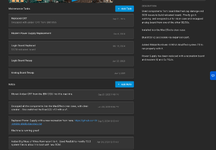
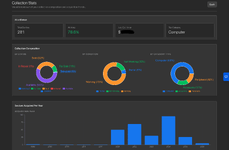
- Track your collection with photos, notes, maintenance logs, and condition history
- Works across a web admin dashboard, a public storefront (if you want to sell), and a native iOS app
- Ships with 280+ pre-built device templates for common Apple hardware, so you're not typing "Motorola 68000" from scratch every time
- Has an AI chat assistant that can answer questions about your collection ("which of my machines haven't been powered on in over a year?")
- Supports English, German, French, and Spanish, for now
- Custom fields let you track whatever matters to you that isn't built in
- Only a name and category is required to add a device. Fill in the rest as you go or need
- Asset tagging for devices and locations with a scanner built into the iOS app and web app for quick device lookups (can also scan serial number bar codes)
I built this primarily for my own use, but designed it to be useful for a range of collectors -- not just Apple, and not just computers. Whether you track 10 machines or 500, it should scale reasonably well.
If you want to give it a try, the repo and setup instructions are at https://github.com/wottle/InventoryDifferent2. I'd genuinely love feedback on what's missing, what's confusing, or what doesn't match how you actually manage a collection.
Reach out and let me know if you are interested to help beta test. Trying to get others using it before I post more broadly.
Thanks for taking a look. And if you do install, let me know what you think. What doesn't make sense, what could be optimized, what is missing, etc.
I also recently re-designed the iOS device detail screen to look a bit nicer, while adding quick buttons for transitioning a device in its "lifecycle" (e.g. from "For Sale" to "Pending Sale" or "Sold").
I also recently added a new container for a showcase site. You can see the early stages of mine (I need to make better "Journeys" and take some good product shots for my actual showcased devices) here: https://thearchive.inventorydifferent.com/
Anyway, I'm hoping this will be helpful to others and I can make it better to do even more as people install it and think of ways to improve it.
Last edited: