• Hello MLAers! We've re-enabled auto-approval for accounts. If you are still waiting on account approval, please check this thread for more information.

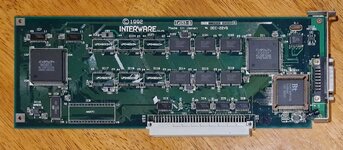
Interware GrandVimage 24-16 image/vram issues?

Kin0fBv.jpg

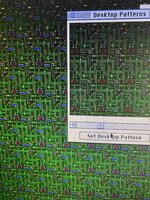
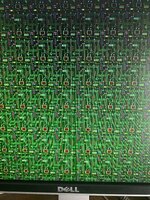
Picked up the card from yahoo.jp via buyee, it's apparently a Japanese market only card. I've noticed a few issues with the card, firstly the boot screen (it displays a logo for the card) is corrupted/garbled) and if I'm in 256 colors, it tends to corrupt one of the colors on my background (usually black or dark gray) to various other colors. It's seemingly fine in other color depths.

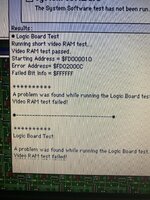
I ran VRAM tests in TechTool Pro and Mac Test Pro and both failed very quickly on the VRAM.

Additionally, but probably not related, at 1024x768 the image is very washed out on multiple LCDs I've tried, but fine on a MS15.
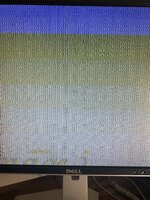
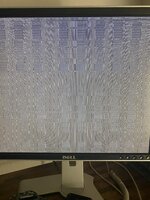
ZozB3DL.jpgkPfRZRS.jpgpBfmnH8.jpgjV54K0I.jpgxA7GqBW.jpg
 
I did remove and re-seat it but I'll give it a clean with contact cleaner also. The card was fairly dirty when I got it (as seen in the first picture). I'm going to try the pressing on VRAM chips phipli suggested as well.
 
Start by poking each chip one at a time :) thats the first step of troubleshooting most video cards. It tells you what area the fault is in.
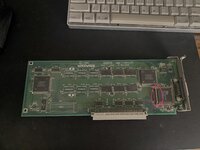

Its the great thing about video cards, you get great visual feedback.
 
Annoyingly now I can't get it to do it to poke chips while it's goofy... the logo was also less corrupted this time... and it "passed" tech tool pro vram tests (though I did see some weird color stuff on one I don't think was normal). Still fails the Mac Test Pro one though and does some weird glitching when it opens the application windows.

I did poke at the chips a bit with a plastic CRT adjustment tool though.

EDIT: Ok it's back, poking various chips is having no effect.
 
Last edited:
I suggest more poking and a very careful visual check. this is almost certainly a damaged trace (look for scratches) or a dry solder joint.

'Didn't find anything' is probably "need to keep poking and looking".

Try with your finger, press each end of each chip. Best to just touch the black part, avoid the pins.
 
I suggest more poking and a very careful visual check. this is almost certainly a damaged trace (look for scratches) or a dry solder joint.

'Didn't find anything' is probably "need to keep poking and looking".

Try with your finger, press each end of each chip. Best to just touch the black part, avoid the pins.
What should I expect to occur when pressing chips when I find "the one"?
 
Are the pins in the socket here lined up properly? It looks like the socket it bulging like they do when a chip isn't lined up right?

IMG_20230708_003744.jpg
 
Ok deeper testing... continued to poke and prod everything with my finger and couldn't get anything to change.
The video being washed out at 1024x768 seems to be a higher than 60hz refresh thing. Lower res can do it too if I select one using a higher refresh, though 1024 will do it at 60hz also.

I can get the background color changing issue on any resolution, but I can pass VRAM tests at 1024x768 256 colors (max it'll do there) and it shows "Max Video Buffer Size" as 768kb which is lower than the lower resolutions that support higher bit depths. It just passed while having goofed up background colors. Once at 1024 I was able to get it to show the uncorrupted logo on boot for a moment and then it glitched out again.
Are the pins in the socket here lined up properly? It looks like the socket it bulging like they do when a chip isn't lined up right?

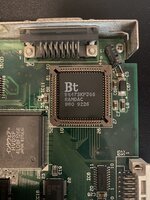
I've since cleaned the board up and cleaned and reseated the RAMDAC twice. Just confirmed the pins look straight but it is bowing slightly on that side for whatever reason.

1024-1365.jpg
 
PLCC sockets do bow out when tired. It's a thing they do with age and a recurring source of grief for me, as it does often cause contact issues.

The weird changing aspect of this seems to imply an intermittent contact issue - VRAM tends to be pretty constant in its glitchiness. Got freeze spray?
 
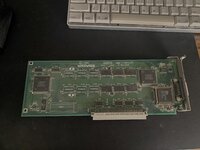
I think I might have that same card.
I thought there was something familiar about your card...20230708_102147.jpg
Not sure how much help it'll be over here across the pond. I also see some buldging on my PLCC socket, but I've not had any issues so leaving it alone.
 
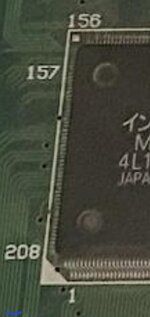
I've NO idea what the chip is on the extreme left end, and the pic is a bit blurry... but those pins near the hole above the "208" look pretty close together...
Screenshot_20230708_102828_Chrome.jpg
Worth a good inspection?
 
I've NO idea what the chip is on the extreme left end, and the pic is a bit blurry... but those pins near the hole above the "208" look pretty close together...

Worth a good inspection?
Just gave another good inspection to all the pins on the various chip sets, including that one, everything looks good as far as I can tell without a microscope.
 
Just gave another good inspection to all the pins on the various chip sets, including that one, everything looks good as far as I can tell without a microscope.
The next thing to do is get a scalpel, and without cutting or scraping or damaging anything, use the back of the blade to poke each pin, gently, one at a time, to see if any aren't stuck down.

If you're very careful, you can rake it backwards (again, keep the sharp bit away, use the back) down the row. You'll have to watch really careufully.

Obviously with the card out.

Every chip other than the RAMDAC. Take note of any pins that aren't stuck down, but then keep going. If there is one, there will likely be more.
 
Little update here... I haven't had a lot of time to mess with the card, ended up switching the Q700+601 over to Mac OS 8.1 and was getting that set up (seems much nicer with the PPC card than 7.6.1). I popped the card back in last night and while in 8.1... I don't get the weird desktop picture color corruptions at all... the initial boot screen is still corrupt and when it changes video modes or color palettes launching apps it goes a little garbled for a second but otherwise works... weird...
 
Back
Top