• Hello MLAers! We've re-enabled auto-approval for accounts. If you are still waiting on account approval, please check this thread for more information.

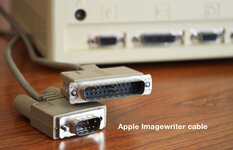
Imagewriter II pinout cable

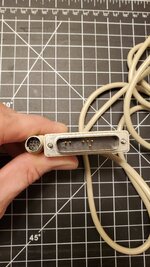
Hey guys, I have a Imagewriter II but I don't have the cable... I want to create a cable to connect the printer with a Macintosh 512k but I don't have the pinout, is there someone that has the original cable that can help me with this cable creation?

I attached the cable picture that I'm talking about
 

Attachments

  • upload_5201.jpg
    upload_5201.jpg
    203.8 KB · Views: 28
Does classic macos 9 support epson emulation via USB printing? I can't seem to find any info. I currently send data to printers via macOS Ventura.
 
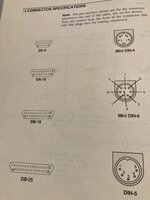
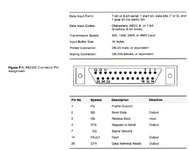
Hey @ClassicGuyPhilly -- I know its around a year later but I am currently trying to build a cable for a mini din-8 to a DB25 one but I have been searching around the internet and havent been able to find the pinout I am needing this cable to be able to print to an imagewriter 1, do you by any chance have the pinout for that cable? -- or could you check it out?
 

Attachments

  • Screenshot 2024-09-02 at 9.38.00 PM.png
    Screenshot 2024-09-02 at 9.38.00 PM.png
    9.9 KB · Views: 24
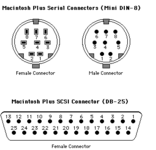
Hi @naruse I managed to create the cable but I made an adapter from DB25 to DB9, but I think to conver din-8 to DB25 is the same way.
You can get the manual here! But importante to mentioned that is a RS422 protocol and follow different specification of we use nowaday.
If you want to connect to a old mac computer that are capable to communicate using this protocol, you can only rewire the pinout cable, but if you want a today's computer, I suggest watch this video were a user made exactly what you want.
Of course, the video suggest to use an Arduino as interface to print image, but you can see in the video that the converting R2422 to RS232 the communication happen, so you can just install some driver to use serial printer or use a putty to make this communication happen.

This is the pinout to use DB25:
1725368859744.png

I hope its bring some light in the end of tunnel for you!
 
DB25 in Macs is a SCSI connector, not a serial! Do not connect a serial cable to the SCSI connector!
yeah I know, the idea is to connect from mini din 8 to the serial port in the ImageWriter 1 printer as it only has that one port. :)
 
Hi @naruse I managed to create the cable but I made an adapter from DB25 to DB9, but I think to conver din-8 to DB25 is the same way.
You can get the manual here! But importante to mentioned that is a RS422 protocol and follow different specification of we use nowaday.
If you want to connect to a old mac computer that are capable to communicate using this protocol, you can only rewire the pinout cable, but if you want a today's computer, I suggest watch this video were a user made exactly what you want.
Of course, the video suggest to use an Arduino as interface to print image, but you can see in the video that the converting R2422 to RS232 the communication happen, so you can just install some driver to use serial printer or use a putty to make this communication happen.

This is the pinout to use DB25:
View attachment 77890

I hope its bring some light in the end of tunnel for you!

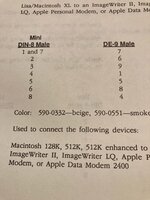
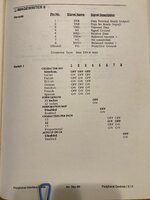
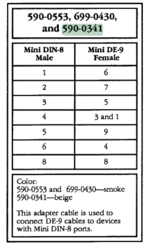
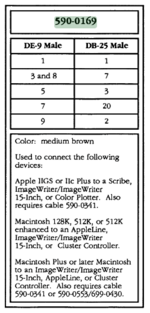
Thanks @thiagofalencar !. Actually just after I sent this message yesterday I saw this post for different pinouts for cables; if you look at the bottom you can see that for the Mac+ to ImageWriter you need actually 2 cables! -- one for mini Din 8 to DB9 and then the DB9 to DB25!.

Code:
D. MACINTOSH PLUS (Mac II) CABLES

18. MAC+ => IWR    (590-0169, with 590-0341) (Mini DIN 8-pin => DB25)

The for future reference for anyone who needs to figure this out, you can cross reference those numbers with https://bitsavers.trailing-edge.com...dures_Peripheral_Interface_Guide-Jan_1991.pdf

And create the two cables OR just create one -- its important to mention as @dochilli said that DB25 is a SCSI port so this cable would only be used for the printer only!
 

Attachments

  • Screenshot 2024-09-03 at 9.21.30 AM.png
    Screenshot 2024-09-03 at 9.21.30 AM.png
    34.4 KB · Views: 19
  • Screenshot 2024-09-03 at 9.22.24 AM.png
    Screenshot 2024-09-03 at 9.22.24 AM.png
    51.6 KB · Views: 18
Last edited:
Back
Top