• Hello MLAers! We've re-enabled auto-approval for accounts. If you are still waiting on account approval, please check this thread for more information.

iMac G4 Removing Chipset Heatsink

mcbeav

6502
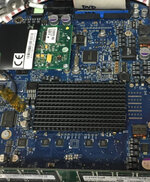
Does anyone have any idea how the chipset heatsink is connected on an iMac G4 logic board? It has little tabs touching the logic board, but I can't tell if they're soldered and what purpose the tabs serve. I want to re-paste the chipset heatsink, but obviously I don't want to destroy the board.

 

Attachments

  • IMG_4099.jpeg
    IMG_4099.jpeg
    1.2 MB · Views: 14
This refurb guide refers to it being attached by a metal clamp; hopefully yours isn't expoxied

 
This refurb guide refers to it being attached by a metal clamp; hopefully yours isn't expoxied


This refurb guide refers to it being attached by a metal clamp; hopefully yours isn't expoxied

I dont see anything about that black heatsink in the guide. Maybe I missed it, but I see where it talks about the CPU. The CPU has a metal clamp, and that is fairly simple to remove. I can't find any info anywhere about how to remove the heatsink on what is likely the equivalent to like a northbridge chipset. I don't know exactly what chip is underneath, but it's not the CPU or GPU.
 
This refurb guide refers to it being attached by a metal clamp; hopefully yours isn't expoxied

It does appear to be glued to the board, i'll probably just leave it alone. Thanks for the help
 
It does appear to be glued to the board, i'll probably just leave it alone. Thanks for the help

Yep leave it be. You can remove it by freezing the area and with a sharp knock it'll pop off (what I've had to reluctantly do with a couple of GPUs with bad fans integrated into heatsinks, acetone on the core removes the epoxy) but there is always chance of damage here.
 
Yep leave it be. You can remove it by freezing the area and with a sharp knock it'll pop off (what I've had to reluctantly do with a couple of GPUs with bad fans integrated into heatsinks, acetone on the core removes the epoxy) but there is always chance of damage here.
Yeah, I was going to use dry ice or duster, but I'm going to leave it alone. I figured I'd repaste it and be done with it, but dosdude1 said the chip doesnt run very hot, so it's not worth the risk or the trouble. I appreciate the response.
 
Back
Top