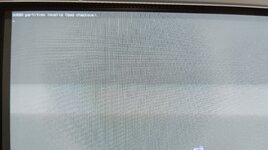
Hi, I'm working on this iMac and, even though I put a new battery in it, every time I start it up it shows me this message on the screen, along with the folder symbol with a question mark, and after a few seconds it boots from the first partition.
Even if I select another partition in the boot menu, it doesn't save, it always shows this message and seems to search again. I tell you that booting with the ALT key doesn't work, it ignores it, only pressing C or pressing O+F+Alt+Option works.
Within Open Firmware I apply the commands to reset firmware, but the same thing happens. I have tried pressing the CUDA button and also removing the battery for a few minutes, and it doesn't work.
Could the NVRAM be corrupted? Can it be replaced or does it include the boot ROM as well?
I have OS9.2.2 on the first partition and OS8.6 and I can't boot from OS8 because it doesn't save the selection in the boot menu and the ALT key doesn't work when starting up.
Even if I select another partition in the boot menu, it doesn't save, it always shows this message and seems to search again. I tell you that booting with the ALT key doesn't work, it ignores it, only pressing C or pressing O+F+Alt+Option works.
Within Open Firmware I apply the commands to reset firmware, but the same thing happens. I have tried pressing the CUDA button and also removing the battery for a few minutes, and it doesn't work.
Could the NVRAM be corrupted? Can it be replaced or does it include the boot ROM as well?
I have OS9.2.2 on the first partition and OS8.6 and I can't boot from OS8 because it doesn't save the selection in the boot menu and the ALT key doesn't work when starting up.