

Need to get an iMac now
True to my word, I now have a trayloader up and running.
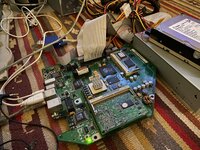


Need to get an iMac now
And what are the results of your experimentations?
And what are the results of your experimentations?
c
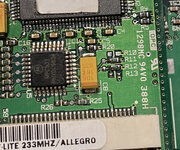

A big update on this!
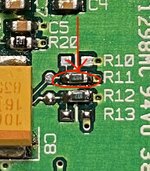
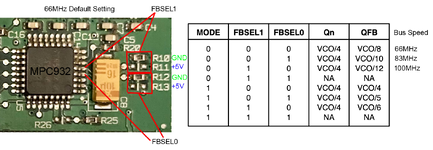
I found the 100MHz bus setting:
Move R10 to R11 as shown below, which sets the MPC932 to its 3x multiplier:
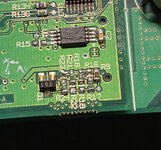
At what I presume to be the MPC106 PLL block:
Move R22 to R21
Move R19 to R18
Move R16 to R17
I had to fit a 350MHz 750L and a 100MHz XPC106 onto the CPU daughterboard to get to the point I could start any testing, which was a lot of work. Once I did that, I solved the resistor settings very quickly. I knew from the MPC932 datasheet how to set 3x mode, so it was then a question of trying every combination of the 4 resistors that set the Grackle PLL until I got a boot.
We thought there might be some sort of block in firmware to running unknown bus speeds, but clearly it's not the case.
Thanks so much for this contribution! I'm going to try it on my iMac! Great work!

Let us know how it goes! Did you solve the instability issues you were previously having?
What do you think, @Daniël ?
This information likely applies to the Wallstreet (it has the identical clock multiplier and resistor pad layout) and probably the Lombard too.
As regards the Beige G3, I wish it was as simple. We have the knowledge to set the Grackle PLLs correctly, but the clock generator won’t do 3:1 mode which is really the ultimate show stopper. I’m musing a mod which uses something like the MPC 932 to handle the CPU bus multiplier. The SC608 would still generate the PCI clocks + feed a reference into the 932, like on the iMac - but the 932 doesn’t have enough outputs for 3x DIMMs. So we need to identify a similar clock multiplier which would be suitable. Or could we run… TWO 932s
Losing 16MHz to get a 100MHz bus isn’t a bad trade off, and you can always go backWell, it kept the Lombard EEPROM, with the processor at 466MHz and the L2 cache at 183MHz. It didn't work at 500MHz. It now has 200MHz cache chips.
I'll try testing the 100MHz this week, although I'm afraid I'll be limited to a 450MHz processor.
Surprised you can’t get to 500 though.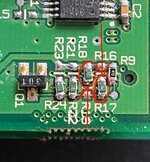

Very nice! Once I get set up again for some soldering, I'll have to try it on my 100MHz XPC106 fitted card.
I've tried a bunch of different resistor configs at the time, but truth be told I couldn't quite wrap my head around the settings for the clock divider, so I didn't happen to luck into the right combination through sheer bruteforce it seems!

very cool! does Open Firmware/thus OS X report the 100Mhz bus speed properly too?A big update on this!
I found the 100MHz bus setting:

Hi, I just tried that, but it didn't work for me. I've tried both 500MHz and 450MHz, and I hear the chime, a crackling noise in the speakers, but the orange LED stays on. I tried this last, simplified combination you mentioned.Losing 16MHz to get a 100MHz bus isn’t a bad trade off, and you can always go back
Small update to the resistor settings after further research, you don’t actually need to move R22 at this location. Just R19 and R16.
View attachment 90267
And of course R10 as mentioned previously:
View attachment 90268
Ah, that’s surprising.Hi, I just tried that, but it didn't work for me. I've tried both 500MHz and 450MHz, and I hear the chime, a crackling noise in the speakers, but the orange LED stays on. I tried this last, simplified combination you mentioned.
View attachment 90448
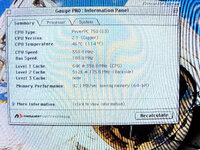
What voltage are you running the 7400 at?A few days ago I did a CPU SWAP for a G4 7400@466MHz, leaving it at 400MHz with the bus at 66MHz, completely stable, with some improvement in cooling, and the cache, according to GAUGE PRO, was working at 133MHz, a 3:1 ratio.
Hello.What voltage are you running the 7400 at?
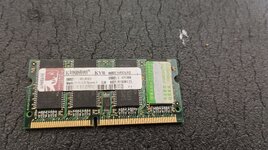
I recently added these RAM modules; they're two 512MB PC133 modules, each of which only recognizes 256MB, so I have 512MB. It hasn't given any problems.
This afternoon I'm trying to test R22.
Could it be affected if the EEPROM is from a Lombard? With it, it recognizes 1MB of cache, while with the original, it only recognizes 512MB.
Well, I'm making progress...I would try popping out one of the DIMMs just as a test. At 100MHz everything is being pushed harder. I’ve learned from my experiments with overclocking the Beige G3 bus (up to 96MHz) that the clock generator has to work harder with more sticks of RAM installed.
It is probably not that as you say, but it’s worth trying different configs in order to see if the machine does something different and hopefully learn more about the issue.
Sounds good.
I’m not sure. I have the original EEPROM fitted so it’s worth trying that.
Could you share a photo of how you’ve set up the CPU multiplier resistors for 100MHz testing?
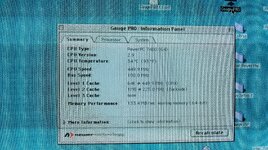
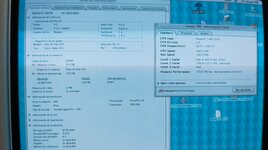
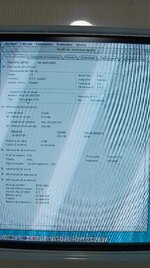
Well, I'm making progress...
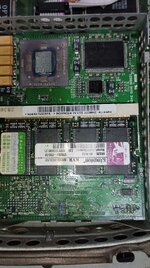
I tried swapping it for two 128MB RAM sticks, but it still wouldn't turn on. So I removed the top stick and left only 128MB underneath. It turned on!!! But take a good look at the photo:
View attachment 90474
It has the Lombard EEPROM installed, 2.5:1 ratio, the processor is running at 450MHz but the L2 cache is running at 225MHz!!!! 2:1 ratio!!! Does the ratio depend on the bus? It won't be able to boot at 500MHz because the cache chips are 200MHz, but it's a great achievement!!
But it's too little RAM to use OSX. What can be done with the clock to use more RAM? Would it be possible to modify something to keep the bus stable at 100MHz and still have 512MB of RAM?
View attachment 90475
EDIT:
I ran another test. I swapped the lower 128MB RAM module for one of these 512MB ones, which only showed 256MB. It booted up. Then I tried adding the 128MB RAM module to the upper slot, and it still works like before: a chime and an orange LED.
It seems to have the problem with the upper slot. Could it be similar to what happens on the G4 AGP, where a RAM slot stops working when you overclock the bus? It would be interesting to be able to patch this.
View attachment 90476View attachment 90477





